August 14, 2019
Question

AA and Boolean variable

  • August 14, 2019
  • 3 replies
  • 2470 views

Hello,

This is a continuation of an earlier post. I received some great input on my problem. I thought I had it solved but the scenario is not working as intended.

And yes this portion is not strictly learning per say but it is requested from a client.

I have groups of slides. Each group consists of a handful of slides that has event video on each slide and nothing else. The videos autoplay. The user can enter these groups at any point and must watch each video before being redirected back to a main menu. So if the user enters on slide 2 the sequence should play as follows : 2, 3, 4, 1 and then redirected to a main menu.  To do this I followed some great guidance by a few experts on this forum. This is what I did.

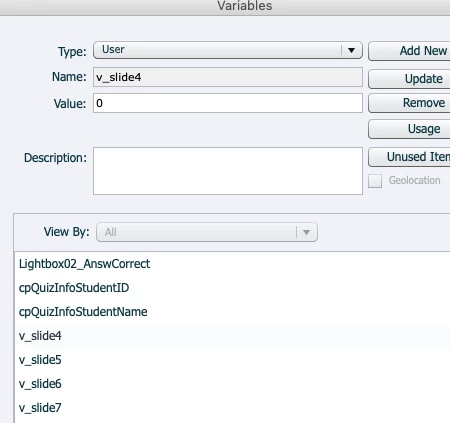
1. I created a variable  for each slide and gave it a value of 0
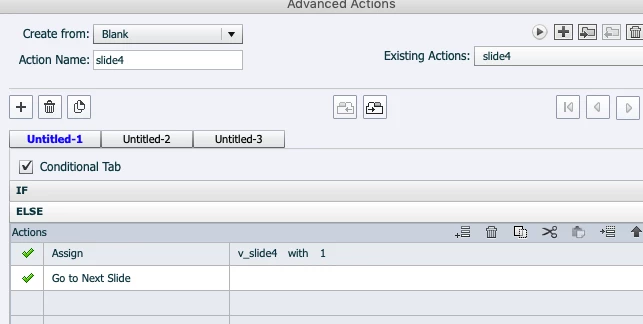
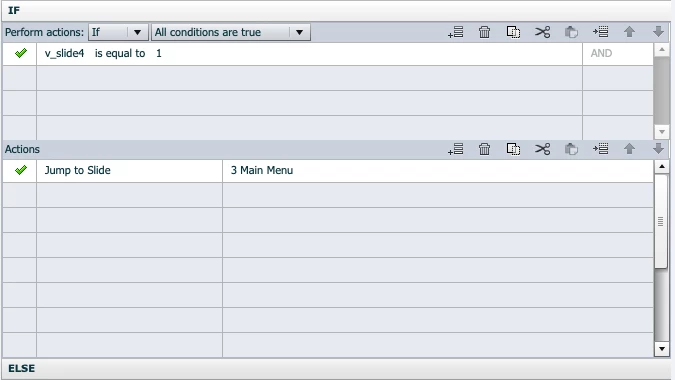
2. I then created conditional actions as follows
3. I then run the AA on slide enter.

The effect of doing is that the entire group is skipped and it plays the next slide after the group. Was hoping that someone could spot the flaw in my logic(obviously there is)

Again, I know this portion is not interactive learning but it is a client requirement.

Thanks in advance

Kurt

    This topic has been closed for replies.

    3 replies

    lkc1
    Known Participant
    August 16, 2019

    I *think* I've gotten it to work.  I did a test with a main menu with 3 buttons that jumps to 1 of 3 screens.  I didn't know how you wanted them to get out of that 'group' though.

    So on the MenuScreen, On Enter, I put an Advanced Action 'Reset Variables' to set var_s1, var_s2, and var_s3 all to 0.

    on screens S1, S2, and S3, I just have text on the screen for 3 seconds 'Playing S1', 'Playing S2', 'Playing S3' so I could tell where I was.

    Then for the 'On Exit' of each of these I put a unique Advanced Action as follows:

    1st action:  assign var for current screen so it registers as 'played'  (Assign var_s1 with 1).

    2nd action is conditional:

         if var for the next screen = 0, jump to the next screen (and play it)

         else, jump to menu screen.


    I hope this helps

    Lilybiri
    Legend
    August 16, 2019

    Here os a link to the published example movie:

    SequenceVideo

    All details of the shared action and two advanced actions can be found in this blog:

    Forced view - special use case - Captivate blog

    It has the same movie embedded but at a fixed resolution, while the link above leads to a rescalable HTML project. I used slides from the Quick Start Project 'Wired' and assets from the assets library.

    Please test starting with any video, and you'll be able to play the vdeo sequence multiple times.

    August 20, 2019

    Thank you so much. unfortunately I seem to have a really basic problem preventing me from implementing your solution. I was have issues jumping from slide 4 to slide1 in the sequence. To troubleshoot I removed all advanced actions and only used a jump to slide 1 on exit from slide 4 . It continues to the next video rather than jumping to slide 1. So I am working on that issue before implementing your solution.

    Kurt

    Lilybiri
    Legend
    August 14, 2019

    Can you please show the Advanced Interaction panel, want to see the part with the 5 slides, and the Success column (which indicates the On Enter actions) expanded so that the name of the AA is visible?

    Something is wrong with the logic in this case. If I understand the setup, you want to jump to the menu slide only when all the video slides have been visited, but they can start either on the first, the second.... slide. You will have to separate the commands to be done always (standard action) from the conditional action where you check the values of ALL the variables. So these sequences are all possible?

    • 1 2 3 4 5
    • 2 3 4 5 1
    • 3 4 5 1 2
    • 4 5 1 2 3
    • 5 1 2 3 4

    Can you confirm if my understanding is correct?

    August 14, 2019

    Please see below. In this case it is 4 slides (videos). In short, I want the user to stay in this 4 slide group until they have seen all 4 slides (videos). each slide auto advances to next video. until they have watched everything in the group. The jump to slide in the last entry sends them back to the 1st entry assuming they have not visited that slide already.

    Lilybiri
    Legend
    August 14, 2019

    I see only 4 of the 5 slides you were talking about. What about the rest of my questions. If my interpretation is correct, your present setup will not work at all.

    You have a Next button on each slide, you will have to use the success event of that action as well to trigger an advanced action, if you need indeed to make any start slide possible.

    LuisXIV
    Participating Frequently
    August 14, 2019

    Hello kurt farr,

    Are the video playing in sequence.

    eg v1,v2, them v3.

    if that is the case jump from v3 to the Main menu.

    LuisXIV
    Participating Frequently
    August 14, 2019

    Additional info

    I create a SmartShape as button,

    that button show up as the video is finishing. eg: in 20sec.

    The SmartShape button jump to Main.

    For info on the pause take a look at Lilibiri blog.

    Luis

    LuisXIV
    Participating Frequently
    August 14, 2019

    The SmartShape is on v3 or the last video of each group.

    Luis