Known Participant
September 25, 2021
Answered

AA and/or JS for Custom Mute Button for slide video?

  • September 25, 2021
  • 4 replies
  • 1791 views

Hey Everyone! I'm new to Captivate but not new, if that makes sense. So I've been scratching my head on something that I've been trying to figure out for days now.  I'm building a curriculum for a client and I created a custom mute/unmute button to be used on slide videos. I have multiple slide videos that play one after another and I THOUGHT that when I created my custom mute/unmute button and created a variable for mute and assigned it, put 0 and 1 or true and false in their respective places in the AA and all that jazz, that once the mute button was clicked and is "on", it did not matter when the slide video with audio ended and the next one started, it would still stay muted. 


So why is it that when the next slide video starts, the sound is back on when I only clicked mute on the prev video slide? I thought the mute command would carry over. I've tried several work arounds and dozens of AA and JS (mind you, I'm not basic but I'm not a pro coder or programmer either, lol).  


When I created the mute/unmute button with an event video it worked great! I was able to use my custom button with the same AA and it would carry the mute funtion to the other event videos on different slides vs me clicking the mute/unmute button on one slide and it mutes for one slide video and then the sound comes right back on on the next slide video without me hitting the button again. ALAS, my client wants CC, so I can't use event video sadly.


Thoughts anyone on what I can do to get the mute/unmute button to function thru multiple slide videos without me having to click on the button a bazillion times?

    This topic has been closed for replies.
    Correct answer Lilybiri

    nope. I added the conditional AA and made it a shared action with my other condional AA's and still doing the mute on every other slide video. What's with that, LOL?


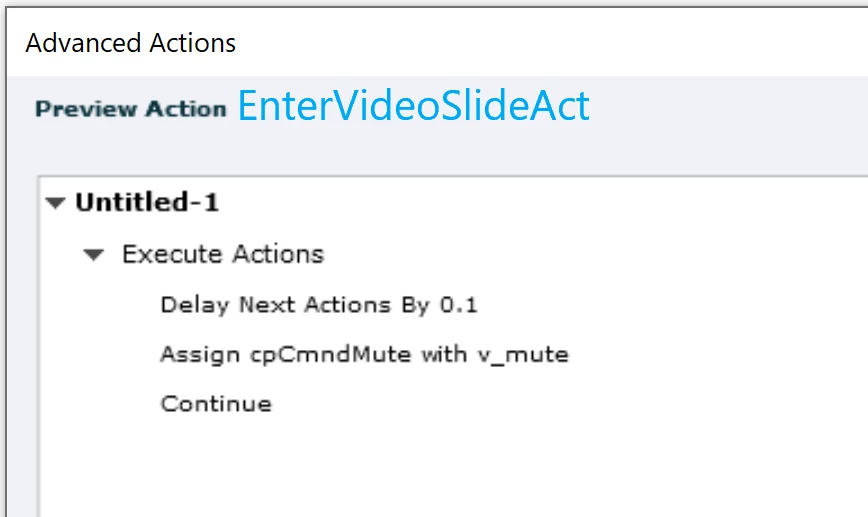
    Sorry, was away last night. I have a much simpler advanced action to be triggered On Enter for the video slides after the first one. I have the Mute button on the master slide. Here is the advanced action, have double-checked. As in many other bug use cases, needed a small delay to get the bug workaround functioning:

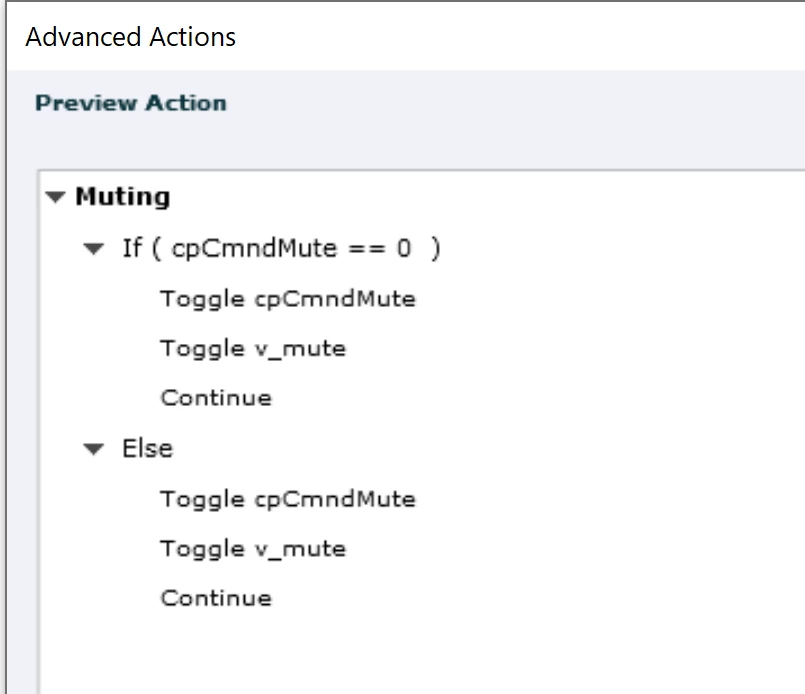
    This is the Mute action:

    It uses that user variable v_mute. Since I know that you have a toggle button with a custom state, I kept the conditional action, you need to add the state change command (posted that in a previous answer). If you don't have a custom state, this conditional action could just be a standard action since THEN and ELSE are identical.

    You don't need a condition for the On Enter action for the following video slides:


    4 replies

    Paul Wilson CTDP
    Community Expert
    Community Expert
    September 25, 2021

    I and Adobe Technical Support discovered a bug back in May that seems like it might be this issue. The workaround that Adobe Technical support came up with was to add an on enter advanced action to every slide like the following...


    I know weird right. But this solved my problem.


    Paul Wilson, CTDP
    Known Participant
    September 25, 2021

    Yo! Thank you so much @Paul Wilson CTDP! And yes, it's so very weird. I've been watching your videos like mad recently and looking up discussion on the Captivate forums regarding different things I can do to make this responsive project user friendly, functional, and visually interesting. But man oh man, this one right here, threw me for a loop. 


    Thanks a bunch!

    Known Participant
    September 25, 2021

    Thanks everyone for the responses.

    Yo @Lilybiri! I was hoping you'd pop in and say something, I've been looking at a lot of posts in the Adobe Captivate Community for other Captivate issues and your username popped up a lot and your responses helped me a lot. But guys check this out! So I'm attaching snippets of my current AA. I did have another AA where I created a variable and named it but it literaly behaved the same way as the cpCmndMute because I gave it the same conditions.  That's neither here or there. What's crazy is that at 5am EST after spending hours trying to find a AA or JS that would work ( I tried to find JS online and nada), I previewed the project and published it and the button when clicked muted every other slide??? How is that possible, LOL.


    So I have 6 slides right and each slide has a slide video. When I clicked on the mute button only once, slides 1, 3, and 5 are muted and then slides 2,4,and 6 are not. I'm dying over here. And it's doing this over and over again. Before, it would literally mute slide one and then every other slide, it'd come back on. 


    Maybe I need to clear my cache again. or like @Lilybiri  said, it's a bug in Captivate...which I'm noticing is a trend in some compacity. I really want to give you guys a link to actually see what I'm talking about with this mute button but ALAS, signed an NDA with my client and I can't have it floating around. 


    Lilybiri
    Legend
    September 25, 2021

    I have a solution, as I told, but not with JS, only with AA.

    You use the solution which I explained in Multiple Toggle buttons with ONE Shared Action - eLearning (adobe.com)

    I used a shared action and Toggle instead of Assign.


    There is no way to do with a user variable what the system variables of the Movie Control category do, sorry. Those system variables are exceptional since they also allow to change the movie, in this case by muting audio.


    A workaround for the bug, which only happens so far I tested for slide video is to add another variable to the ToggleAct, a simple user variable which gets the same value (0 or 1) as cpCmndMute. For the On Enter event of the video slides create another conditional action. Maybe I'll write this out in a short blog post... unless some JS expert offers a better solution. To me it looked like that bug is also bothering a one time JS solution.


    I am just wondering if  muting by JS also needs to be repeated on each video slide. Of course, it is weekend, not everyone is crazy like me.


    Known Participant
    September 25, 2021

    oof! I'm already using and One enter event with shared actions with delayed next and previous buttons because my client wants learners to watch the entire video before the next and back buttons pop up and if they revisit slides they already viewed, the buttons will be visible immediately. I watched Paul Wilson's video Show Delayed Next Buttons Immediately on Slide Revisits in Captivate to get that achieved. But I'm willing to remove this shared action and try something else if I can get this freaking button to work properly lol. I'll let you know my findings. Stay Tuned!


    RodWard
    Community Expert
    Community Expert
    September 25, 2021

    My suspicion is that you may have a logic flaw in your Advanced Action.


    Are you using a Conditional Action that looks at the current value of the tracking variable and then decides what to do?  And is this same Conditional Action being executed ON Slide Enter of each slide that has slide video?


    If so, please show us screen shots of how this Conditional Action is set up.  That might clear up what is happening here.

    Lilybiri
    Legend
    September 25, 2021

    @RodWard  Rod, the mute system variable is reset automatically when you enter a new slide with slide video. It is not an AA bug, it is a bug in Captivate. 

    RodWard
    Community Expert
    Community Expert
    September 25, 2021

    OK.  Thanks for mentioning.

    Lilybiri
    Legend
    September 25, 2021

    I will leave you to the JS experts. It is possible also with AA, just double-checked. I used a combination of a user variable and the cpCmndMute system variable. Both are Booleans and I assign the value of the useer variable to the system variable On Enter for each slide with video. It may be easier with JS but can be done without.

    Known Participant
    September 25, 2021

    @Lilybiri I'm trying to picture what this looks like to be honest. Maybe it's the lack of sleep but is it possible for you to send a snippet of what that AA looks like in Captivate. Personally, I prefer AA vs JS.