ac8 - quiz answer feedback caption is placed inappropriately
Hi, when using ac8 - 8.0.1.242
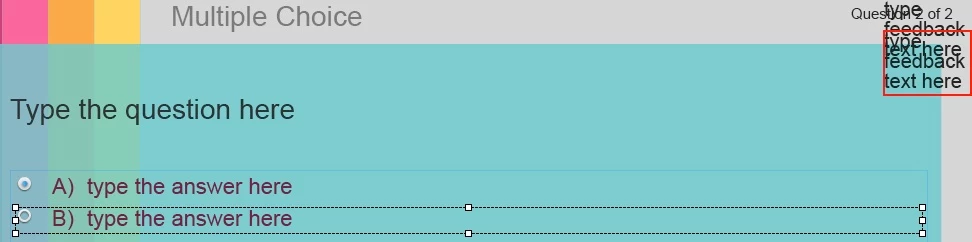
with a new project and any theme applied, when i add a multiple choice question, click properties, advanced answer options, show feedback message.... the answer feedback caption is placed in the upper right corner with each answers feedback caption cascaded over each other. this should be in the lower and a more centred area of the screen. i have to change every single caption position for every slide to correct, very tedious. i have watched many videos showing that the default location should be more appropriate than that.
i cannot find an answer feedback caption in the master slide in order to change it's position properties.
if i select the answer feedback caption in the timeline question slide, then on properties, position, i am able the change the position and object size do show what is appropriate, but how can I make these new appropriate settings the default for the theme I am using?
thanks, Neil
 AdChoices