Inspiring
August 9, 2016
Answered

Accordion Learning Interaction Won't Play Audio

  • August 9, 2016
  • 1 reply
  • 491 views

I have Adobe Captivate 9.0.2.421 on a Mac computer. I am creating a Accordion Learning Interaction with audio in each of the four drop downs. However, when I preview, the audio doesn't play when you click on a drop down. 

    This topic has been closed for replies.
    Correct answer briec21342685

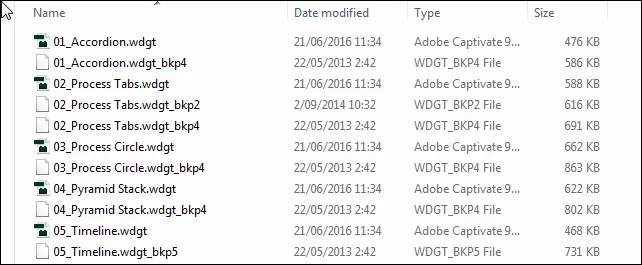
    That is strange, wondering where they are for Mac. The default situation is that Interactions folder is copied from the Gallery to Public documents (called Shared in Mac). Those are used in projects, and also updated regularly because when an interaction gets a patch or a new version it is pushed to the CP-user. In my Interactions folder (here a screenshot) you see that there are some backup files, which were older versions of that interaction:

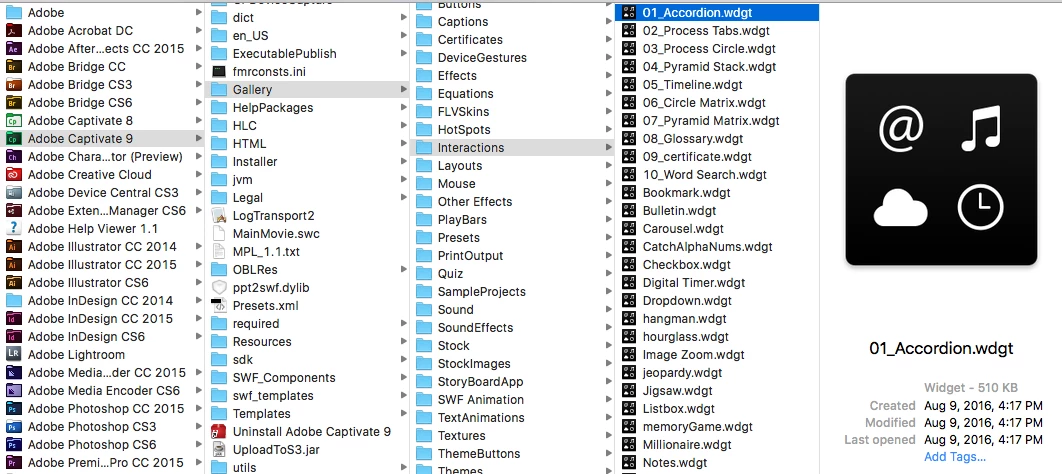
    It's possible I found them here: Adobe Captivate 9-->Gallery--->Interactions.  (see screenshot).
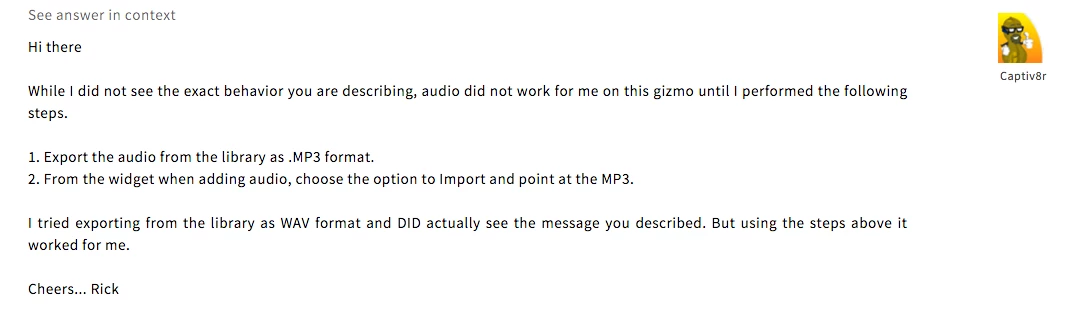
    At any rate, I did find the solution to my problem in a different forum post from Rick "Captiv8r":

    1 reply

    Lilybiri
    Legend
    August 9, 2016

    Which Preview method did you use? Lot of  the interactions only show their full functionality when published and uploaded to a webserver.

    Inspiring
    August 10, 2016

    I go to Preview--> Play Next 5 Slides.

    Lilybiri
    Legend
    August 10, 2016

    Try Preview in Browser or Preview HTML in Browser. Those preview methods are close to the final output. But as I already told, learning interactions often will not be fully functional until they have been published and uploaded to a webserver or LMS (this seems to be the case since 9.0.1, was not so in previous versions).