Phoenix_Leo
Known Participant
December 21, 2022
Answered

Activate the button only when 1st button is clicked.

  • December 21, 2022
  • 1 reply
  • 632 views

There are 6 buttons in the home page.

Button 01:

Only 1st button will be active for the learner, the rest of the buttons will be disabled. When the learner clicks the 1st button it will take the learner to the 1st chapter which has 4 slides, when the learner returns to the homepage after completing the 1st chapter with 4 slides button 2 should be activated

Button 02: 

After button 2 is enabled, the learner clicks the 2nd button it will take the learner to the 2nd chapter which has 5 slides, when the learner returns to the homepage after completing the 2nd chapter with 5 slides button 3 should be enabled.

How to write a advanced action for this kind of scenario?

    This topic has been closed for replies.
    Correct answer Lilybiri

    Thank you for suggesting the new advanced action, I tried but there was a little confusion on my end. Could you explain again? Sorry for the trouble.


    Take out the PAUSE from the Exit event, you have buttons with a pausing point (didn't see your Timelines)


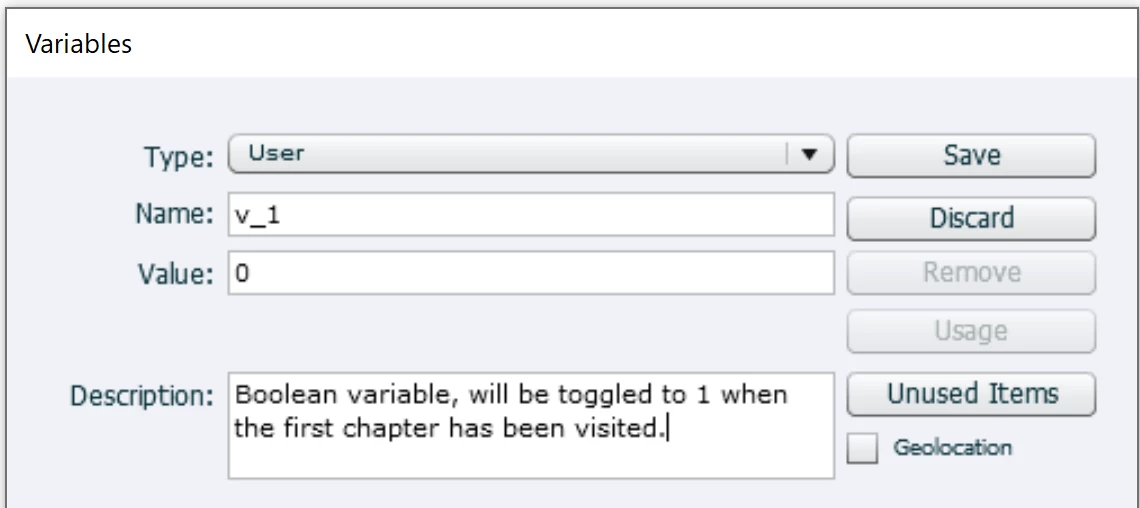
    1. Create 2 variables (or more if you have more than 2 chapters. Screenshot is for the first one.

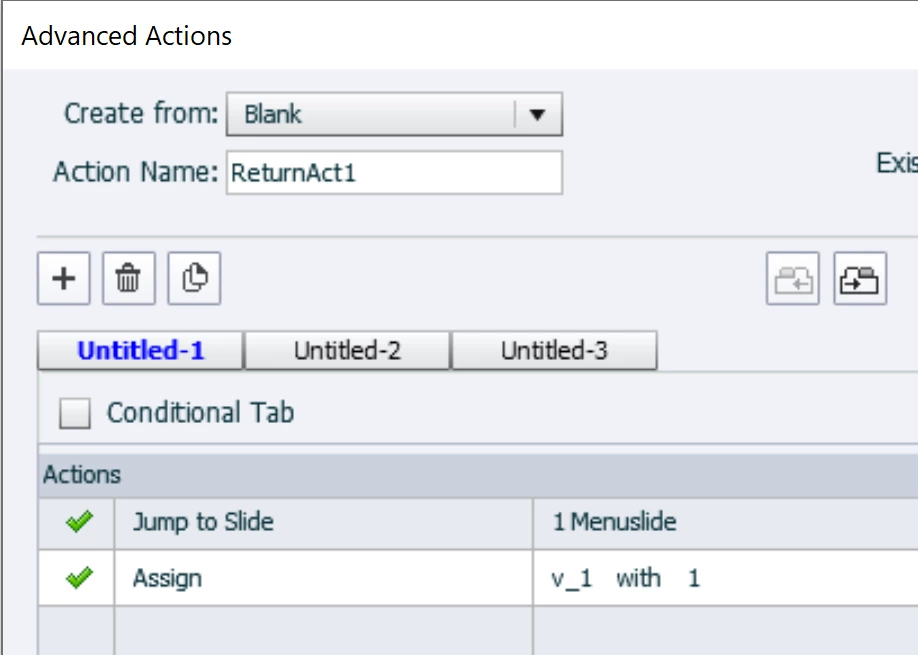
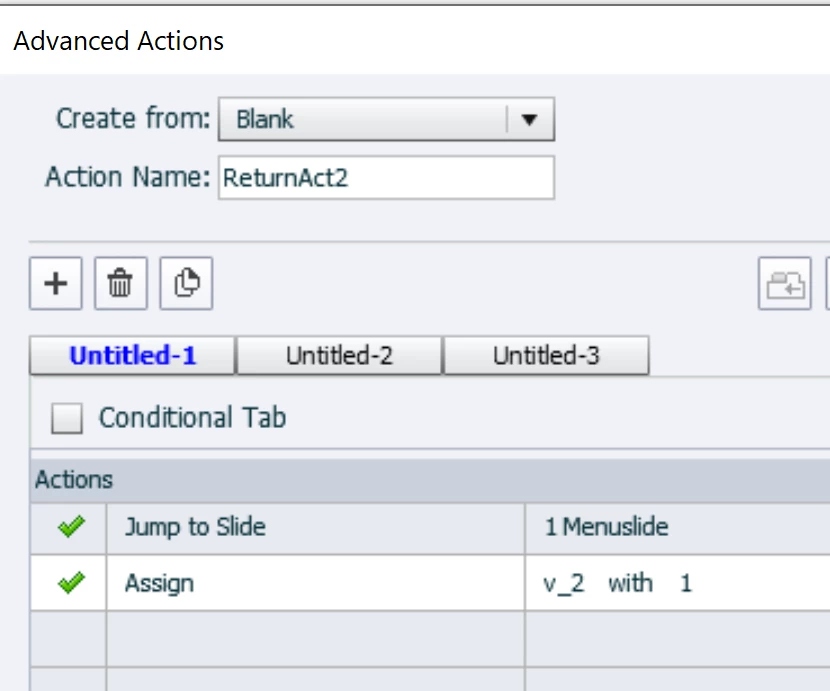
    2. For the Return buttons on the last slide of the two chapters, you need a different non conditional action:

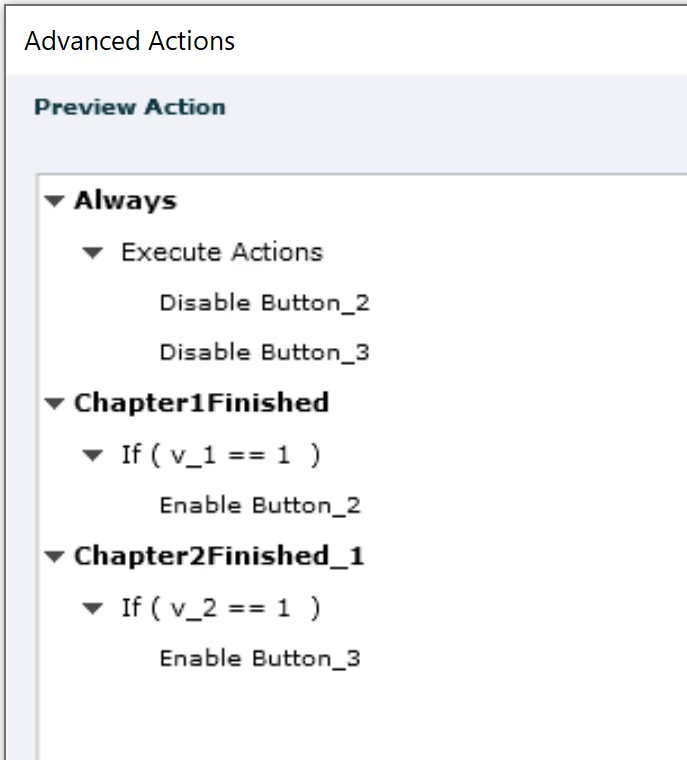
    3. For the On Enter event of the menu slide you need to replace your present action by this 3 decision advanced action:

    1 reply

    Lilybiri
    Legend
    December 21, 2022

    You probably have a Return button on the last slide of each chapter. Use that button for the advanced or shared action, which will look like this:

    • Enable Button2        for a shared action, this Button would be the first parameter, to be changed
    • Jump to MenuSlide            second compulsory parameter which will always be the same 'MenuSlide'.


    Phoenix_Leo
    Known Participant
    December 21, 2022


    Is this advanced action correct?


    Lilybiri
    Legend
    December 21, 2022

    Please, do not use Pause On Exit... always a bad idea.

    You seem to use the On Enter action of the 'homeslide' to disable buttons. But that means that those buttons will always be disabled whenever you enter that slide and that is not what you wanted. That is the reason I proposed to use the Success events of the buttons on the last slide of each chapter to enable the next button. If you keep the action you are showing here, the Enable action which I used will be overridden by the On Enter action when you re-enter the menu slide.

    Next time when you post screenshots of actions, please also post a screenshot of the Advanced Interaction panel in order to be able to see the link between events and actions. I always have to 'guess' and am not sure if that 'guess' is correct.

    If you want to use the On Enter action of the menu slide you will need to define and use variables, one for each chapter: v_1 (for first chapter), v_2 for second chapter. They will be Booleans, have a default value of 0.

    Use the Return button on the last slide of each chapter to toggle the associated variable to 1. For the first chapter:

        Assign v_1 with 1

        Jump to slide...

    Now you'll need a complicated conditional action with three decisions:

    Decision 1 'Always' is not conditional

       Disable Button2

       Disable Button3

    Decision 2 'Chapter2'   is conditional

       IF v_1 is equal to 1

           Enable Button2

    Decision 3 'Chapter 3' is also conditional

       IF v_2 is equal to 1

           Enable Button 3

    etc...