Participating Frequently
April 22, 2016
Answered

Added a PowerPt slide blank inside of Captivate file.

  • April 22, 2016
  • 2 replies
  • 597 views

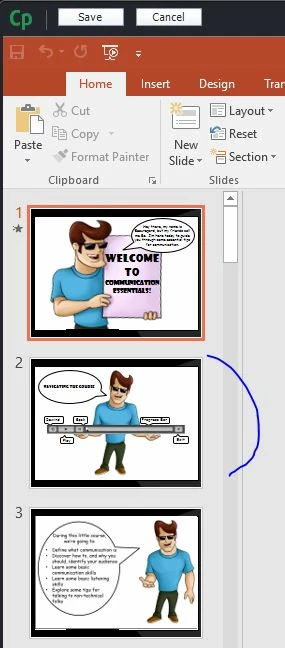
I have Windows 10, using Captivate 8 subscription. I imported a PowerPoint into Captivate.  I added a new slide in the PowerPoint. Then I went to Captivate file and choose to edit with MS PowerPoint/Edit presentation it shows fine as shown in A, however after I click Save, slide 2 is blank as seen in B.  I also used Find in Library and r-click to update. Same results, blank slide in Captivate file.  Confused. Can anyone help?  Thanks in advance.

                                          A                                                         B

This topic has been closed for replies.
Correct answer Lilybiri

AFAIK CP8 is not defined as compatible with Win10, only CP9 is in that situation.

Are there a lot of animations on that slide? To be honest: Captivate is not the best PPT converter at all, why do you use it for that purpose? It is an eLearning authoring tool, I would never develop this in PPT: you can use assets from PPT like images backgrounds, but please create animations in CP.  Are you using High Fidelity option when importing? The other slides look much more static.

2 replies

Captiv8r
Legend
April 22, 2016

Hi there

I note that the slide in PPT has what appears to be a video on that slide. You would likely need to add the video separately to Captivate.

Cheers... Rick

Lilybiri
Legend
April 22, 2016

Thanks, Rick, I couldn't figure out what was exactly on the PPT-slide, it looked like being more complicated.

Lilybiri
LilybiriCorrect answer
Legend
April 22, 2016

AFAIK CP8 is not defined as compatible with Win10, only CP9 is in that situation.

Are there a lot of animations on that slide? To be honest: Captivate is not the best PPT converter at all, why do you use it for that purpose? It is an eLearning authoring tool, I would never develop this in PPT: you can use assets from PPT like images backgrounds, but please create animations in CP.  Are you using High Fidelity option when importing? The other slides look much more static.

rlivermanAuthor
Participating Frequently
April 22, 2016

I'm new to Captivate. I will upgrade today to CP9.

I did not use the High Fidelity option.

There is no video on the slide. I added the slide in Captivate and insert the man image on the slide. No video.

So if I update PowerPoint, say add an image, how does the Captivate file update?

Captiv8r
Legend
April 22, 2016

Hmmm, sure looked like a media playback control to me on that slide. Go figure.

As for updating, look in your library and you should see a red dot where the PowerPoint is listed. Click that dot (or maybe right-click it) and you should see an update option or it should simply update and pull in the changes.

Cheers... Rick