priyshak23717676
Known Participant
April 29, 2016
Question

Adding a rollover state to a ClickBox

  • April 29, 2016
  • 2 replies
  • 234 views

I am creating an interactive TOC where I want the background of my topic to change when I rollover or click to see the sub-topics.

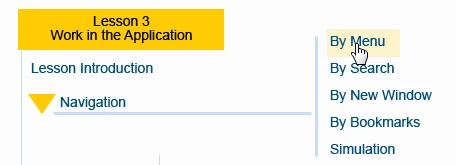
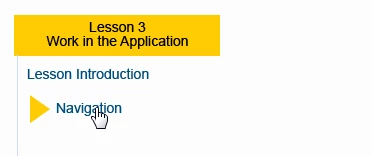
I am using a click box interaction to execute an advanced action to toggle the topic to show and hide. Here's how it looks.

I need help adding the rollover background of my sub topics to my topic. What should I do?
Thank y

This topic has been closed for replies.

2 replies

Lilybiri
Legend
April 29, 2016

By definition a click box is invisible to the user. That is the reason why you can use a click box to trigger an action, but it has no InBuilt States at all.

Replacing, as already suggested, the click box by a shape button which has InBuilt States could be the solution. The Normal state can be set to become invisible by setting the Fill Opacity to 0% and the stroke width to 0px. You can use a similar state for the InBuilt State Down, but for the Rollover state you choose a color and semi-transparency so that the text remains visible. Or even better: add the text to the shape button in Rollover state, so that it will appear in front of the background color. It is a bit tricky to have that aligned perfectly with the now existing text, so my recommendation would be to:

  1. delete the present text (is probably a text caption)
  2. create a shape button with that text, the Fill Opacity = 0% and the stroke width = 0
  3. open the state view, and edit the Rollover state so that it has the wanted coloured background
  4. check the Down state if it looks as you want and exit State view

Shape button can not only trigger any action the same way as a click box, but it can be timed for the rest of the project, or put on the master slide(s). This could be interesting for a TOC.

Participant
April 29, 2016

I am not entirely sure but I would suggest to use a smartshape instead of a clickbox. Then you will have the rollover state options. And you can use it as a button to execute the advanced action. Make the smartshape 0% opacity so you do not see it anymore.

priyshak23717676
Known Participant
April 29, 2016

Thank you, this helps. Simple solution.