
Inspiring
April 10, 2018
Question

Adding custom cartoon characters to the "My Assests" library

  • April 10, 2018
  • 21 replies
  • 1964 views

Hi there,

I will be using a lot of cartoon characters in a project. I take them from eLearning brothers - there is a great collection there.

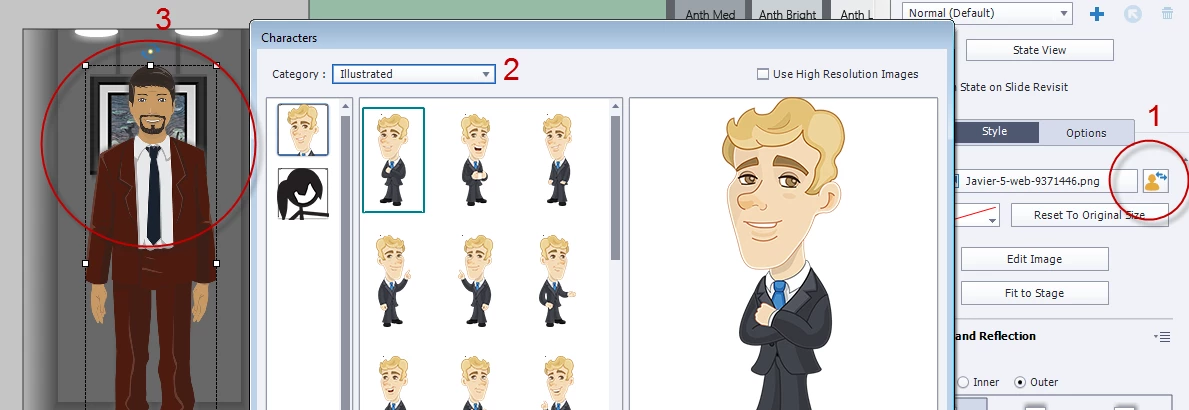
Instead of adding them to the library I was thinking if there is a way to add them beforehand somewhere so I could then choose them by inserting with Media => Characters.

So to put text to the image hereunder, I would like to be able to also click on 1, choose from 2 and have 3.

Is there a way to do that?

Thank you in advance

B
This topic is closed to new replies. Start a new post to keep the conversation going.

21 replies

David Burnham HBA
Inspiring
April 11, 2018

It is hard to tell from your screen capture but do you have the Assets button on the tool bar. If you are using the earlier version 9 - I believe that updating to the latest version - will ADD the Assets button - Note: someone correct me if I am wrong. 

In version 9.0.2.437 and Captivate 2017 - When you download characters from ELB, the characters are stored in your Category assets so when you click on the  Assets button and select Category Assets the characters will be there.

You can then insert from the Assets just like you do to pick the characters loaded with the Standard Captivate eLearning assets.

Inspiring
April 11, 2018

Thank you for taking time to reply David.

I have both 2017 and 9. I am using 2017 for my new projects, but our IT security has restricted the access to the tab "Get Free eLearning Assets". So what you mean is that if I download an image through that tab(1), I should be able to see it later in the list of resources(2)?

Thanks again

B

David Burnham HBA
Inspiring
April 11, 2018

Ah yes IT! -- Yes if you access the ELB through the Assets button when you download from ELB they are added to the Category Assets in 9 and 2017 and you can access them there and insert as with the standard elearning characters