
February 7, 2012
Question

Adjust volume settings after editing audio

  • February 7, 2012
  • 1 reply
  • 493 views

Captivate v5.5

Having created a project with audio on each slide. Maybe some days later I need to make some changes to the script/audio on one or two of the slides.

I re-record the new audio using the same microphone as used for the other slides.

I have noticed that there is a slight difference in the sound level of the old audio vs the new audio.

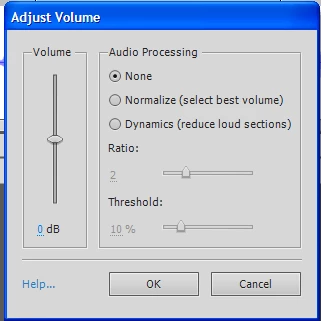
Is it now good practice to use the "Adjust Volume" option and if so, what are the suggested settings and how can I ensure the changes are applied to the whole project and not just the slide I am editing ?
Noel

This topic has been closed for replies.

1 reply

RodWard
Community Expert
Community Expert
February 7, 2012

Bear in mind another factor:

On any given day your own voice is going to sound different even when you use the same microphone in exactly the same room with exactly the same settings.  I find that when I need to splice in some new voiceover to correct something on one or more slides in a module that has already been recorded, I need to do three or four minutes of recording before my voice falls into a similar volume and tone as that on the previous recording.  At first my voice is always too quiet and it sounds as if I have the volume too low, yet the gain setting is exactly the same as the previous recording session.  It just takes a little practice before my voice matches what I recorded before.

February 7, 2012

Would you therefore not suggest the use of the "Normalise" option once you have made you changes ?

I am assuming the "normalise" option will ensure all audio - including the recently added - will be set at the same level.

What I wonder however is what does Captivate consider the best volume level to select.

Noel