


Gojak
Inspiring
March 28, 2023
Answered

Adobe Captivate 2019 unable to preview project using "Preview next X slides"

  • March 28, 2023
  • 1 reply
  • 434 views

Hi all,

I am using CP 2019, and the preview option stopped working a few weeks after installing version 11.8.0.586.
Reinstalling CP doesn't solve the issue. The funny thing is it affects just a few laptops, while others work fine. It's a company network, and I assume some background scripts or permissions are blocking some parts of the application, but just on a few laptops. Any suggestions on how to resolve the preview error? I fear other installations will start experiencing the same issue in time, affecting the ability to review advanced slides quickly during production.
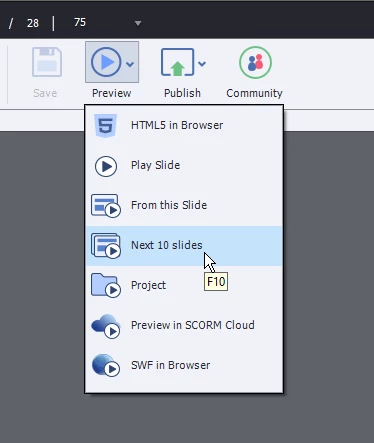
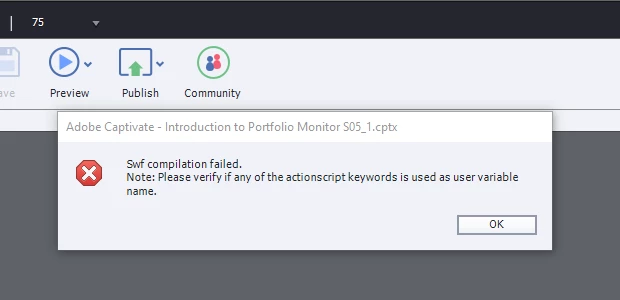
Note that the issue is not project related. It's an issue with the application option.

    This topic has been closed for replies.
    Correct answer Lilybiri

    In the most recent version 11.8.1 (only available for Win at this moment) that option is finally gone.

    For a non-responsive project all Preview methods except F11, Preview HTML in Browser and Preview in Scorm Cloud were based on SWF technology, hence the error which is popping up. Since a couple of years Flash Player is banned from all browsers. If you no longer have installed, you cannot use those preview methods anymore. However since they used a temporary SWF output they were not very WYSIWYG because HTML output can be very different.

    My personal workaround is to activate the TOC in Overlay if I want to check long projects. I activate all Navigation by TOC and that allows me to go quicker to a specific slide.

    1 reply

    Lilybiri
    LilybiriCorrect answer
    Legend
    March 28, 2023

    In the most recent version 11.8.1 (only available for Win at this moment) that option is finally gone.

    For a non-responsive project all Preview methods except F11, Preview HTML in Browser and Preview in Scorm Cloud were based on SWF technology, hence the error which is popping up. Since a couple of years Flash Player is banned from all browsers. If you no longer have installed, you cannot use those preview methods anymore. However since they used a temporary SWF output they were not very WYSIWYG because HTML output can be very different.

    My personal workaround is to activate the TOC in Overlay if I want to check long projects. I activate all Navigation by TOC and that allows me to go quicker to a specific slide.

    Gojak
    GojakAuthor
    Inspiring
    March 28, 2023

    Yes, that makes sense. However, all laptops are flash free, and on some the preview is still working, and that's what confuses me. I thought that the preview is still somehow integrated into CP without the flash extension in Windows. I guess we will have get CP 11.8.1 to resolve this. Thank you!

    Lilybiri
    Legend
    March 28, 2023

    It will not be solved in 11.8.1, all the SWF-based preview methods have simple disappeared.