
March 14, 2012
Question

Adobe Captivate 5.5 and Neo Speech: issue to use Paul voice

  • March 14, 2012
  • 1 reply
  • 1297 views

Hello,

I have installed succesfully Adobe Captivate 5.5 and then Neo speech Add-on. But unfortunately, when using Speech management function, I can't find Paul and Kate voice. These voices are not proposed in the voice list while the installation has suceeded.

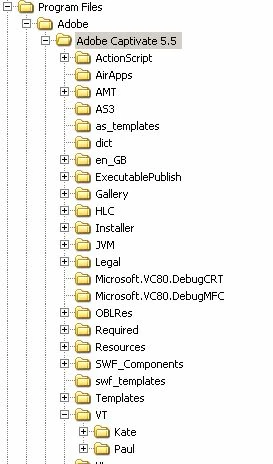
A Kate and Paul directories have been install under Adobe Captivate 5.5 but I don't know why these voices seems to be not installed.

My PC uses Windows XP, default language = french. Adobe Captivate has been installed in English.
Thanks for your support,

Odile

    This topic has been closed for replies.

    1 reply

    March 14, 2012

    Hi Odile

    First off, did you restart the program?

    DId you install after you downloaded?

    Can you put a printscreen of what it shows when you are trying to add the voices?

    Hopefully that will help us figure out what might be going wrong.

    March 15, 2012

    Hi,

    First I have installed Adobe Captivate 5.5.

    Then I have installed Neo spech.

    I have restarted my PC, then launch Captivate: Paul and Kate voices are not present in Speech Manager. And I have no special error message, only voices missing.

    After that I have installed Loquendo speechs.

    Launch again Captivate and see that Loquendo voices are pesent in Speech Manager.

    Now I will show you Neo Speech install report, installation done after an Captivate application stop:

    The installation has succeeded in the good directory.

    When installing Loquendo the report is not really the same, it seems that some additional execution are done:

    Following other discussions on the forum, I have looked at my Windows Control Panel Voice and see that 3 voices are proposed. I assume that these are Windows voice. I didn't find Stefan, Simon, Kate or Paul voices and I'm not ablle to add or configure something.

    If someone has an idea of the issue

    March 27, 2012

    Finally it works after applying this workaround:

    After installing the Neo speechs and Loquendo speechs, copy Paul and Kate directory from xxxxx\Adobe\Adobe Captivate 5.5\VT\ directory to xxxxxx\Adobe\Adobe Captivate 5.5\Loquendo\LTTS7\data\voices.

    The result is:

    Odile