
JoeyKahler
Participating Frequently
February 3, 2016
Answered

Adobe Captivate 9.0 eLearning SCORM 1.2 course re-opens and begins on last slide upon multiple views

  • February 3, 2016
  • 3 replies
  • 1328 views

Having users comment that after the view and complete a project with quiz questions and click through, that when they re-open the course to retake, the course opens on the last slide of the project... any reason for this or any workarounds???  Thanks
This topic has been closed for replies.
Correct answer Lilybiri

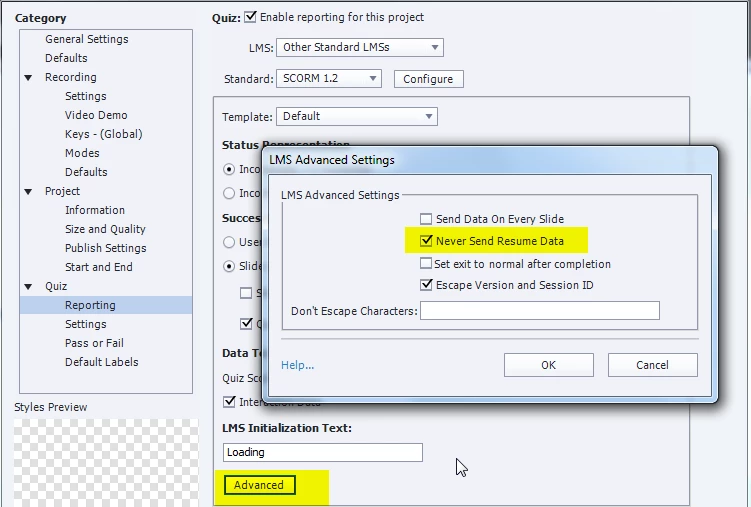
Resume data (bookmarking ) is turned on by default. You can turn it off in Quiz, Preferences, Reporting, under the Advanced button

3 replies

Participant
April 26, 2016

I disagree with the suggested solution. The solution below is better because it still allows the learner to continue where they left off if the course was not completed 100% on the first attempt.

Under TOC Settings > Runtime Options, Self-Paced Learning MUST be turned off.

If enabled, it will save the learners progress to their local machine. This is a great feature if you are using this course outside of an LMS, but causes many problems if the course will be deployed in an LMS. For example, if the learner has completed the course and it is being reassigned to the learner, on the 2nd attempt, the learner will start on the final slide of the course. Another example is if multiple learners are using the same computer to complete the same courses. If one learner completes the course, then the 2nd learner who takes the same course will start on the final slide.

RodWard
Community Expert
Community Expert
April 26, 2016

Captivate actually allows for two different methods of bookmarking courses.  As you noted, Self-paced Learning is one method of bookmarking but it's designed for use when you are NOT reporting to an LMS.  The other type is Resume Data Bookmarking which is part of the SCORM standard.

I have always been of the opinion (and my previous tests seem to confirm) that selecting any option in Quiz > Settings to report to an LMS disabled the Self-Paced Learning option.  It still shows as selected in the Skin Editor, but the self-paced learning bookmarking effectively does not work.  You don't get the self-paced learning bookmarking dialog box pop up to ask the learner if they want to resume where they left off.

Are you sure that self-paced learning bookmarking is still active when using SCORM?  What do you see to indicate that?  (The fact that the course is using bookmarking when set to report to SCORM could be due to Resume Data Bookmarking kicking in, not Self-Paced Learning Bookmarking.)

Participant
April 26, 2016

What we've observed is a particular client who constantly experienced the issue JoeyKahler reported. We discovered that they were training 200 people on the same 4 computers.

The #1 recommended solution was to enable "Never Send Resume Data" but this was simply not an option for us because our course duration is 45-60 min and learners desperately need the "Continue Where You Left Off" feature. This solution sounds like "If you don't want Athlete's Foot, just cut off your leg!"

Furthermore, it is very easy to replicate. Simply complete the course and immediately reassign it to yourself. Or, you can complete the course, login as a different user and launch the same course to replicate the issue every time.

We tried everything to fix this and nothing worked at all. Finally, after disabling Self-Paced Learning, it started to work perfectly.

Confirmed using Adobe Captivate 9 on Moodle 2.9 SCORM 1.2 course.

JoeyKahler
Participating Frequently
February 3, 2016

Thanks for the response! Appreciate it very much

Lilybiri
LilybiriCorrect answer
Legend
February 3, 2016

Resume data (bookmarking ) is turned on by default. You can turn it off in Quiz, Preferences, Reporting, under the Advanced button