
Participant
November 29, 2016
Question

Adobe Captivate 9 Completion status not reporting to LMS

  • November 29, 2016
  • 1 reply
  • 1034 views

Hello,

I have created a course with some content slides and 25 quiz questions at the end. The course content has a few buttons that carry about 50 points, the rest of the 50 points divided among the quiz questions. My captivate course behaves as expected with the results slide showing me that I have obtained a passing score and when I click the Continue button, it takes me to the Success Slide on which I have the user click an "Exit the course" button. But the LMS is not registering the completion status. I am using SCORM 1.2. Here are some screenshots of my quiz settings and Advanced Interaction windows.
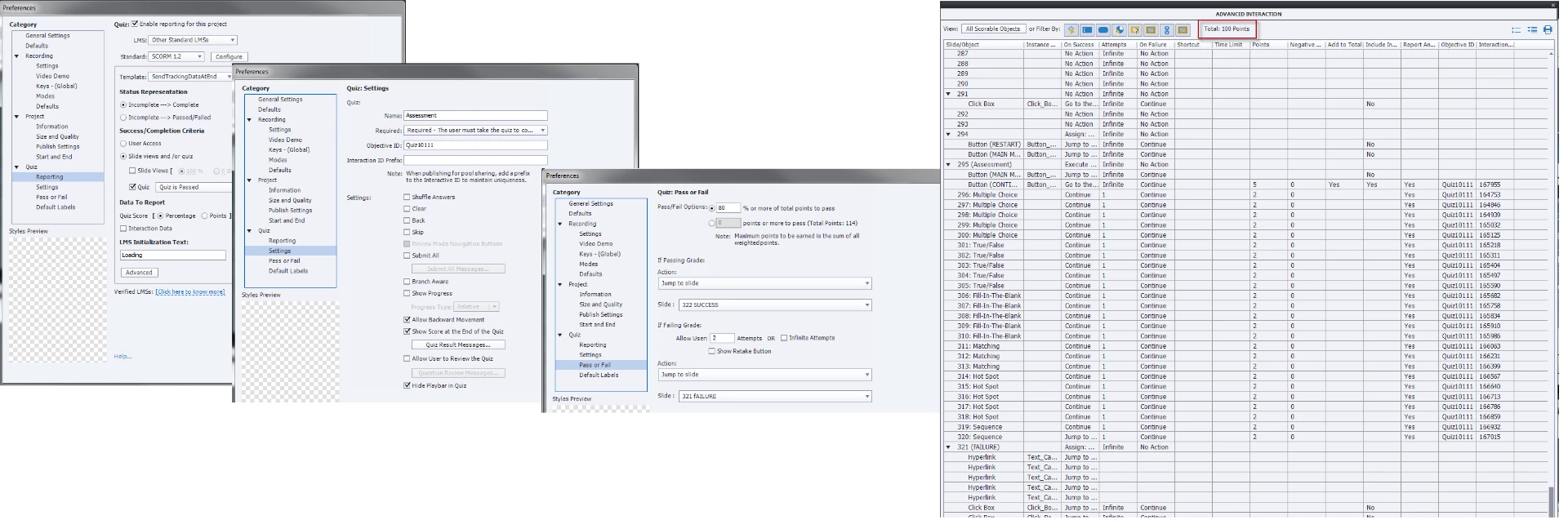
For all my old courses without embedded quiz, I have always set the Quiz Settings as "Pass required..." and Status Representation as "Incomplete --> Complete" that has worked. But for my current course with the quiz, this setting causes the  Continue button on the results slide to not work.

Any suggestions?

This topic has been closed for replies.

1 reply

Lilybiri
Legend
November 29, 2016

Which exact version of 9 do you use?

I see that you have 2 attempts on quiz level, but no Retake button. How does the user get a second attempt when he failed on the first Quiz attempt?

Participant
November 29, 2016

I am using 9.0.2.437.

Upon failing, I have set the Continue button on the Results slide to jump to a slide which allows the user to view the TOC for the various chapters in the e-learning (if he/she wants to review a lesson) and an option to retake the quiz (a button which has the Action set to Jump to Slide #).

You will be able to see the Jump to Slide action for the Continue button within the Quiz properties screen attached in my post above.

Lilybiri
Legend
November 29, 2016

Continue button is the most important embedded object on the Score slide. It will trigger the actions you specify in Quiz, Preferences, Pass or Fail. The Failure action will be done only when attempts are exhausted, which is after the second attempt. Maybe you misunderstood? It is a bit the same work flow as on a single question slide: the Last Attempt action is done only after attempts are exhausted.

You can use the On enter action of the Score slide to have the navigation that you want.