Participating Frequently
Aug 12, 2017 6:16 PM UTC
Question

Adobe Captivate 9: Drag & Drop

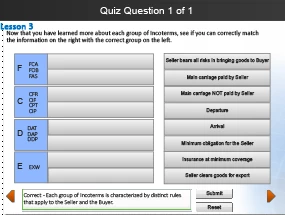
In my drag and drop slide, the "back" button does not work. It is set to "go to previous slide" . Have a similar drag and drop and the back button works just fine.

Karen
    This topic is closed to new replies. Start a new post to keep the conversation going.

    4 replies

    Lilybiri
    Legend
    Aug 12, 2017 6:26 PM UTC

    What is the  option chosen in the Required field of Quiz Preferences, Settings? This looks like the first question slide in a quiz. Going back is getting out of the quiz scope.

    Translate
    Participating Frequently
    Aug 12, 2017 6:58 PM UTC

    Optional, hmmm.

    Translate
    Participating Frequently
    Aug 12, 2017 7:03 PM UTC

    I changed it to "allow backward movement" . It worked. Even though the other drag drop slide was almost identical and it allowed backward movement.  I don't get Captivate sometimes. Thanks for your help!

    Translate
