
Participant
July 24, 2019
Question

Adobe captivate - Cannot set up LMS reporting

  • July 24, 2019
  • 1 reply
  • 207 views

Hi there,

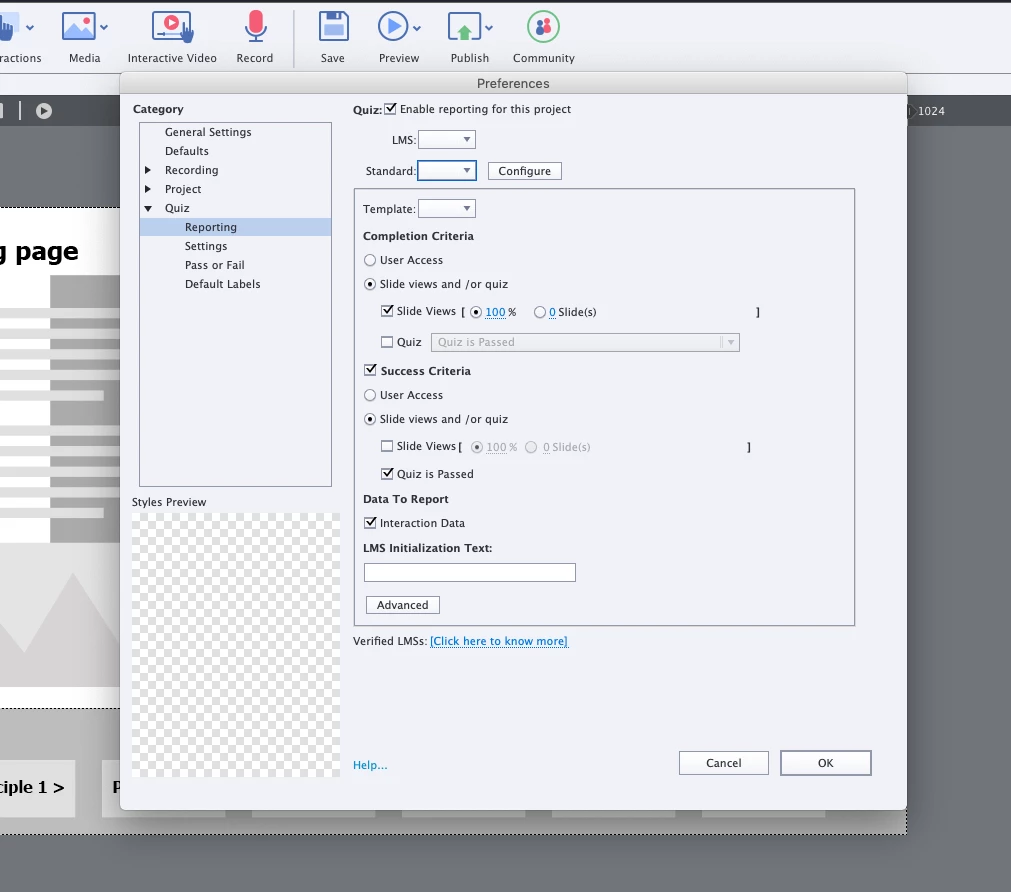
When I try to setup reporting for my project, the LMS and Standard drop-downs are empty. And if I click configure, Adobe captivate does not respond and I have to force quit it. Any ideas?

PS: I'm running the 2019 Release (11.5.0.476)
This topic has been closed for replies.

1 reply

Lilybiri
Legend
July 24, 2019

Looks like your Preferences are corrupted.

Please, find the subfolder 'utils' under the installation folder and run the file 'CleanPreferences...' which fits your OS while Captivate is closed. You need admin rights.

Participant
July 24, 2019

That didn't work unfortunately. But I was able to create a new project and copy the slides. Which solved the issue.

Thanks though!

Lilybiri
Legend
July 24, 2019

OK, that means the project itself was corrupted. Glad you could solve it.