Participant
May 25, 2020
Question

Adobe Captivate Captivate “Freeze/Not Responding” after clicking “Publish” button.

  • May 25, 2020
  • 1 reply
  • 603 views

Hello, 


My teammates and I encounter a serious problem that we all cannot publish to Scorm1.2 and not sure what is the root cause.


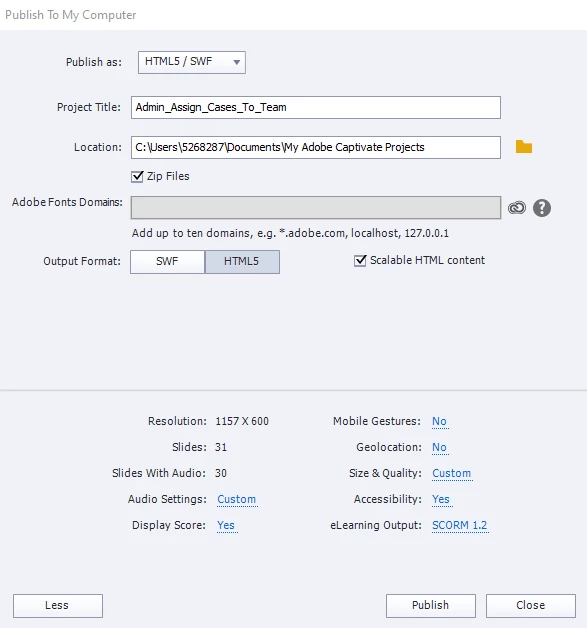
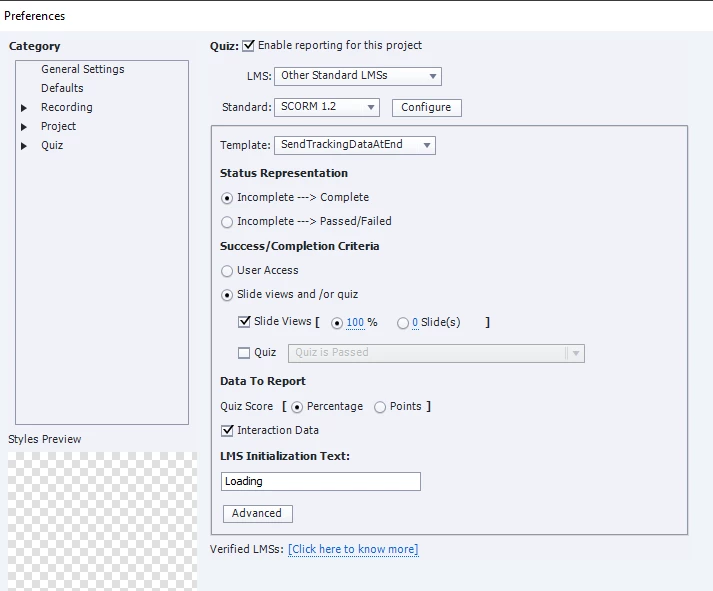
When we publish eLearning course by Adobe Captivate, Captivate is just “Freeze/Not Responding” after clicking “Publish” button.I’m not sure is the Preferences setup issue or whatelse so i upload the Scorm1.2 publish setting as well.


Can anyone advise what happen? as this is not only happening to me but also my teammates. 


Thank you!
    This topic has been closed for replies.

    1 reply

    Lilybiri
    Legend
    May 25, 2020

    I do not download any attachements, please insert the screenshots in your question.


    Menntion also the exact full version number you are using, as mentioned under Help, About Captivate. Are you on Mac or Win?

    Participant
    May 25, 2020

    I'm using 2019 Release (11.5.1.499) in Win10. Already add in the screenshots, please see if you have any clue. Thanks a lot!


    RodWard
    Community Expert
    Community Expert
    May 25, 2020

    I see nothing wrong with these settings.  My interest would be to know WHERE you were trying to publish to.


    Is the publish output folder located on your PC hard drive or somewhere else?