
Known Participant
November 18, 2016
Answered

Adobe Captivate Fatal Error

  • November 18, 2016
  • 3 replies
  • 1453 views

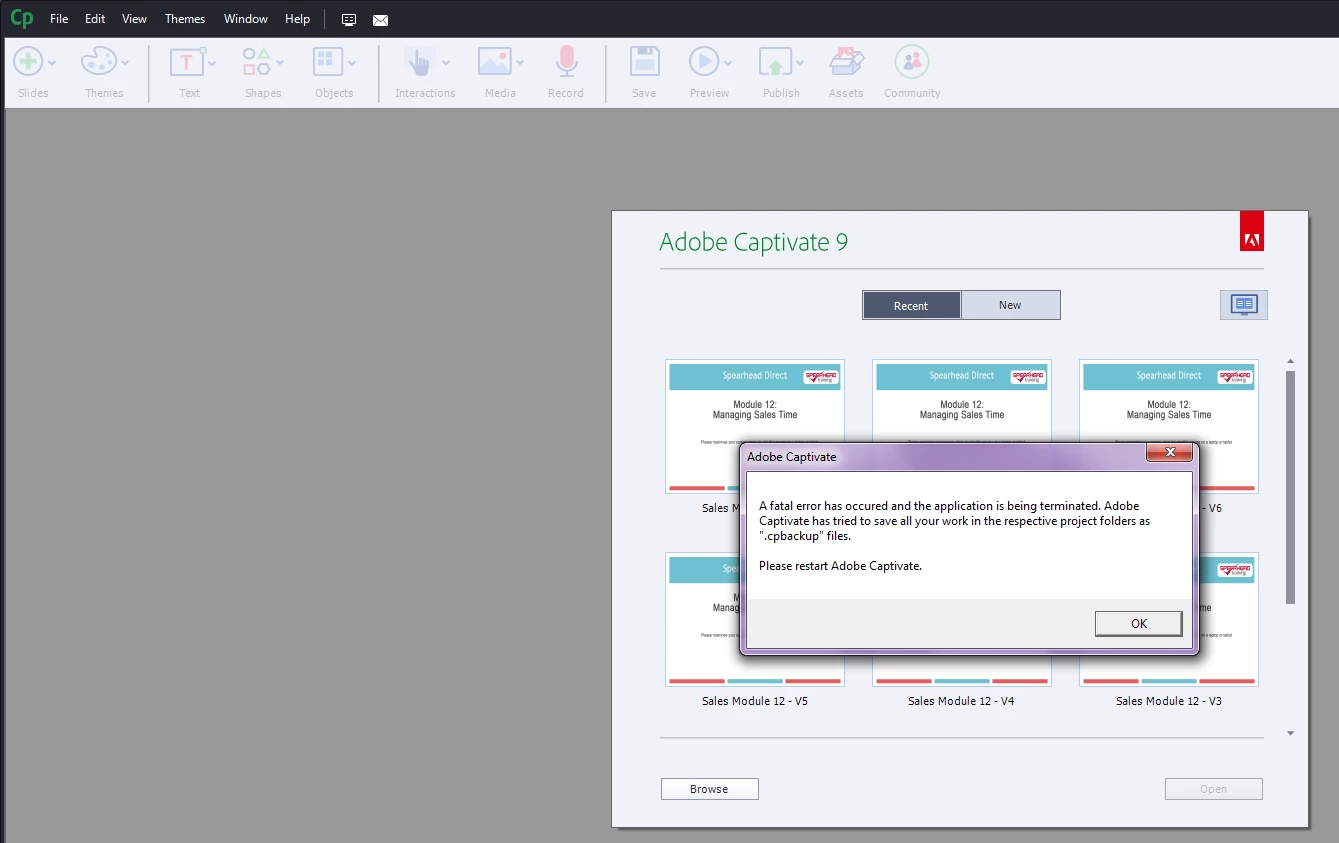
My colleagues and I are all experiencing the fatal error message when opening Captivate 9.  This is happening on at least 5 different machines as well as on a Mac (which doesn't produce the error window, it just freezes).  A couple of my colleagues updated to the most recent version 9.0.2.437 and are still experiencing the issue.  The log contains the following...

000000018006FFB8 (CPPublic): : WCPSEHException::operator=

00000001800706AD (CPPublic): : CPExceptionUtils::GenerateCrashDump

0000000180070632 (CPPublic): : CPExceptionUtils::GenerateCrashDumpFile

0000000180070A6E (CPPublic): : WCPSEHException::WCPSEHException

000000018007049D (CPPublic): : WCPSEHException::operator=

000007FEDEDEECA5 (MSVCR110): : CxxThrowException

000007FEDEDED66B (MSVCR110): : _DestructExceptionObject

000007FEDEDED580 (MSVCR110): : _DestructExceptionObject

000007FEDEDEE71C (MSVCR110): : _FrameUnwindFilter

000007FEDEDEEFEB (MSVCR110): : _CxxFrameHandler

000000007798905D (ntdll): : RtlDecodePointer

0000000077978C0F (ntdll): : RtlUnwindEx

00000000779AD948 (ntdll): : KiUserExceptionDispatcher

000007FEDEDCCB50 (MSVCR110): : strcmp

00000000005F2B9C (CaptivateUI): : ICPAutoUpdateNotifier::ICPAutoUpdateNotifier

00000000005F74A8 (CaptivateUI): : ICPAutoUpdateNotifier::ICPAutoUpdateNotifier

00000000005F72E9 (CaptivateUI): : ICPAutoUpdateNotifier::ICPAutoUpdateNotifier

00000000005F68CF (CaptivateUI): : ICPAutoUpdateNotifier::ICPAutoUpdateNotifier

00000000005F5A78 (CaptivateUI): : ICPAutoUpdateNotifier::ICPAutoUpdateNotifier

00000000039C3FEA (CaptivateUICore): : ICPToolTipProvider::~ICPToolTipProvider

00000000039CBF56 (CaptivateUICore): : CPWebView::OnMessageReceived

00000000039D0E32 (CaptivateUICore): : CPWebView::GetCPString

00000000039D028F (CaptivateUICore): : CPWebView::GetCPString

00000000039CF2D8 (CaptivateUICore): : CPWebView::GetCPString

00000000039C3FEA (CaptivateUICore): : ICPToolTipProvider::~ICPToolTipProvider

00000000039C2F62 (CaptivateUICore): : ICPToolTipProvider::~ICPToolTipProvider

0000000003ACA10A (CaptivateUICore): : CPShowWidgetPanelActionComponentContext::SetPanelPrefs

000007FECFD61E88 (libcef): : cef_browser_host_create_browser_sync

000007FECFDB2938 (libcef): : cef_string_multimap_value

000007FECFDA8469 (libcef): : cef_string_multimap_value

000007FECFDB26AA (libcef): : cef_string_multimap_value

000007FED180EEF4 (libcef): : UnregisterNonABICompliantCodeRange

000007FED1834545 (libcef): : UnregisterNonABICompliantCodeRange

000007FED17FA35F (libcef): : UnregisterNonABICompliantCodeRange

000007FED106BC09 (libcef): : GetHandleVerifier

000007FECFED99D3 (libcef): : GetHandleVerifier

000007FECFE99738 (libcef): : cef_time_to_timet

000007FECFE98EFA (libcef): : cef_time_to_timet

000007FECFEDA9B8 (libcef): : GetHandleVerifier

000007FECFEDB06B (libcef): : GetHandleVerifier

000007FECFEB5468 (libcef): : cef_time_to_timet

000007FECFDE4918 (libcef): : cef_time_to_timet

000000018004DC26 (CPPublic): : CPGetTickCountSinceAppStartTimeNS100

000000018004DD40 (CPPublic): : CPGetTickCountSinceAppStartTimeNS100

0000000077759C11 (USER32): : TranslateMessageEx

000000007775992A (USER32): : TranslateMessage

000000014001965E (AdobeCaptivate): : TranslateMessage

0000000140019850 (AdobeCaptivate): : TranslateMessage

000000014001A6E2 (AdobeCaptivate): : TranslateMessage

000000014001B078 (AdobeCaptivate): : TranslateMessage

0000000077855A4D (kernel32): : BaseThreadInitThunk

000000007798B831 (ntdll): : RtlUserThreadStart
This topic has been closed for replies.
Correct answer Tammy_Moore

I have experienced the same. It has been fine for months and today it freezes right after start up once i get to the window to select a new project or open an existing one. I had the same behavior a day or two ago, but I didn't have time right then to troubleshoot to see if it was the file or Captivate. Today I needed it, so I dug back in. No file would open even ones that worked fine just a week ago. I haven't updated anything in the last week except two Adobe Creative Cloud apps this morning (After Effects and one other). I tried double-clicking on an existing project to launch Captivate and it froze for that method as well.

The first thing I tried was to clear the cached project folder (Documents/Adobe Captivate Cashed Projects). I have had that clear up issues in the past. No change this time though.

I then cleaned preferences using the Captivate utility. Though not needed since the reinstall cleared the whole folder, I renamed the sample and project folders in My Documents.

I then uninstalled. I reinstalled using a Captivate 9 file from 8/19/15 I still had in my download folder. It had the same name as the file to download it fresh again, so I didn't see the need to download again.

It is working for me now with a pretty clean reinstall. I have not added in the patch again from a few months ago yet.

3 replies

Tammy_Moore
Tammy_MooreCorrect answer
Inspiring
November 20, 2016

I have experienced the same. It has been fine for months and today it freezes right after start up once i get to the window to select a new project or open an existing one. I had the same behavior a day or two ago, but I didn't have time right then to troubleshoot to see if it was the file or Captivate. Today I needed it, so I dug back in. No file would open even ones that worked fine just a week ago. I haven't updated anything in the last week except two Adobe Creative Cloud apps this morning (After Effects and one other). I tried double-clicking on an existing project to launch Captivate and it froze for that method as well.

The first thing I tried was to clear the cached project folder (Documents/Adobe Captivate Cashed Projects). I have had that clear up issues in the past. No change this time though.

I then cleaned preferences using the Captivate utility. Though not needed since the reinstall cleared the whole folder, I renamed the sample and project folders in My Documents.

I then uninstalled. I reinstalled using a Captivate 9 file from 8/19/15 I still had in my download folder. It had the same name as the file to download it fresh again, so I didn't see the need to download again.

It is working for me now with a pretty clean reinstall. I have not added in the patch again from a few months ago yet.

Lilybiri
Legend
November 18, 2016

Which version of 9 do you use? The latest versio is 9.0.2.437. Is Captivate installed on your system, not on a networked drive? Are the paths for the projects (Publish at in Preferences, General Settings) and Cache folder pointing to folders on your system, not to networked folders? If you are on Windows, Run Captivate as Administrator, please. Since the problem also happens on Mac, the last tip is not relevant, just wanted to remind.

Update to OS or installing other applications can cause this, but also the presence of some fonts. Did you add fonts lately?

In case you installed a patch for 9 recently, did you Clean the Preferences and delete the Layouts folder in Public (or Shared for Mac) documents? Do you clear the cache regularly?

Known Participant
November 18, 2016

It has been working fine for months.  Nothing has changed, no updated to any software.  We where on the previous version of Captivate .403 (I believe) and was running fine, when this happened, we went ahead and updated to see if it would fix the issue.  No luck:(.

Nothing has been added, environments have been the same for awhile and we aren't running off network, everyone has there own install. 

Biggest question is why now and not the months leading up to it.

Lilybiri
Legend
November 18, 2016

Please update to 4.0.2.437.

BDuckWorks
Inspiring
November 18, 2016

Is there any chance you've done an update to the OS or installed a third-party application since the Cp was working?

​This looks severe!