Question
Adobe Captivate Trial Installation Error
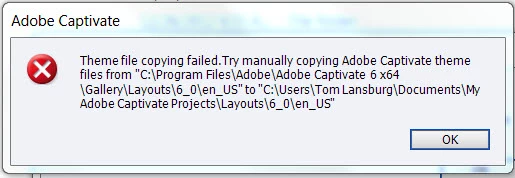
The trial downloaded fine but when installing Captivate I received the following messages during installation. In Windows, windows creates a folder named My Documents. However it appears Adobe Captivate is looking for a folder just called Documents which doesn't exist. If I look into "C:\Users\Tom Lansburg\My Documents\My Adobe Captivate Projects\Layouts\6.0\en_us", Adobe had already created and placed the files it is looking for here. Windows will not allow me to create a folder called Documents without first merging what the system folder contents of My Documents has in it. I was reluctant to do this since there maybe links to files in these folders that won't get remapped when I do this.
 AdChoices