
Participating Frequently
May 26, 2015
Answered

Adobe Presenter 7 issue

  • May 26, 2015
  • 1 reply
  • 1803 views

I installed the Adobe Presenter 7.0.7.

Adobe - Adobe Presenter : For Windows : Adobe Presenter 7.0.7 - English : Thank You

After selecting the Adobe Presenter Start Powerpoint 2010 license agreement screen was displayed.

But Pressing the "Accept button" of the license agreement screen does not have a reaction.
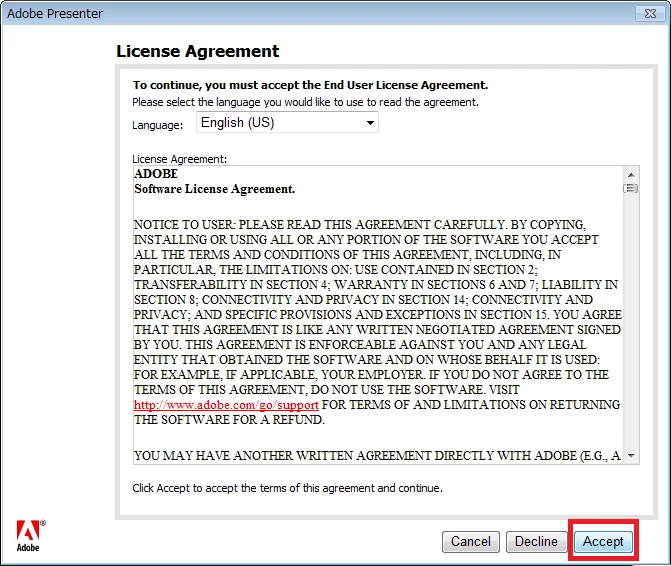
I forcefully closed the non-responsive PowerPoint2010.

It can not also be closed, it was only way to forced termination.

What should I do to accept the license agreement?

Please help.

Usage environment:

Windows7 64bit

Office 2010

Adobe Presenter 7.0.7

This topic has been closed for replies.
Correct answer Mayank_Meh

I have set a new user administrative privileges, but it does not work well.

Adobe Presenter folder also have already changed to full control.

Kind regards,


Hi There,

Can you try the steps in the below link and check if it resolves the issue :

http://blogs.adobe.com/captivate/2011/06/adobe-presenter-eula-issues.html

Regards,

Mayank

1 reply

RajeevAdobe
Adobe Employee
Adobe Employee
May 26, 2015

Please follow the steps as mentioned in the document linked below and let me know if that works.

https://helpx.adobe.com/creative-suite/kb/software-license-agreement-reappears-click.html

If it still gives you an error then you may create a new user account which has Administrator rights and then try to launch it again.

Regards,

Rajeev.

田_54_2Author
Participating Frequently
May 28, 2015

Thank you for support.

I changed the folder permissions and created a new account,but the problem did not resolve.

Would you have a solution that can be considered in the other?

Kind regards,

RajeevAdobe
Adobe Employee
Adobe Employee
May 28, 2015

Did you also try to create a new user account with admin rights and then launch the product.

Regards,

Rajeev.