
patrickt56319763
Participant
June 11, 2016
Answered

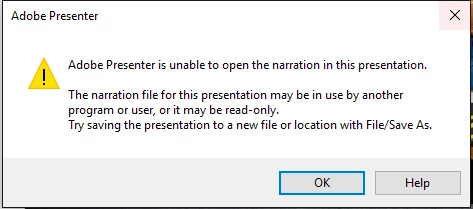
Adobe Presenter Unable to Open Narration in this Presentation

  • June 11, 2016
  • 3 replies
  • 2086 views

I receive this notice every time I attempt to add a quiz to a presentation (that has NO narration in it and that is not accessible to another user). Does the same thing if attempting to add narration. Only way to add narration or a quiz is to first save it as another file name. Presenter 11 with Windows 10, PowerPoint 2013. Need some help, please...!
This topic has been closed for replies.
Correct answer Jorma_at_Knox

Yes, Presenter has always had issues when working with projects that are on external or shared drives. When in files that are sync'd with applications like DropBox, there can be issues as well.

Moving the project to your Desktop, or at least a non-sync'd location on your C drive, is the best solution.

3 replies

Participant
October 24, 2016

Same issue here!

Participant
September 2, 2016

I had the same problem.

In my case it was caused by the presentation existing in my OneDrive folder. Something about OneDrive interferes with Adobe Presenters access to the necessary files.

The problem was solved by moving the presentation to my Desktop.

Jorma_at_Knox
Jorma_at_KnoxCorrect answer
Legend
October 27, 2016

Yes, Presenter has always had issues when working with projects that are on external or shared drives. When in files that are sync'd with applications like DropBox, there can be issues as well.

Moving the project to your Desktop, or at least a non-sync'd location on your C drive, is the best solution.

zeeshan hussain
Adobe Employee
Adobe Employee
June 12, 2016

Hi Patrick,

Please package your project and share it with me using drop box. (zhussain@adobe.com)

Note: Option to package your project is available on your Presenter ribbon.

Regards,

Zeeshan Hussain

Adobe Presenter Engineering Team