
November 25, 2015
Question

Advanced Action actions incorrectly firing multiple objects

  • November 25, 2015
  • 1 reply
  • 512 views

I'm using Captivate 6 and building a Captivate lesson where on a single Bookshelf slide, there are three bookshelves, each with multiple books. (see below picture) Each book has a click box that jumps to a different slide. Upon entry into the different slide, I'm using a ActionVisited conditional advanced action to assign a unique "visited" variable the value of "1" for that particular book. A different Setup_MenuSlide conditional advanced action executes upon entry (or return) to the single Bookshelf slide, where if the visited variable associated with a book is evaluated to "1", an image object (checkmark) appears to denote that the book has been read.

Using a picture, here's what the Bookshelf slide looks like before any of the books have been visited:
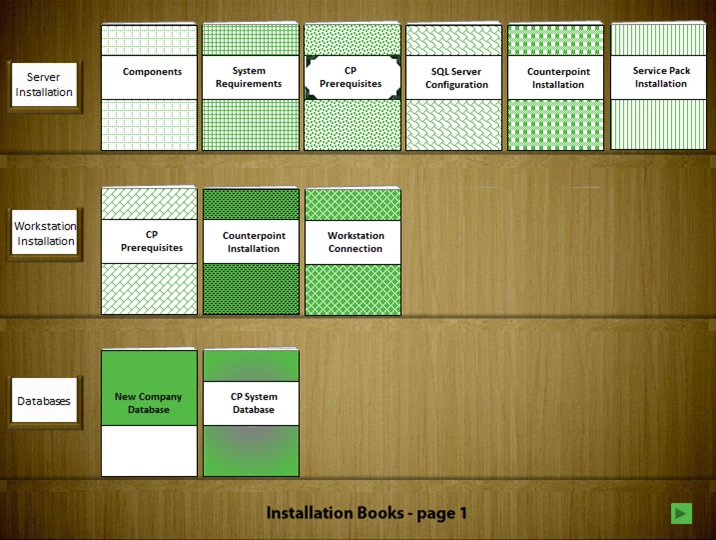
As long as I move to each book in order (e.g., "Components", then "System Requirements", then CP Prerequisites, etc.), the checkmark object appears on the corresponding book.

The problem is this:  If I move to a book out of order (e.g., I go to "Counterpoint Installation" before any of the others on that shelf), the checkmark object appears on the book I selected as well as all others that precede it on that shelf, even though I haven't yet visited the preceding books.
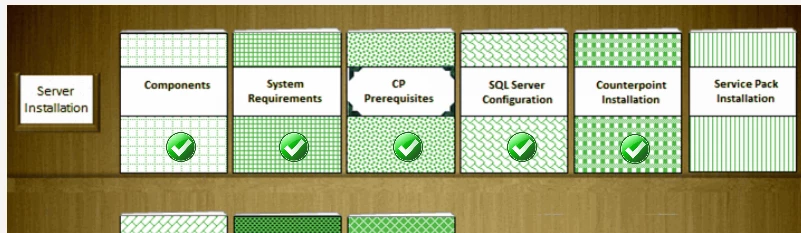
I've played around with the order of the book click boxes and associated checkmark objects on the timeline, but it makes no difference in the behavior. Here's what the timeline looks like:
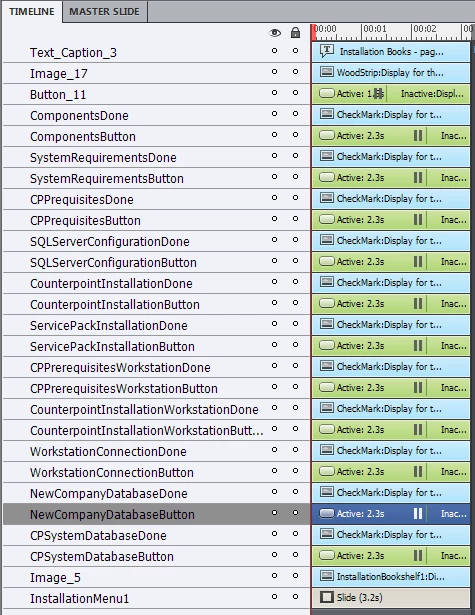
Does anyone have any ideas what I may be doing wrong? Do you need to see anything else to help diagnose the problem?

This topic has been closed for replies.

1 reply

Lilybiri
Legend
November 25, 2015

Screenshots of the conditional advanced action On Enter?

November 25, 2015

Thank you for the quick response!

Here's a screenshot of the Setup_MenuSlide advanced action. This is the advanced action executed by the main bookshelf slide, and is responsible for evaluating the condition of the "visited" variable to determine whether to show the corresponding checkbox object.

And here's a screenshot of the AssignVisited advanced action. This is the advanced action that executes after the slide associated with a book has been visited. It sets the "visited" variable for the book to 1. 

Lilybiri
Legend
November 25, 2015

I have some comments, tips:

  • Avoid using the same name for two different things, that can lead to issues. I prefer shorter names as well, but will always start with at least one character that defines the type of item, like 'v_one' is a variables, 's_one' is a slide, 'i_one' is an image. Even reusing an object name for an action or a decision in an action can cause problems.
  • I don't know exactly which event is triggering the 'AssignVisited' action. You have to be sure that the Slide label is the correct one, and gets stored in the variable. Why not use the navigation action on the menu slide to assign a value to a variable v_choice? That will be a simple standard advanced action with two statements, much easier than your complicated conditional action with as many decisions as you have books. If you insist on using the slide label, be sure to put first the 'Jump to' command before the 'Assign with' command.
  • Even easier: you can show an object from another slide. You certainly have a 'Return' button on each 'book' slide? Why not use that return button to show the appropriate checkmark? You will not even need any conditional action, not even one variable.
  • The only reason for which you'd need variable would be if you wanted something to happen when a shelf or the whole bookcase is finished. If you don't need that, try the work flow I described.

You see that I try to make it much more simple. If you had shared actions (not yet there in CP6) this would be very quickly done. Even with duplicating actions it will not take long, much less than all the time you put in creating those conditional actions.