
tpriddlenew
Known Participant
April 19, 2017
Question

Advanced action click and reveal - not displaying SCORM cloud

  • April 19, 2017
  • 1 reply
  • 594 views

Hi,

I have a click and reveal developed using Captivate 9. I have executed a simple advanced action to display a change of state on a text box and subsequently change the colour of the tab (button) to show the learner that content has been viewed.
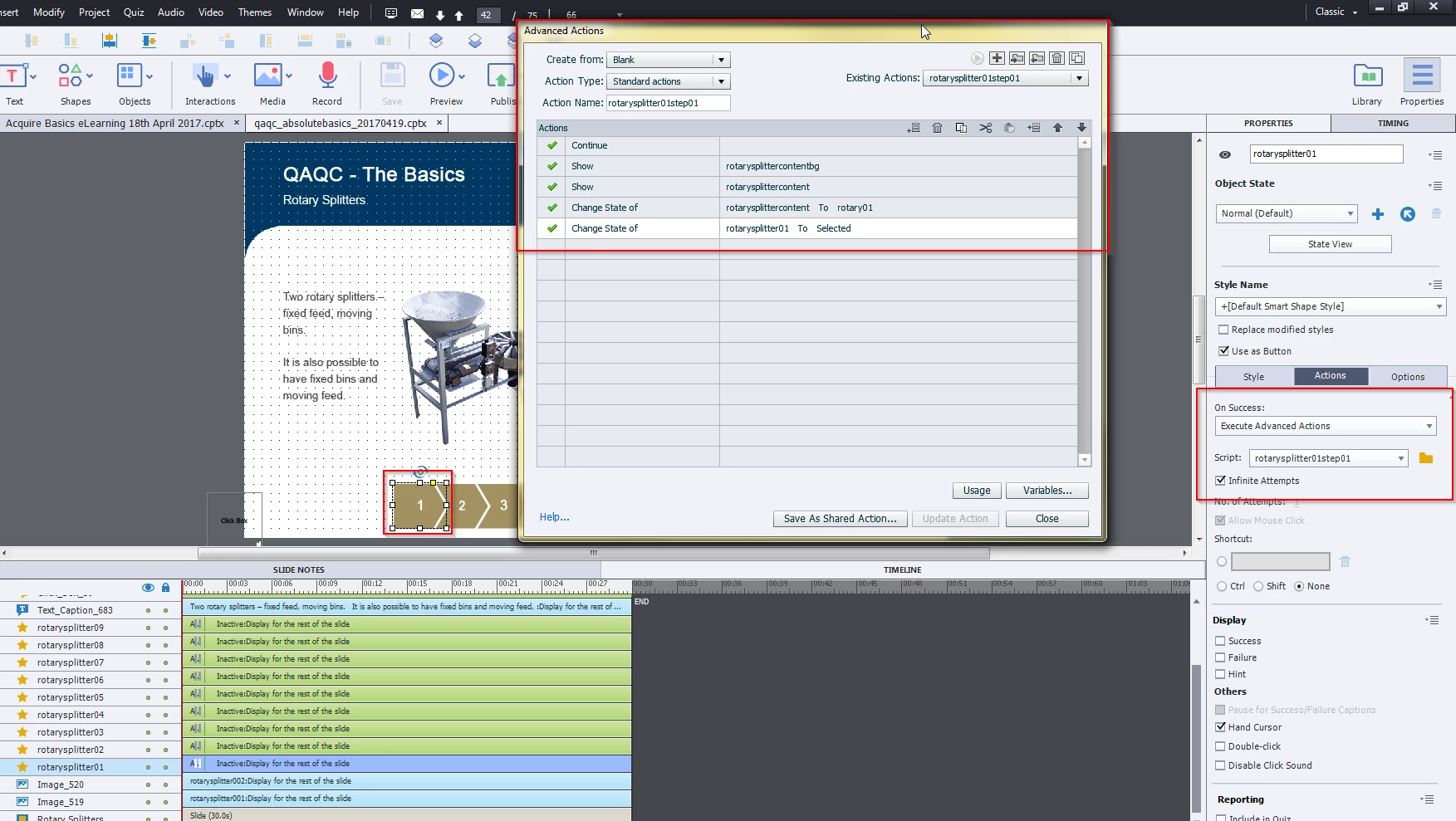
The screen is behaving correctly within preview, however when published and viewing in SCORM cloud I receive the following screen.
I have 2 screens with the same settings that are not working so any assistance would be greatly appreciated. There must be something I've missed! Anyone have any ideas?

This topic has been closed for replies.

1 reply

Lilybiri
Legend
April 19, 2017

Screenshots are very tiny.

Why do you have such a long slide duration when you are pausing the slide at 1,5secs by all those buttons? Do you have slide audio playing? Do you understand the meaning of pausing points? I wonder because I also see on the state a click box which is not visible in the timeline on your screenshot, when is it pausing and what is its functionality, Maybe read this blog post:

Pausing Captivate's Timeline - Captivate blog

The action starts with a Continue command: that means that you first release the playhead before the other commands. Why do you release the playhead? If all those buttons are meant to show something without leaving the slide, you should take out that Continue command, and you'll never need that click box because I suspect it is meant to pause the slide at a later time?

tpriddlenew
Known Participant
April 19, 2017

Thanks for the reply and useful blog link Lilybiri - I am still getting my head back into the behaviour of pause points, etc with Captivate!

Your suggestion may work, but I have also managed to get this working correctly by modifying the slide On Enter and On Exit which were both set to pause and changing these both to No Action. This may have been a legacy from copying the initial template into this project.

I was playing around with the length of the slide as I was troubleshooting. You are correct it does not need to be that long.

Can you clarify what the best practice setup would be for a click and reveal type screen like this?

As I understand it, I should:

- Remove the clickbox which was set to pause project until user clicked

- Change the advanced actions so it is simply

  1. Show content bg object
  2. Show content object
  3. Change state of content object
  4. Change state of button to selected
  5. Set button object pause state for 1.5 seconds

From a previous forum post I remember there is no option to add a close button to a state of an object?

Thanks again  

Lilybiri
Legend
April 19, 2017

Understanding the Timeline is to me the primary goal of any Captivate training, too few trainers however seem to agree. When I see the number of problems on this (and other) forum caused by not understanding the timeline, this confirms my opinion;:

Challenges for Starters - Captivate blog

You can also use groups: group bg + object, and you'll have only one Show command. Since you have several similar actions, I would also switch to shared instead of advanced actions.

You can use a hyperlink to close 'something', but not different hyperlinks to different states. Have a look at another blog post:

More is in a...hyperlink - Close button - Captivate blog