Known Participant
July 31, 2015
Answered

Advanced action doesn't work when I add a second decision block

  • July 31, 2015
  • 1 reply
  • 418 views

I'm trying to write an advanced action in Captivate 8. In answer to a question about points, the user will type a number in a text entry box. When they submit, the advanced action will evaluate the number. If it's 10, the program should jump to a slide that shows that 10 is the correct answer. (When I do just that in a single decision block, it works.)

However, the full advanced action needs to evaluate whether the entered value is higher or lower than 10, and then send the user back to the question slide and display an appropriate message. When I add that part in a second decision block, the advanced action performs as intended if an incorrect value is entered, but doesn't work if the correct value is entered. It just displays the question slide again.

Here's the code:
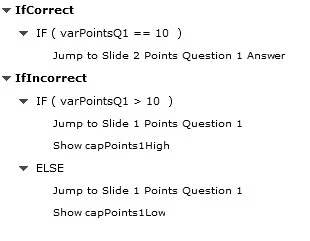
Any ideas about what I'm doing wrong? Should there be an ELSE statement in the first decision block? I tried using Continue there, but that didn't help.

-Stuart

    This topic has been closed for replies.
    Correct answer Lilybiri

    The logic of your advanced action is not correct. All decisions are always evaluated. What happens here is this:

    1. First decision checks if var is equal to 10; if that is the case, it will jump to Slide 2
    2. Second decision checks if var is greater than 10, if that is correct it will jump to Slide 1. I suppose the capPoints1High is ON slide 1?
    3. BUT here is the logical bug: if if is not greater than 10, which is also the case when it is equal to 10, it will jump to Slide 1, although it already jumped to slide 2 first with the first decisioin

    Two possible solutions:

    1. switch decision 1 and 2 (easiest one)
    2. delete the ELSE part of decision 2 and create a decision 3 to check if var is less than 10

    1 reply

    Lilybiri
    LilybiriCorrect answer
    Legend
    July 31, 2015

    The logic of your advanced action is not correct. All decisions are always evaluated. What happens here is this:

    1. First decision checks if var is equal to 10; if that is the case, it will jump to Slide 2
    2. Second decision checks if var is greater than 10, if that is correct it will jump to Slide 1. I suppose the capPoints1High is ON slide 1?
    3. BUT here is the logical bug: if if is not greater than 10, which is also the case when it is equal to 10, it will jump to Slide 1, although it already jumped to slide 2 first with the first decisioin

    Two possible solutions:

    1. switch decision 1 and 2 (easiest one)
    2. delete the ELSE part of decision 2 and create a decision 3 to check if var is less than 10
    EilmerAuthor
    Known Participant
    August 1, 2015

    Thanks for explaining that - I see the logical flaw now. I used your second suggested solution, and that solved the problem.

    -Stuart

    Lilybiri
    Legend
    August 1, 2015

    It is often the best way, avoiding the ELSE part. But in this typical case the first solution would have worked as well, with the move buttons for decisions it would have been a quick fix.