
isaac_s1
Known Participant
July 13, 2017
Question

Advanced Action Script (conditional) disappears

  • July 13, 2017
  • 2 replies
  • 450 views

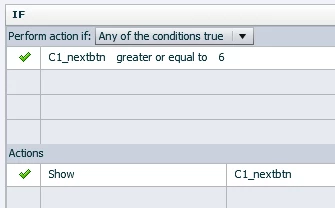
Created a swap page with a variable that counts to the same number of tabs on the screen attached to each button. In this example, once the variable hits 6, the next button is supposed to display. However, when I enter the action that tells the next button to show, the action is blank the next time I try to view it. Captivate also asks me if I want to save my changes when I close the window even though I've already updated the action manually before exiting it. Lots of funny business here.

Odder still, if I select another action that does display properly then switch to the offending action, the old action still displays, which leads me to believe that Captivate isn't deleting my scripts, it's simply encountering a bug that doesn't display them.

I have tested this multiple times, and it occurs every time with a show command in a conditional action. I've tried opening/closing it, rebooting my computer, using older versions and rewriting the actions from scratch. Heeeelllppppp
This topic has been closed for replies.

2 replies

Participant
August 27, 2017

I am having the same problem. Just started this morning. Scripts that I have written appear blank. If I rewrite and save it saves, but when I go to close the script it asks me to save again and says that the script already exists and to use another name. If I do both scripts appear blank when I reopen them???? Very Curious.

I have restarted, even have used two different machines and still getting the same blank scripts????? Very strange indeed!

isaac_s1
isaac_s1Author
Known Participant
August 28, 2017

I never found a solution, so I had to make do with standard actions. I tried using the same action in a completely blank project, and it gave me the same problems!

I suppose I'll just avoid using conditional actions until my company approves Captivate 10.

RodWard
Community Expert
Community Expert
August 28, 2017

Lilybiri pointed out the most likely cause of the issue as being the specific early version of Captivate 9 having some bugs in the handling of Conditional Actions.  Can you check whether your Cp 9 version is 9.0.2 or an earlier version?  If you're not on 9.0.2 then you should update immediately.

Lilybiri
Legend
July 13, 2017

Two ideas. Either you are still on 9.0.0 instead of 9.0.2.437 First version had issues with conditional actions in upgraded projects. Is project upgraded?

Second possibility: use of same name for two items, scripts, decisions...