
Participating Frequently
August 25, 2017
Question

Advanced Actions...CC and more

  • August 25, 2017
  • 1 reply
  • 386 views

So I have a standard action that starts audio and shows a couple pictures to the participant. It's working well. I just have the following questions that I can't figure out.

1. Can you make an advanced action inside of an advanced action. I.E. It opens a window and plays audio. I'd like to be able to have the client click that window and it open something else. I'm stuck.

2. Can you have smart shapes inside an advanced action. I'd like to put an arrow that points as the audio is reading inside that second pop up window. Hope that makes sense.

3. Finally, I can't figure out how to make CC work inside the Advanced action. I've seen the cpCmndCC but unsure how to use it. So currently my slide is paused and the advanced action is working. What I'm stuck on is where to put the CC for that advanced action. If I put it in the slide notes, I don't know how to make it work with the second audio.

Hope this makes sense and I'll probably hear I'm making it harder than it needs to be, which is typical for me.

Thanks in advance.

Sabrina

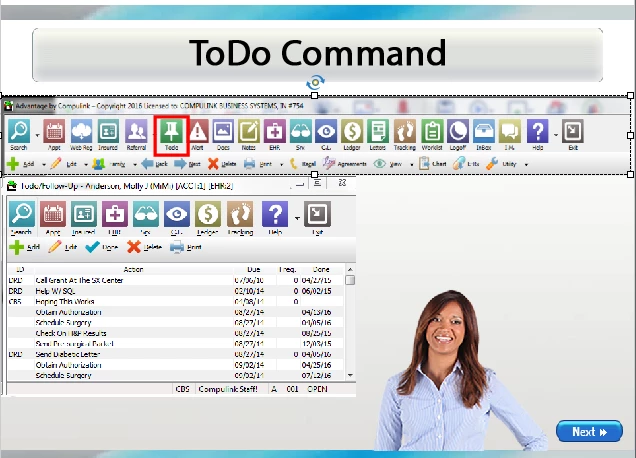
In this example the client clicks the ToDo icon and the smaller window opens and the audio plays.
This topic has been closed for replies.

1 reply

Lilybiri
Legend
August 25, 2017

Confusing your questions. Since you don't mention which version you are using, I suspect you are not on Captivate 2017 yet (where there is no longer a difference between standard and conditional actions).

Question 1: what do you mean by 'window' in 'it opens a window'? If you mean using the command Show to make an initially invisible object visible, why not add a button to it? Or use a hyperlink which can also trigger an advanced action. I don't understand why this is an 'advanced action in an advanced action'? Have a look at:

More is in a...hyperlink - Close button - Captivate blog

Question 2: You can show a hidden shape, and you can time it with the Delay next actions command, but since I don't know which version you are using.... not sure you have that command.

Question 3: the automatic CC feature can only be used with slide audio, not with object audio. You have to create custom text containers with the CC for that type of audio and show or hide it. The system variable cpCmndCC (be careful because all variables are case sensitive) is acting only on the built-in CC.

SLB1973Author
Participating Frequently
August 25, 2017

Sorry. I am on Captivate 2017. What I'm saying about a standard action is that I did not create a Conditional tab while you say there is no longer a difference, I thought there was a bit of a difference. One is marked conditional and has if, where, else statements. ??No? That's what I mean when I say standard. Perhaps my verbiage is wrong.

Question 2: I know how to delay items in the timeline, but when you are relying on the client to click a button for another action to happen, I'm not sure how you know how long to delay it.

Question 3: Thank you, that answered that part of the question. At least now I know I can't and will have to do custom CC.

Lilybiri
Legend
August 26, 2017

I don't think the term 'standard' action' is still  relevant as it was in previous versions because it doesn't appear anymore in the Advanced Actions dialog box at all. Each advanced action can have several sequences of commands that are always executed, once or in an eternal While loop, or sequences that are based on a condition (once or in a while loop) or possible combinations of all of those. Because you used that term 'standard action' I supposed you were not using that latest version. Look at the complete explanation of the Advanced Actions dialog box in 2017: Advanced Actions Dialog box in Captivate 2017 - Captivate blog

Question 1: you didn't answer my questions about the meaning of 'opening a window'? To me a window is another tab in the Browser that is displaying the course, but again I suspect wrong verbiage. I offered you two suggestions with a link to an article.

Question 2: you misunderstood, I am NOT talking about delaying items on the timeline but about using the command 'Delay Next actions by....' in an advanced action. It is very difficult to explain in detail solutions if there is confusion about the used terminology. You don't 'have a shape in an action'....you can show/hide them with a command in an advanced action, or in case of an interactive object, you can enable/disable that object. Please, try to explain your question more in detail, maybe post some screenshots.

Hope you don't mind but it often happens with 'newbies' that they try to use advanced features before understanding the basic core features of Captivate (not the same as terminology).  This is an article, based on my experiences as moderator of this forum, as consultant and trainer for Captivate:

Challenges for Starters - Captivate blog

You know the metaphor: if you want to run a marathon, you first have to train with shorter distances to build up the physical and mental skills necessary for that big marathon (and you need to buy proper equipment).