
Participating Frequently
August 20, 2019
Question

Advanced Actions - click and appear

  • August 20, 2019
  • 2 replies
  • 300 views

I am new with advanced actions and can't find what I am looking for....

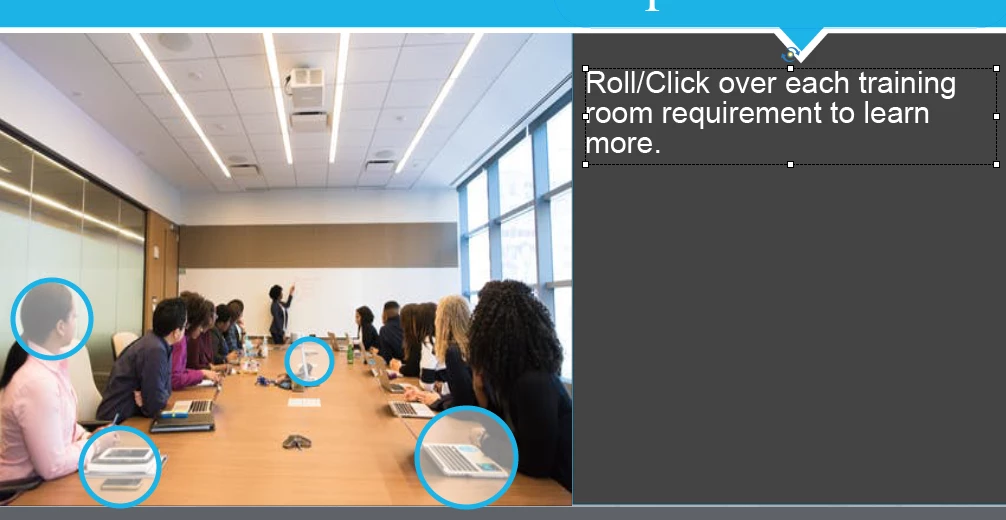
I am on Captivate 9.  I want the user to be able to click on the blue circles below and have a caption(words) popup and explain the item, then change color (to show they have already read that caption).  Then have the user click on another circle and have that caption/words popup.  Is this an advanced action item or is there an easier way.  I am not quite understanding advanced actions, after the research I have done.

I can't use a button, b/c it's square.  I thought about a click box, but then the color of the circle won't change.

Thank you!!!!

Angela
This topic has been closed for replies.

2 replies

Lilybiri
Legend
August 21, 2019

I would recommend a shared action. But since I do not have CP9 anymore, need some information from you/

  • Do you have the 'Delay Next Actions....' command in Advanced Actions?
  • I know you have multistate objects, but cannot remember if you have the InBuilt state available?
  • Do you want the popup text to remain on screen or to disappear when another circle button is clicked?

The idea is:

  1. To create a shape button with the circular shape and add the Visted state (if available) or a custom state which has the color to change to.
  2. To create a text container with a text state for each of the shape buttons, Normal state is invisible (ALpha and Stroke = 0)
  3. Create a shared action that will depend on the answers to my previous questions. You will show the popup by changing the state, delay the next actions, and then change state of the circle button (and eventually change back to Normal for the Text).

There are several alternatives, but need the info I asked for.

Participating Frequently
August 21, 2019

Lilybiri,

To answer your questions:

  • Do you have the 'Delay Next Actions....' command in Advanced Actions?
    • I do not see it
  • I know you have multistate objects, but cannot remember if you have the InBuilt state available?
    • I do not see this either
  • Do you want the popup text to remain on screen or to disappear when another circle button is clicked?
    • Disappear when the next circle is clicked.

The below isn't right, but I was able to copy and paste it.  I am NEW with advanced actions.

LuisXIV
Participating Frequently
August 21, 2019

Hello Angela,

1) The circle are smartshape.

2) the circle is going to change color.

3) After a few second the smartshape with the the text is hidden or when you click on a new circle the text is hidden.

Luis