Inspiring
July 15, 2011
Answered

Advanced Actions for branching slides

  • July 15, 2011
  • 2 replies
  • 965 views

Hello everyone,

I have spent hours on this, viewed all Lieve and Adobe's materials and all I have accomplished is a headache and about 50 actions and variables in the trash can. Any help would be appreciated...greatly!

I am using CP 5.5 on a PC.

Situation:

I have a training scenario where the learner comes into an entry slide (slide 1 for simplicity). On this slide there are four photos of managers to speak with. A clickbox over each photo sends you to a new slide. (ie: manager 1 (M1) sends you to slide 2 (S2), M2=S3, etc.). Once you viewed the info from the manager you click a back button and are sent back to slide one so you can visit all four managers. Once complete, the learner selects a continue button and jumps to slide 6 to continue the scenario.

Goal:

1. When the learner selects a manager and goes to the manager's page, on their return to the entry slide, I would like to see a green check mark by their photo.

2. I would like the "continue" button hidden until all four manager pages have been reviewed.

Sounds simple? So I thought.

One last question:

You can attach advanced actions to a slide and a clickbox. Which takes precedence? Should one be used over the other.

I always find great info on this forum, so thanks in advance for your thoughts.

Keep Smiling!

Mike
This topic has been closed for replies.
Correct answer RodWard

Funny you should post this question because this is EXACTLY what I had to do for a client of mine a month or so back, except that in his case it was 6 different roles involved in a business process.

I had a photo of each role on the main slide with an Event Hander widget attached to each, but a click box would have done the job just as well.  Clicking the photo executed an Advanced Action to jump to the slide that told you all about how that role participated in the business process.

I created a separate variable for each role called [RoleName]Done with default value of 0, and an Advanced Action for each role called Set[RoleName]Done.  Then I set the OnExit action of each role info slide to execute this action.

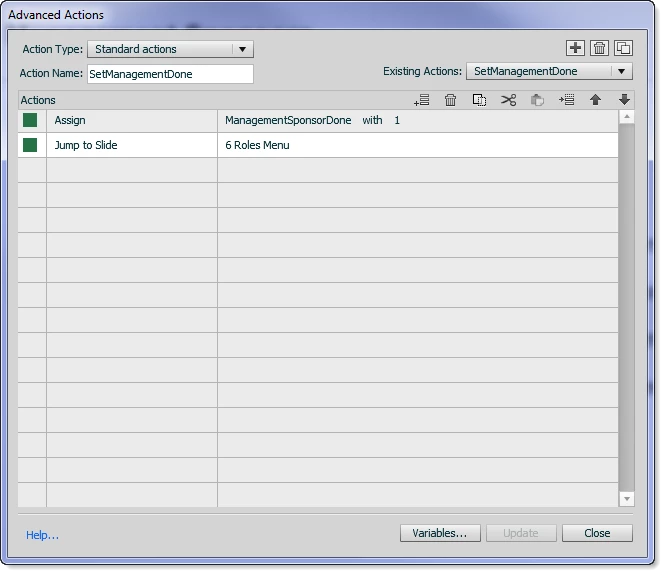
Here's what a typical action looked like:

As you can see, when the learner is exiting the role information slide, and it executes this action, it sets the ManagementSponsorDone variable to 1 and then jumps back to the Roles Menu slide (the slide with all the role photos).

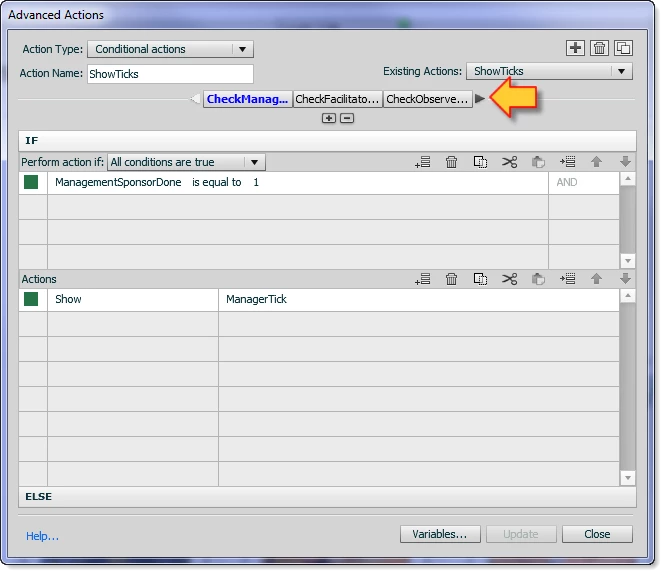
When the user arriives back at the menu slide it runs a Conditional Advanced Action OnSlideEnter called ShowTicks that looks at the value of each role's variable to see whether or not it has been set to 1 and if so, unhides the tick sitting over that role's photo.

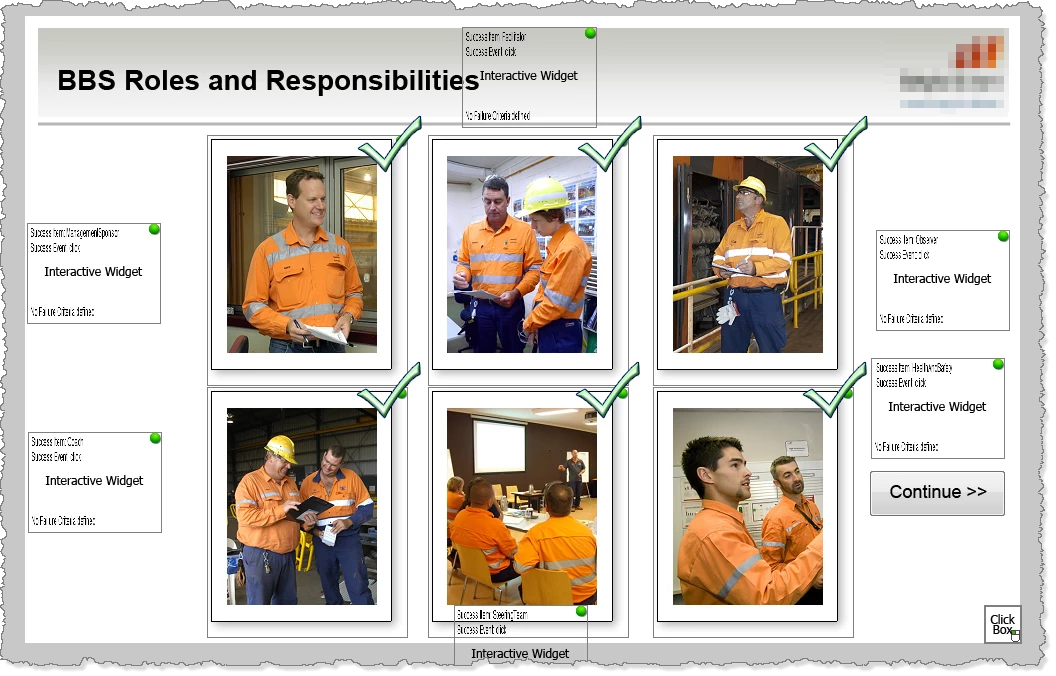
Here's what the menu slide looks like. Each tick has an Item Name that indicates which role it applies to (ManagerTick, etc):

And here's what the ShowTicks conditional action looks like:

Note the arrow here that shows how the conditional action is made up of one condition for each role.

Is this the sort of thing you were looking for?

2 replies

Lilybiri
Legend
July 15, 2011

Hi Mike,

Rod answered your principal question. I pop in to answer your question about 'priority'.


You can attach an advanced action On Enter for a slide: that will be executed really before everything else. If you attach an advanced action On Exit for a slide it will be executed on leaving the slide, but only if the slide has been viewed up to the last frame. If you attach an advanced action to an interactive object that will be executed for the action On Success, when the user has 'success': for a Click box, when he clicks on it, same for button, for TEB when he entered something and (if it has to be validated) it is correct. Similar for On Failure. And it will be at the pausing point. I do not see a usecase where both an action attached to a slide or one attached to an object could happen at the same moment, so do not see any possible conflict. I have been creating a lot of advanced actions, really

As for your use case, described it more than once on my blog and in articles.

Lilybiri

Inspiring
July 16, 2011

Hello Lieve,

Longtime follower of your blog. I read the quiz blog with similar attributes to the scenario I described, but was unable to properly apply it. I appreciate your contributions to this field and your answer to the priority question. As always, your advice is greatly appreciated.

Thank you,

Mike

Lilybiri
Legend
July 17, 2011

Thanks Mike,

You know that I'm always prepared to help you with advanced actions issues, it could help me to explain better on my blog.

Lieve

RodWard
Community Expert
RodWardCommunity ExpertCorrect answer
Community Expert
July 15, 2011

Funny you should post this question because this is EXACTLY what I had to do for a client of mine a month or so back, except that in his case it was 6 different roles involved in a business process.

I had a photo of each role on the main slide with an Event Hander widget attached to each, but a click box would have done the job just as well.  Clicking the photo executed an Advanced Action to jump to the slide that told you all about how that role participated in the business process.

I created a separate variable for each role called [RoleName]Done with default value of 0, and an Advanced Action for each role called Set[RoleName]Done.  Then I set the OnExit action of each role info slide to execute this action.

Here's what a typical action looked like:

As you can see, when the learner is exiting the role information slide, and it executes this action, it sets the ManagementSponsorDone variable to 1 and then jumps back to the Roles Menu slide (the slide with all the role photos).

When the user arriives back at the menu slide it runs a Conditional Advanced Action OnSlideEnter called ShowTicks that looks at the value of each role's variable to see whether or not it has been set to 1 and if so, unhides the tick sitting over that role's photo.

Here's what the menu slide looks like. Each tick has an Item Name that indicates which role it applies to (ManagerTick, etc):

And here's what the ShowTicks conditional action looks like:

Note the arrow here that shows how the conditional action is made up of one condition for each role.

Is this the sort of thing you were looking for?

Inspiring
July 16, 2011

Hello Rod,

Thank you so much for the information and especially how you provided the screenshots. This worked on the first try. I went and purchased the Event Handler you mentioned and found it to be a 'must have' in my development toolbox. I found my mistakes in the previous attempts. Sometimes we try and make things too complex when the KISS principle rules the day. Thanks again!

~Mike