
Known Participant
August 27, 2015
Answered

Advanced Actions issue when converting a Captivate 8 project to Captivate 9.

  • August 27, 2015
  • 2 replies
  • 703 views

It seems that there is a problem keeping the Advanced Actions when you save a CP8 project to the new CP9.

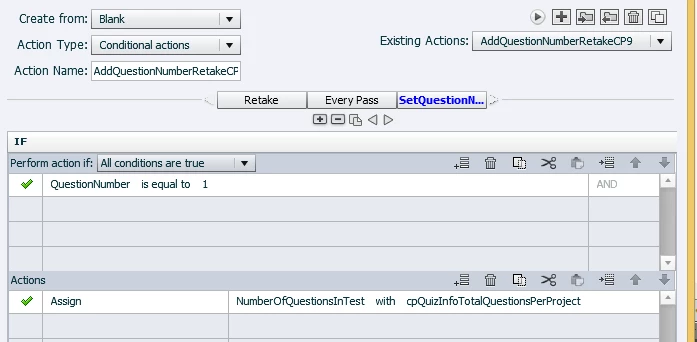
The first 3 screenshots are from the same orginal script (Retake, Every pass, SetQuestionNumber)

Don’t be distracted of the ”CP9” differentiation in the Action Name label. The content are still identical with the Action Name “AddQuestionNumberRetake” ind the orginal project)

Retake:

Every Pass:
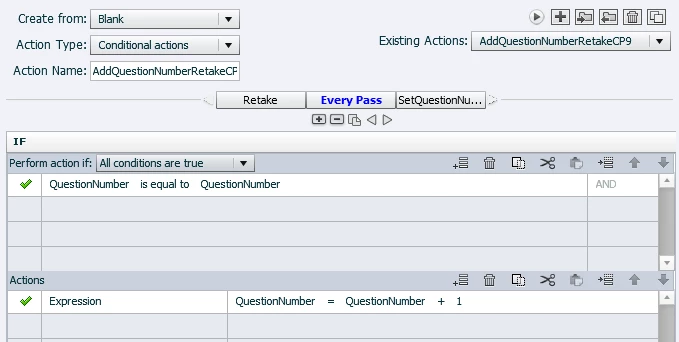
SetQuestionNumber:

And finally how the Action Type transformed to a Standard actions…. in CP9:
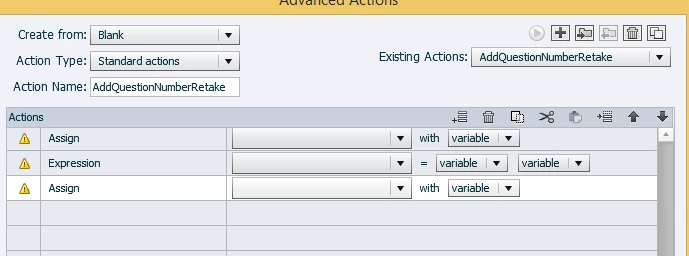
For your information: None of the existing variables are gone in the Captivate 9 conversion.

I have to rebuild my Advanced Actions and visit every single quiz slide (got about 1400 of them) to correct this issue. Or is there maybe an easier way to fix it?

This topic has been closed for replies.
Correct answer Lilybiri

This is a major bug that has already be posted on this forum as well. We hope for a quick fix.

Workaround: when you open the conditional action in the Advanced Actions dialog box in CP9 for the first time, be sure to edit something and use the Update button. In that case the conditional action will be preserved.

BTW: it is not converted to a standard action but to a shared action.

2 replies

Known Participant
August 28, 2015

This bug has been driving me nuts.   I can't use Captivate 9 until the problem is resolved.  I have lots of conditional actions in my files, and I can't spend the hours fixing the broken AA.  Do I have to open every conditional action, edit and update the conditional action in my project?   I have many, or do I have to just perform this change on one conditional action?

Thanks,

Lilybiri
Legend
August 28, 2015

Totally understand, I'm very frustrated as well. What is strange, shared conditional actions are not "bitten" by this bug, they continue to work OK after upgrading a project. I'm more than happy that I replaced advanced by shared actions whenever possible. You have to update every normal conditional action. Crossing my fingers that the patch will be posted quickly.

Known Participant
August 28, 2015

I'm coming across another issue with Captivate 9.  I import SVG images into the library, and I see a message "1 items successfully imported", but the name of the image does not appear in the Library.  I have used the button at the top, Media>SVG and the image appears on the slide, but the name does not appear in the Library.  When I use the import icon located in the library, the explorer directory opens, I select the SVG image and click open.  Once again, a pop up window appears,  "1 item has been successfully imported", but the name of the image does not show up in the library. 

Lilybiri
LilybiriCorrect answer
Legend
August 27, 2015

This is a major bug that has already be posted on this forum as well. We hope for a quick fix.

Workaround: when you open the conditional action in the Advanced Actions dialog box in CP9 for the first time, be sure to edit something and use the Update button. In that case the conditional action will be preserved.

BTW: it is not converted to a standard action but to a shared action.