SandyTucker
Known Participant
October 3, 2011
Answered

Advanced actions not recognizing total quiz points

  • October 3, 2011
  • 2 replies
  • 1105 views

Hello - I have an advanced action set on the quiz results slide. The advanced action says that if QuizInfoTotalQuizPoints is greater than or equal to 91 (literal), then a pass flash animnation file plays, else a fail animation flash file plays. 

The "fail" message at the bottom of the results slide is correct, but the "pass" flash animation is playing even if the points are less than 91. Anyone know why the advanced actions isn't recognizing total quiz points? Strangly enough I thought I had tested this awhile back and it was working, but it isn't working now.

Thanks!

This topic has been closed for replies.
Correct answer RodWard

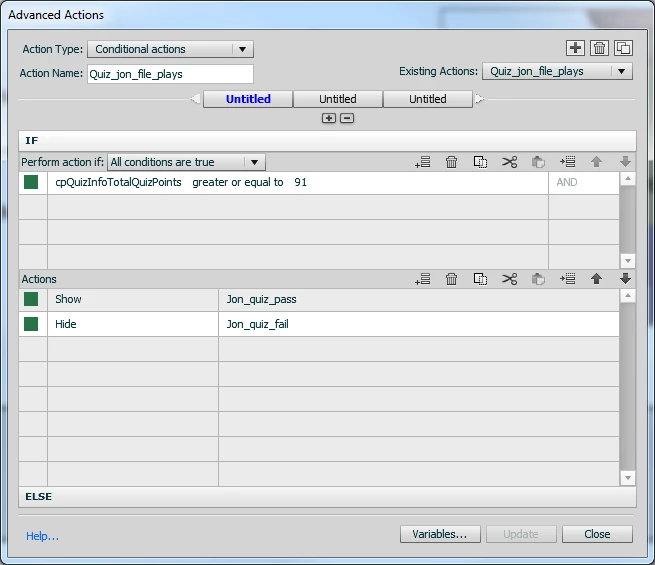
sorry, let me get some more detail here.  The results slide is set up to execute advanced actions on enter. Here is the advanced action conditional action below. This is just a system variable which I thought was the total score achieved. The "else" statement is just the opposite of the success actions (if greater or equal to 91).
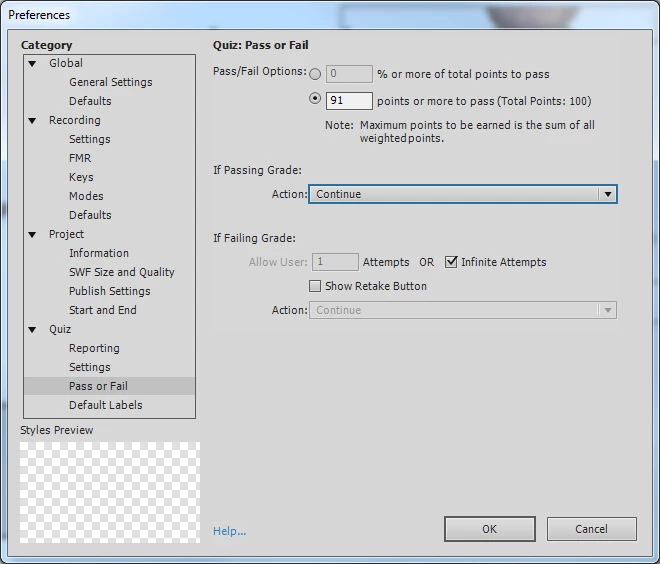
Here is how the quiz preferences pass/fail area is set-up:
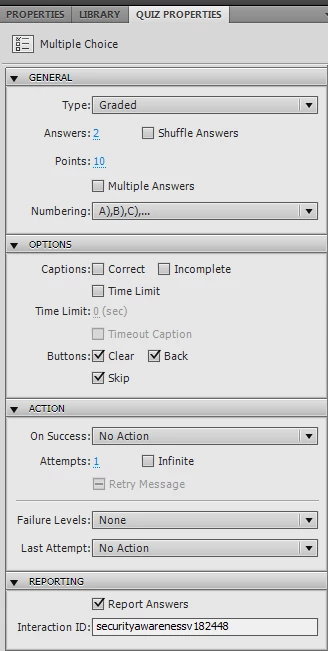
Here is the first question slide. They are all set-up the same way except all the other 10 questions only have 9 points assigned to them.
I hope this clarifies things a bit? thank you!


Your issue may be with the variable that you've chosen to use in your condition.  This often happens because the Description fields on the Captivate system variables are woefully inadequate sometimes in telling you exactly what the variable does.  They should be a lot more helpful and unambiguous, but software developers tend to think "everybody knows that..." and they hate writing anything but code, so they are notorious for leaving out detail.

My suspicion is that cpQuizInfoTotalQuizPoints is NOT the total number of quiz points scored by the learner.  It's the total number of points available to be scored in the quiz (i.e. in all quiz question slides).  Note also the variable cpQuizInfoTotalProjectPoints, which is the total number of points that could be scored across all interactions in the project, including interactive objects on non-quiz slides.

The variable cpQuizInfoPointsscored is the one that would tell you the number of points the learner actually scored.  But going with this variable would mean you'd have to keep updating your Advanced Action condition every time the number of points in your lesson changed. I would be far easier to just use cpQuizInfoPassFail and check for a 0 or 1 to see whether or not the user failed (0) or passed (1) the lesson.

Try changing the variable in your condition and then see if things improve.

2 replies

SandyTucker
Known Participant
October 4, 2011

@ Rod and Lilybiri - thank you both for your extremely helpful info - I really don't know how effective I would be using Captivate without the two of you.

To answer some of the specifics - I am on CP5.0.  I have been testing Rod's solution and so far it seems to be working fine. I'm still genuinely puzzled by exactly what some of those other variable fields do. If cpQuizInfoTotalQuizPoints really simply equals the total number of quiz points available, then setting a condition that said to play a specific flash file if cpQuizInfoTotalQuizPoints was equal or greater than 91 (of possible 100) should always play. But that isn't what happened - it all seemed to be determined by how I answered the very first question, which had more points assigned that the others. I hope you CP power users will have some influence on Adobe - it is quite frustrating not to have anywhere to go to research what these fields really mean/do. Their documentation - a chart of system variables posted in May 2009, defines this field as "Final Quiz Score". So would one conclude that it is simply buggy then?

I originally had used cpQuizInfoPointsscored - and it seemed to work fine (with same if/then conditional statement in advanced actions). The problem I ended up encountering was that since the course was unchecked on "never send resume data" and the course was bookmarked - if you were in the middle of the quiz and left the session then came back, the bookmarking worked but the advanced actions didn't retain the previously answered question points and played the wrong animation. FYI, I also tried the cpQuizInfoTotalProjectPoints and it seemed to have the exact same effect as when I used the cpQuizInfoTotalQuizPoints.

In any case, what seems to be working is as Rod suggested - cpQuizInfoPassFail.

Thanks again!!!

Lilybiri
Legend
October 4, 2011

Sandy,

Did you have a look at the lists published by cpguru and pipwerks? They try to explain the significance of all the variables. In your use case the system variable cpQuizInfoLastSlidePointScored could have been used for that first question to check if they had passed that one, as an alternative to your calculation of the 91 points.

Lilybiri

SandyTucker
Known Participant
October 3, 2011

More info for anyone who may be able to tell me what is going on. I have 11 questions. The first question is assigned more points (10) while the remaining 10 questions only get 9 points. Because the first question has to be correct, in order to "pass" they have to get a score of 91 or better (so allowing them to get just 1 wrong as long as they answer the first question correctly, but not passing if they answer the first question wrong and all the rest of the questions right).  What I am finding is, the advanced actions work OK, if I get the first question wrong and then all the rest of the questions right (advanced action plays the "fail" animation as it should), but so long as I answer the first question right, I can answer all the rest of the questions wrong and it still plays the "pass" animation. Does anyone have any ideas why the advanced actions only seems to be looking at how the first question is answered? The quiz results statistics are always correct as well as the corresponding text message, so I am baffled as to why the advanced actions are only considering how the first question is answered when determining which flash animation to play.

RodWard
Community Expert
Community Expert
October 3, 2011

You mention that you have this Advanced Action set on the Quiz Results slide but you don't mention how you've set it up.  Does it run OnSlideEnter or did you set it up in Quiz Settings > Pass Fail as the OnFail action?

You'll need to tell us more about exactly what this Advanced Action does?  Did you set up your own custom variables or is it looking at the system variables that track quizzing?

SandyTucker
Known Participant
October 4, 2011

sorry, let me get some more detail here.  The results slide is set up to execute advanced actions on enter. Here is the advanced action conditional action below. This is just a system variable which I thought was the total score achieved. The "else" statement is just the opposite of the success actions (if greater or equal to 91).

Here is how the quiz preferences pass/fail area is set-up:

Here is the first question slide. They are all set-up the same way except all the other 10 questions only have 9 points assigned to them.

I hope this clarifies things a bit? thank you!