
Participant
November 22, 2017
Answered

Advanced actions not working

  • November 22, 2017
  • 1 reply
  • 693 views

I have a slide where a user picks one of three menu options and depending on the option they choose it should play a sound, increase a variable (fluid) by a certain amount then progress to the next slide where they can select further options. I have set up my variable and my advanced actions (associated to clickboxes placed over text captions) but when I preview the clickboxes do nothing and the project just goes to the next slide. I have a screenshot of my advanced action below (it is conditional as this is what I have seen copied from this forum, not because I believe it should be necessarily) which may help put this into context:
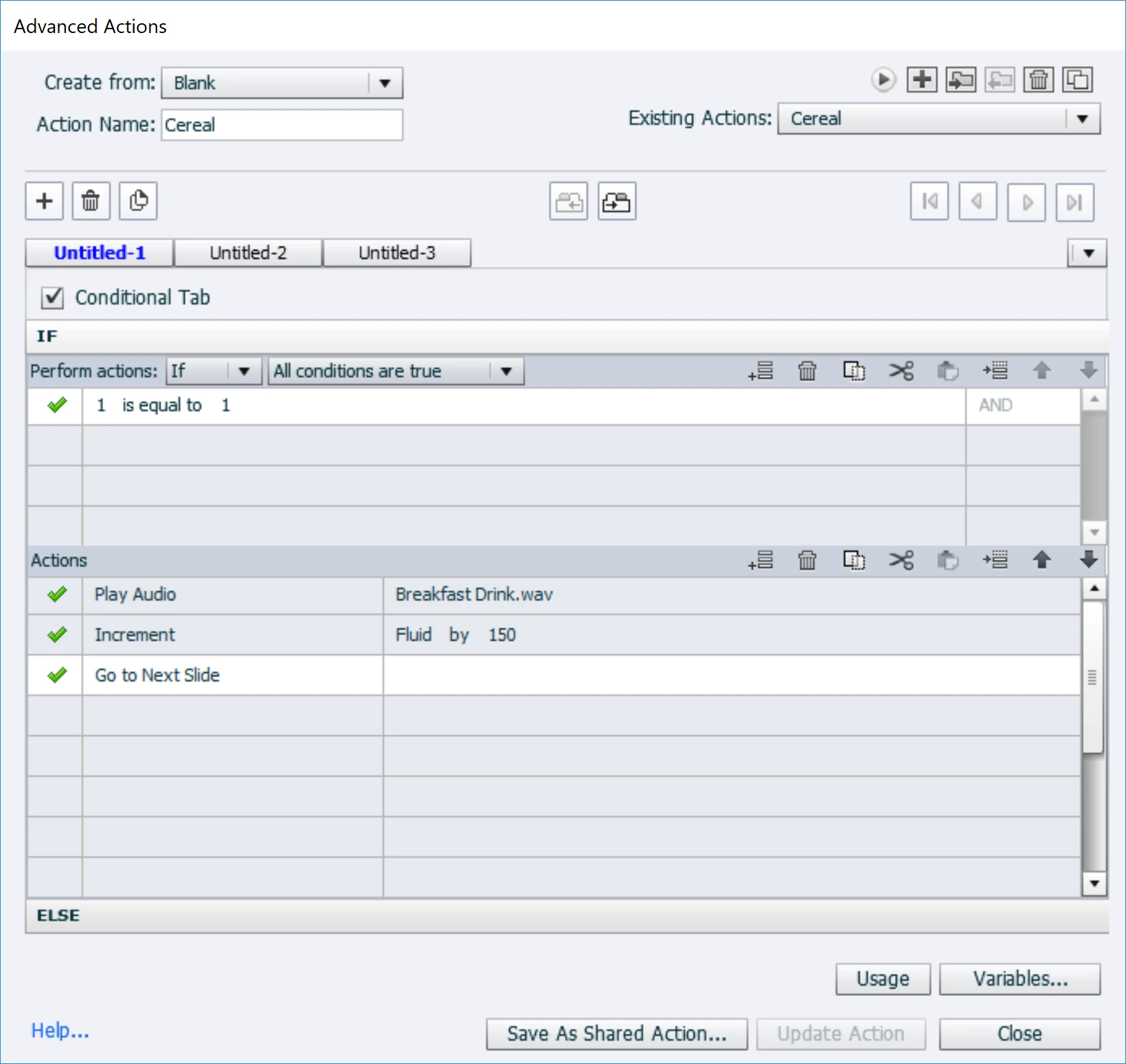
I tried this in a separate project and bizarrely the first slide did nothing but the second slide worked so I have recreated it in this project and am still experiencing the same issues.

Thanks in advance!

This topic has been closed for replies.
Correct answer Lilybiri

It has no sense whatsoever to use a conditional action in this case, you just have a standard action. Uncheck the checkbox 'Conditional'.

With that action it is normal that the learner goes to the next slide, since it is your last command. Did you check the value of thatt variable? You can do so by inserting it in a tet container that you display for the rest of the project, always on top.

That variable will be incremented by the correct amount. If you want to hear the audio, you'll have to delay toe command to go to the nest slide with the Delay Next Actions command.

If you tell what you really want to happen, maybe  I could offer a solution.


BTW: why do you use a clicb box over a text instead of using a shape button in which you insert that text?

1 reply

Lilybiri
LilybiriCorrect answer
Legend
November 22, 2017

It has no sense whatsoever to use a conditional action in this case, you just have a standard action. Uncheck the checkbox 'Conditional'.

With that action it is normal that the learner goes to the next slide, since it is your last command. Did you check the value of thatt variable? You can do so by inserting it in a tet container that you display for the rest of the project, always on top.

That variable will be incremented by the correct amount. If you want to hear the audio, you'll have to delay toe command to go to the nest slide with the Delay Next Actions command.

If you tell what you really want to happen, maybe  I could offer a solution.


BTW: why do you use a clicb box over a text instead of using a shape button in which you insert that text?

Participant
November 23, 2017

Thank you so much! The delay action worked perfectly! I had not thought of that as I have only just started using advanced actions so had not appreciated that the next action would not wait for the previous action to complete before starting. I have also changed the clickbox to a button and it now has a wonderful outline when you hover over the text. Thanks again!

Lilybiri
Legend
November 23, 2017

Fine! Thanks for reporting back.