January 10, 2014
Question

Advanced Actions? (Text Entry and Questions)

  • January 10, 2014
  • 1 reply
  • 529 views

I am a work-study at my local community college.  One of my current projects is building a "learning" module with Adobe Captivate 6, and exporting it as SWF/HTML.

The advisors found the module on a career website and were given permission to use the content in the module.  The original can be found here: SMART Goals.

Basically, I changed some layout and visuals, but the content is mostly the same.  But I need the module to act the same way, which is where I'm running into problems.  I've been watching Lynda.com videos and searching high and low.  I haven't been able to find clear answers, or ones that obviously apply to my issues.  I do realize that this may be due to the fact that I'm not sure exactly how to phrase the things I'm trying to accomplish.

Hopefully these images along with the explanations will help.  Currently, my project is only set up to advance to the next slide.  And here is what I am hoping to accomplish:
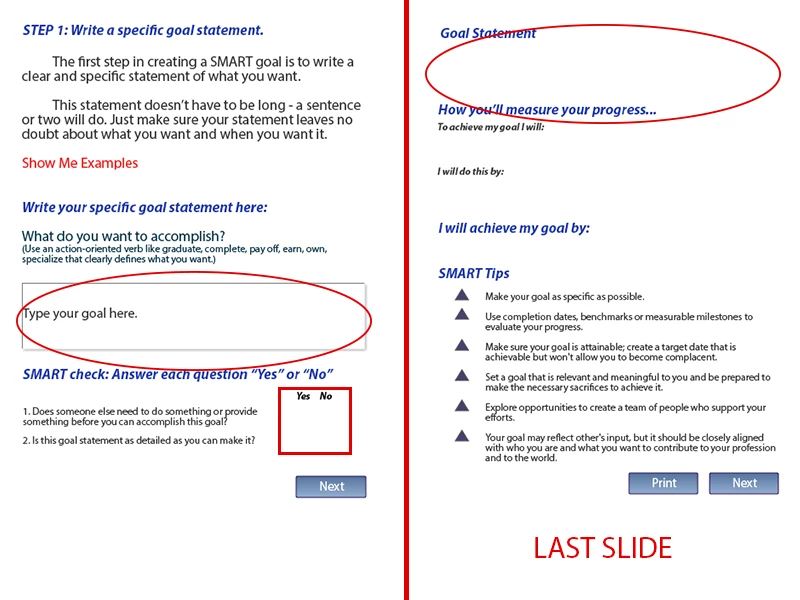
One of the internal module slides is on the left, the last slide is on the right.  In the module I have about 3-4 slides like the one on the left.

1.  Text entry boxes (circled in red above) need to be filled out by the user throughout the module.  What they enter then needs to show up on the last slide under the appropriate headline (circled in red on last slide).

2.  The yes or no questions need radio buttons (red square box on left slide).

3.  If they answer "no" to any questions, I need to have a box pop up before they can proceed, which has a short blurb on "YES vs. NO."  They don't have to go back and change their answer, the box just needs to appear before they can continue.

That is about it.  This isn't a quiz, so I don't need any of the yes or no answers tracked or recorded.

Thank you all for your time and support.  If you need any other screen shots or information please let me know.  I will be monitoring this post frequently.

THANKS!

This topic has been closed for replies.

1 reply

Lilybiri
Legend
January 10, 2014

You need some advanced actions and widgets.

I love lynda.com but not their Captivate courses. Too basic, no good practice IMO.

TEB: this is easy, because each TEB has an associated variable. It is even created automatically and has the same name as the TEB (which I don't like, will always create my own variable). To show it on a later slide, you have to insert that variable in a text container (either a caption or a shape used as text container). From the screenshot I see that you expect long entries, don't forget to make the TEB big enough and to activate the 'Show Scrollbar' option in the Options accordion of the TEB. To display a very long text in the text container: variable length is by default only 50, but you can increase it. Another possiblity to display the variable is in a Scrolling Text interaction (if you are on CP7) or TextArea widget.

http://blog.lilybiri.com/curious-about-variables-in-captivate-4-5    although old, can help you to understand variables

http://blog.lilybiri.com/widgets-and-custom-questions-part-2    where I talk about the TextArea widget (Scrolling Text is similar but guaranteed for HTML output).

For Yes/No  : you can use a radiobuttons widget or interaction   http://blog.lilybiri.com/widgets-and-custom-questions-part-1

Your last question requires an advanced action. That will be tough. You need to make that 'popup' using a text caption or a shape or whatever you want. Make it invisible by unchecking 'Visible in output'. And then you need a trigger for the advanced action (depends on how you make those Yes/No questions). With that action you'll show the popup and play your audio clip.

Lilybiri

January 10, 2014

Thank you so much Lilybiri!  I agree with you about the Lynda videos.  "Up and Running" and the "Essentials" were basically the same, which was unfortunate.

They are closing up the office here shortly, but I will be sure to update you on Monday with my progress.

From what I've read and looked at so far, this looks like it will meet the mark!!

thanks again.

Lilybiri
Legend
January 10, 2014

Have quite a lot of tutorials on my blog, if you have time, feel free to explore them. Most have focus on advanced actions (my specialty).