
lisl_cammileg14411995
Participant
September 5, 2018
Answered

Advanced Answer Not Available

  • September 5, 2018
  • 3 replies
  • 607 views

Hi,

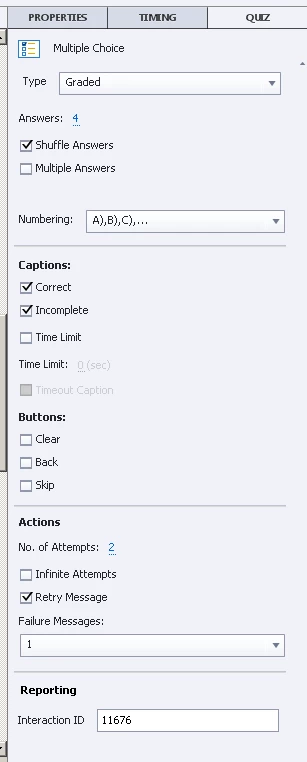
I'm using Captivate 2017 and would like to try Advanced Answer, however, it is not showing for MCQ with Single Answer.

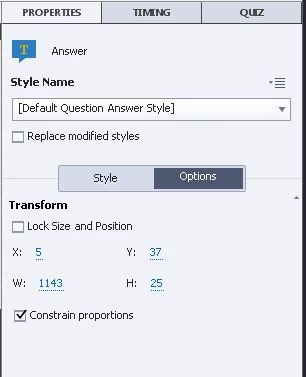
This is the only option showing when I select any of the answers whether it is correct or incorrect.
Thanks in advance!

    This topic has been closed for replies.
    Correct answer Paul Wilson CTDP

    The key is that you need to select your answer or one of your distractors before going to the Properties/Options area. Here is a video I created on this. I hope it helps you. Adobe Captivate - Different Feedback for Each Answer - YouTube

    3 replies

    Lilybiri
    Legend
    September 5, 2018

    I always create a Quizzing workspace where I have both Quiz Properties and Properties panel open (one in the left, one in the right docking station). That is not only useful for the Advanced Answer feature, but also for MCQ with multiple correct answers, where you want to use the partial scoring (and individual penalty). This means that you have to leave the Newbie UI and switch to the Expert UI by activating the 4th option under Preferences, General Settings "Enable Custom workspaces…..'.    

    Most features are identical for Knowledge Check slides and for Quiz slides. Have a look at a detailed comparison in:   http://blog.lilybiri.com/knowledge-check-slides-tips

    Paul Wilson CTDP
    Community Expert
    Community Expert
    September 5, 2018

    And here is the Fluid Box version I mentioned in the previous video. Adobe Captivate - Advanced Answer Option Using Fluid Boxes - YouTube

    Paul Wilson, CTDP
    Paul Wilson CTDP
    Community Expert
    Paul Wilson CTDPCommunity ExpertCorrect answer
    Community Expert
    September 5, 2018

    The key is that you need to select your answer or one of your distractors before going to the Properties/Options area. Here is a video I created on this. I hope it helps you. Adobe Captivate - Different Feedback for Each Answer - YouTube

    Paul Wilson, CTDP
    lisl_cammileg14411995
    Participant
    September 5, 2018

    Hi Paul,

    I watched your video earlier today and that's why I wanted to try the Advanced action. I think I got it figured out now, the advanced answer is only available for knowledge check slides which I overlook.

    Btw, great videos! I've learned a lot from your videos.

    Thank you!

    Paul Wilson CTDP
    Community Expert
    Community Expert
    September 5, 2018

    You can use it on final quiz questions as well. You just need to select the answer you're working with first and it can only be for single answer questions. Multiple Choice where you can select more than one answer isn't compatible with an advanced answer either.

    Paul Wilson, CTDP