



BrianNiemiec
Participating Frequently
April 22, 2021
Question

Advanced Answer Option feedback

  • April 22, 2021
  • 2 replies
  • 438 views

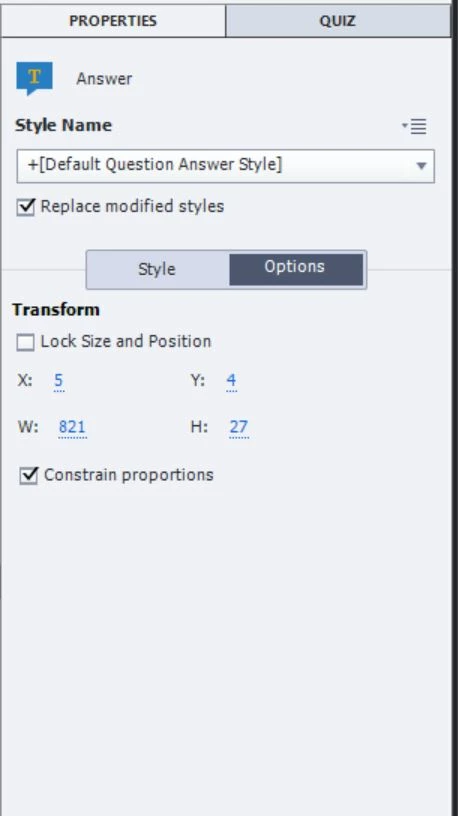
I've seen multiple videos online for an Advanced Answer option on the Properties/Answer/Options panel but I do not see this checkbox in Captivate 11 or 11.5 (CP2019). Has it been removed? (Screenshot shows an answer in a multiple choice question).

Thanks everyone.
This topic has been closed for replies.

2 replies

Lilybiri
Legend
April 22, 2021

You probably are on a MCQ with multiple correct answers.

BrianNiemiec
Participating Frequently
April 22, 2021

On Rod's advice, I changed it to multiple answer and I'm still not seeing the option.

Lilybiri
Legend
April 22, 2021

Rod did NOT advice to choose multiple correct answers The option Advanced Answer only exists for Multiple Choice Questions with ONE correct answer. Sorry, I didn't see Rod's answer before writing my question. I edited your question as well, because we are currently on version 11.5, still far away fro version 19.

Please check your exact version number under Help, About Captivate. If you are on Windows it should end on 553, for Mac it will be a higher number.

RodWard
Community Expert
Community Expert
April 22, 2021

The Advanced Answer option is only available for Multiple Choice quiz questions, not Multiple Answer quiz questions.  Deselect the option that changes the question type from radio button (multi-choice) to checkboxes (multi-answer).  Then select one of the answers.  The option will be available.

The Advanced Answer option only appears on the Properties tab when the question type is Multiple Choice in the Quiz tab.

BrianNiemiec
Participating Frequently
April 22, 2021

Thanks for your quick response, Ward. However, I'm still not seeing it.