


September 18, 2020
Question

Advanced Slide Options

  • September 18, 2020
  • 1 reply
  • 2310 views

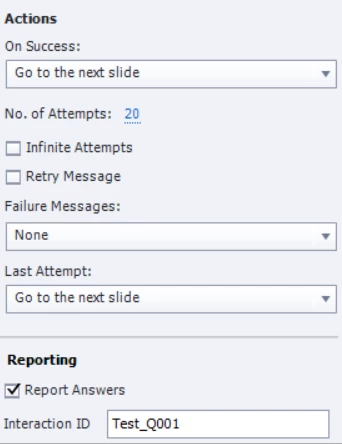
I have to use the advanced slide option as there is a different response to every answer a person chooses. I have set the quiz slides to go to the next slide once the correct answer is chosen and when they click anywhere on the slide. I can get this working sometimes in the preview but when I sent it to the approval group and they view in the SCORM viewer some slides don't advance when you click on them. I have looked at all my slides and the set up seems the same. Can you tell me what setting might be hampering this. Here is a screen shot of my set up. (now I just tested it and no slides are advancing after a correct answer!!!). This is my first Captivate project, thanks for your help, 
 

This topic has been closed for replies.

1 reply

Lilybiri
Legend
September 18, 2020

Bit confused. There is a possibility of  Advanced Answer feature for MCQ, but you don't seem to talk about that. I just see that you set up the global Success and Last Attempt action.

You are talking about quiz slides I suspect, not about an interactive object. It has 20 attempts (which is a lot). What is happening after a correct answer? Did you delete any embedded object on the quiz slide? Those are the objects which do not have an individual timeline, not in the quizzing master slide nor in the quiz slide based on that master slide.

September 18, 2020

I have eight quiz slides (my first captivate project). My physicians want the user to get a different message for each incorrect answer so I am using advanced options. The only thing not working on some slides is when the user gets the correct option I say click anywhere to go to the next slide, and when you click anywhere it's not moving to the next slide, can you help?

Lilybiri
Legend
September 18, 2020

What did you set up as Advanced Answer option: feedback or action? It it is action, which action do  you have for the correct answer?