


Inspiring
August 17, 2022
Question

After saving CP 9 file in CP 2019, CC export does not work

  • August 17, 2022
  • 1 reply
  • 923 views

As I had done before, I wanted to use the export function to export all CC of a CPTX file to a Word doc to translate them into another language.

These files had been updated from CP9 to 2019 (by simply opening them in the latest version and saving them).

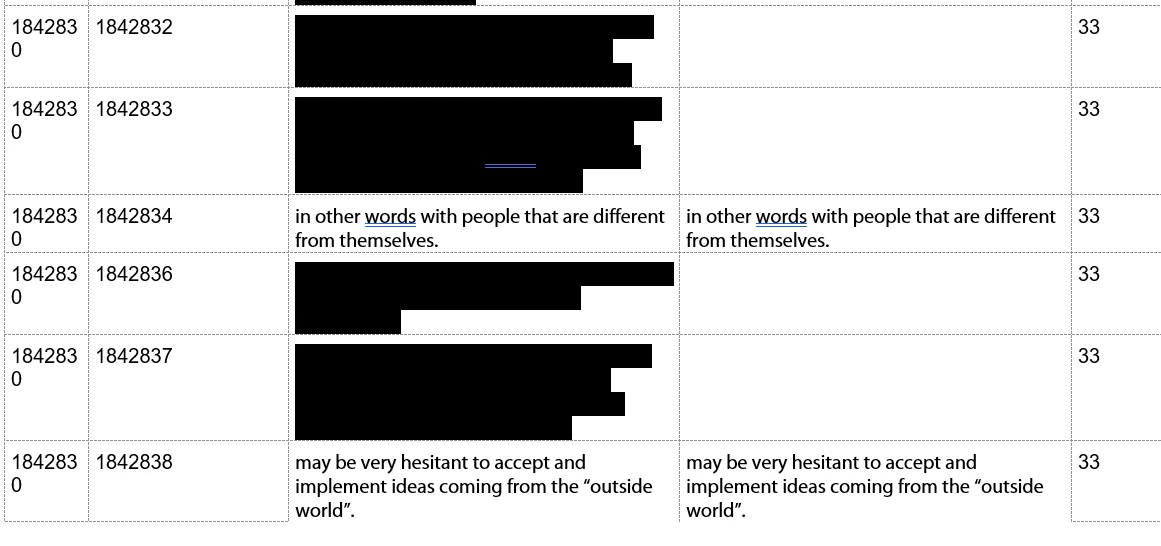
But image my surprise as I saw that the CC were broken in the Word doc. Most of them blacked out in the left column with no text in the right. In the past, every line was like the 3rd one here with the same text in both columns.

Any idea how to fix this?
 

    This topic has been closed for replies.

    1 reply

    Lilybiri
    Legend
    August 17, 2022

    What is the color of the blacked out texts? Export keeps all the styling of the text.

    Inspiring
    August 17, 2022

    It is broken in this case. I did it before and usually it was simply black as in the 3rd line in the image.

    The text is not blacked out in the CPTX file! It is just a standard text.

    Lilybiri
    Legend
    August 17, 2022

    You didn't really answer my question. What is the color of the text in the blacked out text containers?