Inspiring
Apr 2, 2025 11:29 AM UTC
Answered

Align PDF and video side by side

In Captvate 12.5, how do I place a PDF (as a web object) and a video wall (with 1 video selected), adjacent to each other, instead of being vertically aligned?


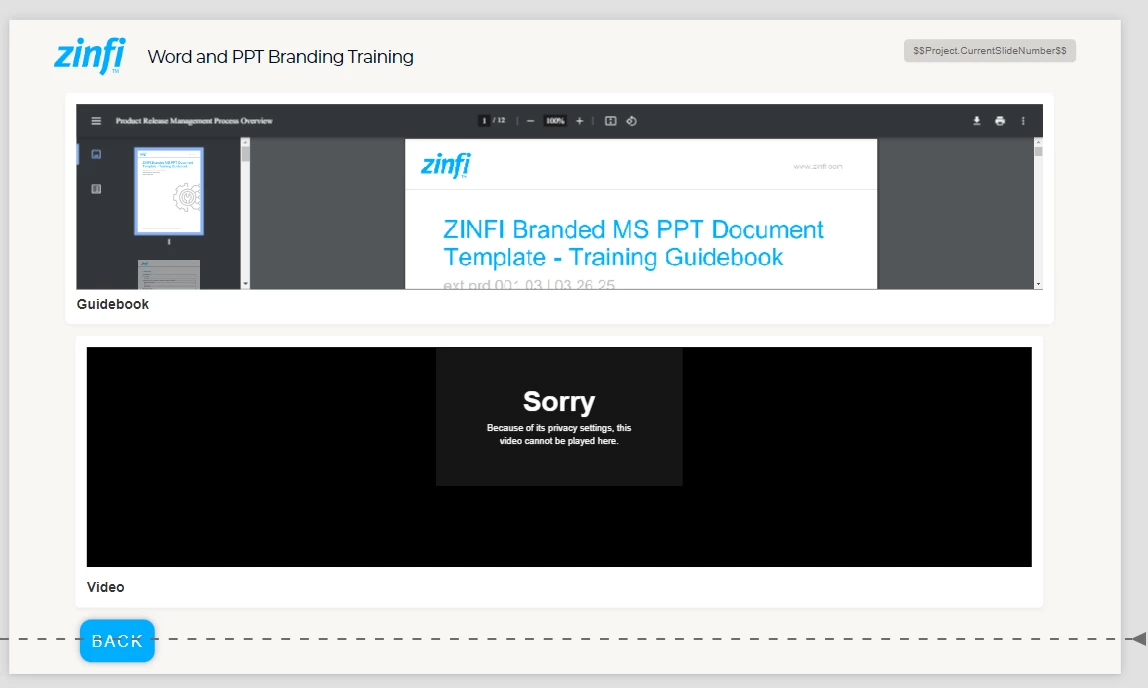
At present, the slide looks like this:


    kdmemory
    kdmemoryCorrect answer
    Inspiring
    Apr 2, 2025 1:58 PM UTC

    Place a media object: Web Object with Number of web objects set to 2 and set the Web Object Source in one to System and select your PDF. For the second web object host your video in an HTML5 video tag on a server and link it. On desktop and tablet there will be nicely on left and right. On a mobile though they are stacked vertically.

    3 replies

    kdmemory
    kdmemoryCorrect answer
    Inspiring
    Apr 2, 2025 1:58 PM UTC

    Place a media object: Web Object with Number of web objects set to 2 and set the Web Object Source in one to System and select your PDF. For the second web object host your video in an HTML5 video tag on a server and link it. On desktop and tablet there will be nicely on left and right. On a mobile though they are stacked vertically.

    Translate
    Inspiring
    Apr 10, 2025 7:19 AM UTC

    Your suggestion worked. I used Vimeo video with the embedded link.

    Translate
    kdmemory
    Inspiring
    Apr 10, 2025 12:55 PM UTC

    Glad I could help!

    Translate