


Participating Frequently
July 27, 2020
Question

Alignment is off on Matching question slide

  • July 27, 2020
  • 1 reply
  • 485 views

Hello,

I'm using a Matching question type on a quiz slide.  In design mode, everthing lines up fine.  But when I preview or run the published version, the numbering and my column 2 'answers' are out of alignment.


Design mode
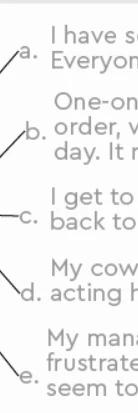
 

in preview
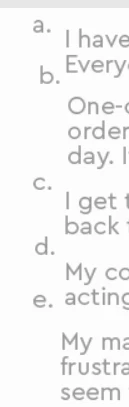
Any ideas what to change to fix this?  Initially, I had shuffle on and I thought that was the problem due to different size text boxes.  But I turned shuffle off and it's still happening.  Thanks!

    This topic has been closed for replies.

    1 reply

    Participating Frequently
    July 28, 2020

    I changed to a Top Alignment instead of Middle and it looks okay now but what if I liked Middle?  Wouldn't you assume the numbering would stay aligned with the text box?

    RodWard
    Community Expert
    Community Expert
    July 28, 2020

    Please log this with Adobe as a bug. It's been an issue for several Captivate versions and yet nothing has been done about it.  The only way to get any change is to have lots of people flag it as a problem.