



Alex.Fox
Inspiring
September 15, 2021
Question

Allowing The User to De-Select and Reset Multi State Buttons

  • September 15, 2021
  • 1 reply
  • 478 views

I am trying to figure out a way that a user will be able to reset a mutli state button. Currently I have multiple boxes on a slide where a user can click on them and change their appearence from Normal to Visited to indicate which options they selected:
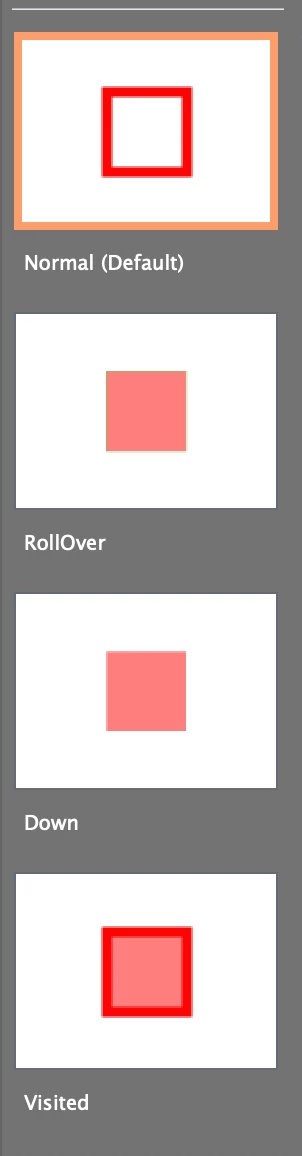
 

 However, I cannot seem to figure out how to set them up with the ability to allow the user to de-select a box which would reset the state view of that box go from Visited to Normal again. I know I can create a "Reset" button on the slide with the advance action to reset all of the buttons on the slide from Visited to Normal, but I don't want a mass reset.

This topic has been closed for replies.

1 reply

Alex.Fox
Alex.FoxAuthor
Inspiring
September 15, 2021

SOLVED:


So after posting this I figured out what to do and wanted to post here in case anyone else runs into this same issue. I created a "toggle" variable and advanced action for each button. https://www.youtube.com/watch?v=Y8pPX7zzCIs
Now I do have 39 buttons in total on this one slide so if there is a way to do this more effectively I am open to other suggestions

Lilybiri
Legend
September 16, 2021

For that amount of actions I really would create a shared action, not so many duplicate advanced actions. 

I suspect you are using the InBuilt Visited state, not a custom state which could have given you must more control. If you use a custom state, you just need the command 'Go to Next State' for the button, and the Normal state will be replaced by the Visited state if it was active, and the Visited state will be replaced by the Normal state if it was active. Please do not choke Captivate with such a big amount of advanced actions as you have done now. YouTube is not always the best place to find information, because there is NO curation and it has a lot of crap as well next to good videos.

In my workshop on Adobe's conference next week, 23rd of September, toggling between two states is one of the topics.  Registration is free.

This may be interesting as well:

Multiple Toggle buttons with ONE Shared Action - eLearning (adobe.com)


Alex.Fox
Alex.FoxAuthor
Inspiring
September 21, 2021

Correct I am using the InBuilt button states. I gave what you listed above a try with the custom state and although it did work, I had to remove the "roll-over" state for this method to work properly.