Known Participant
April 16, 2016
Answered

Alpha effect

  • April 16, 2016
  • 1 reply
  • 1081 views

Good afternoon!

I have an image that I would like to be on the screen initially for about five seconds, then use alpha from and to effect to gradually fade to about 50% over another five seconds, and then remain at about 50% for the rest of the slide, another 15 seconds.  Is this possible?

Thanks!
This topic has been closed for replies.
Correct answer Lilybiri

Which version are you using and which output do you want: SWF or HTML?

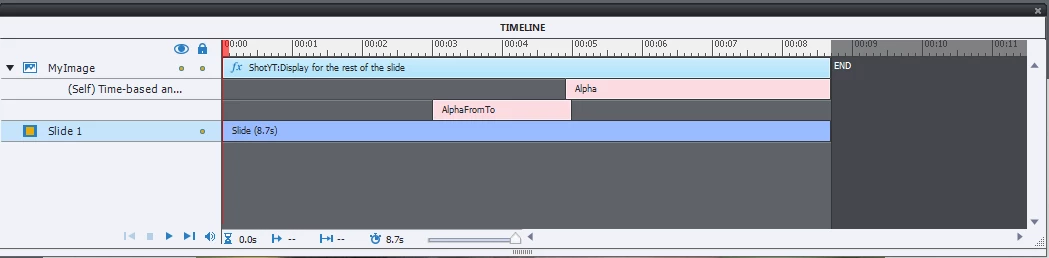
I tried it in 9.0.1.320, effects look like this:

You see that I created a small overlap from the first (Alpha From To) with the second effect (Alpha = 50%) to avoid flickering.

This are not the timings that you showed but you get the idea.

1 reply

Lilybiri
LilybiriCorrect answer
Legend
April 17, 2016

Which version are you using and which output do you want: SWF or HTML?

I tried it in 9.0.1.320, effects look like this:

You see that I created a small overlap from the first (Alpha From To) with the second effect (Alpha = 50%) to avoid flickering.

This are not the timings that you showed but you get the idea.

Known Participant
April 17, 2016

I am in Captivate 8 and I don't have a publishing preference.

Thanks.  I will give your response a try.

Lilybiri
Legend
April 17, 2016

In Captivate 8 you will have to create a similar custom effect sequence but in the Effects panel. The Effects timeline is not yet embedded in the Timeline panel. SWF output will be OK, I'm not sure for HTML.