
Inspiring
December 16, 2016
Answered

AlphaFromTo Effect not working as expected in Drag and Drop

  • December 16, 2016
  • 1 reply
  • 354 views

I am using Adobe Captivate 9. I have a drag and drop interaction where once the drag object is dropped on the drop target, the drag object goes from 100% Alpha to 0% Alpha (without clicking a button). I am using an advanced action using Apply Effect > AlphaFromTo.

What happens is that the drag object, when dropped on the drop target, will go from 100% to 0% Alpha, but will then change right back to 100% Alpha. I need the effect to be permanent, so that it will stay at 0% Alpha. I have the Effect Duration set at 0.5 seconds.

Not sure if this is a timing issue, or if this effect is designed only to work once and then go back to it's original state.

How can I get the object to remain at 0% Alpha?
    This topic has been closed for replies.
    Correct answer Lilybiri

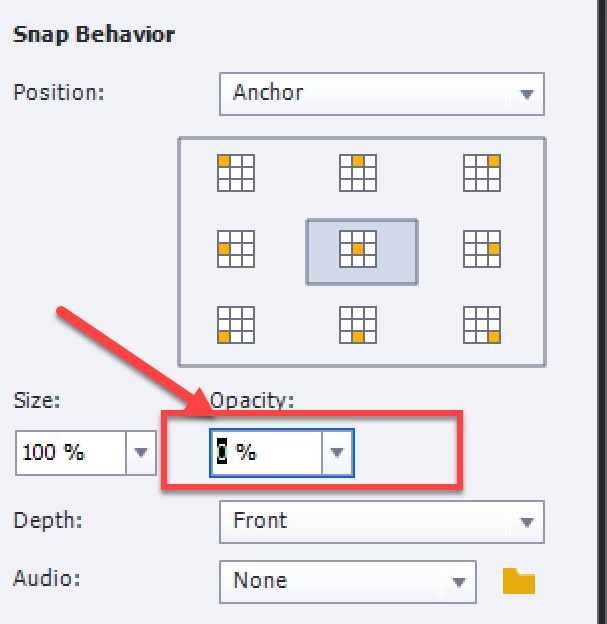
    Why do you not use the Snap behavior that has the feature to set Alpha to 0%?

    1 reply

    Lilybiri
    LilybiriCorrect answer
    Legend
    December 16, 2016

    Why do you not use the Snap behavior that has the feature to set Alpha to 0%?

    loxx9Author
    Inspiring
    December 16, 2016

    Thanks - this works, mostly. However, if the Depth is set to "Front", the object fades to 0% opacity, and then at the very end it will flash once briefly before it stays faded. Not sure if this is a bug or not. 

    Lilybiri
    Legend
    December 16, 2016

    You can also set size to 0 as well. Or, since you are on CP9 use the InBuilt states. Have some readibng:

    Drag&Drop in 2016 with Captivate 9 - Captivate blog