
tmradiology
Participant
May 31, 2015
Answered

answer bubble shape

  • May 31, 2015
  • 2 replies
  • 273 views

Can anyone please tell me how to change the answer bubble shape on multiple choice questions???? I noticed that on some of the slides the circles changed to squares (which I did not change) and I have no idea how it happened. I need them to be consistent but cannot find where to change them. I have looked everywhere. PLEASE HELP!!!!!!

    This topic has been closed for replies.
    Correct answer Captiv8r

    Hi there

    Are you talking about changing the picture below?

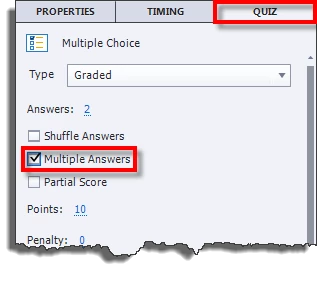
    If so, look at the Quiz tab in the properties panel and toggle the setting labeled Multiple Answers.

    With Multiple Answers enabled, you see check boxes. Without, you see option buttons.

    Cheers... Rick

    2 replies

    tmradiology
    Participant
    June 1, 2015

    Thank you sooooooooo much, Rick! I just spent hours trying to figure this out . Well, at least now I know I can't change them. Thank you for taking the time to answer my question.

    Captiv8r
    Captiv8rCorrect answer
    Legend
    June 1, 2015

    Hi there

    Are you talking about changing the picture below?

    If so, look at the Quiz tab in the properties panel and toggle the setting labeled Multiple Answers.

    With Multiple Answers enabled, you see check boxes. Without, you see option buttons.

    Cheers... Rick