
Participant
October 10, 2018
Answered

Answer spacing in Sequence KC not adjustable CP2019

  • October 10, 2018
  • 1 reply
  • 370 views

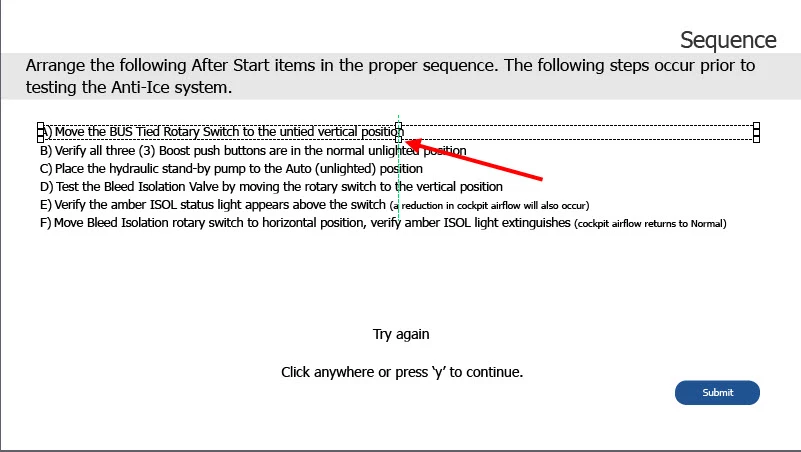
I have a series of Knowledge Check questions that I am using in an Interactive video.  The handles do not allow you to resize the answer box to put some space in between the answer choices Does anyone know why ?
    This topic has been closed for replies.
    Correct answer RodWard

    Multiple Choice question types are fine because you have more control over the formatting of the Answer Captions.

    But Sequence questions are a pain because all of the answers are basically stuck together as a group.

    The only workaround that I have found is to insert a blank space just before the answer and format this space to be a larger font size.  But you still tend to have some formatting issues with the leading letter in the answer caption.

    This is one of the (many) areas that Adobe needs to pick up the text formatting abilities of Captivate.

    1 reply

    TLCMediaDesign
    Inspiring
    October 10, 2018

    You can press CTRL + Enter and then make the text top aligned in each answer.

    It probably has to do with the way drag and drop sequences work, there can't be any vertical space between the objects.

    RodWard
    Community Expert
    RodWardCommunity ExpertCorrect answer
    Community Expert
    October 10, 2018

    Multiple Choice question types are fine because you have more control over the formatting of the Answer Captions.

    But Sequence questions are a pain because all of the answers are basically stuck together as a group.

    The only workaround that I have found is to insert a blank space just before the answer and format this space to be a larger font size.  But you still tend to have some formatting issues with the leading letter in the answer caption.

    This is one of the (many) areas that Adobe needs to pick up the text formatting abilities of Captivate.