samamara
Known Participant
February 28, 2021
Answered

Any ideas why a project would not pause...?

  • February 28, 2021
  • 1 reply
  • 634 views

Hi all; 


My colleauge and I previously made a project for work (simulation) which is to quiz but also teach in case of failure and users need to take another attempt. It worked perfectly as it is supposed to. I made another last week with the exact same settings and I'm almost positive it that *worked* before I saved it away and now doesn't work. The project refuses to pause, and I can't figure out why. I'm hoping someone here can help. 


The slide has the screen shot, instructions (top right) a click box (top left)(with no displayed captions as I removed them), an arrow (top left), a text box with feedback (bottom) and an image used as a button to continue (check mark lower right) once the user has read the instruction: 
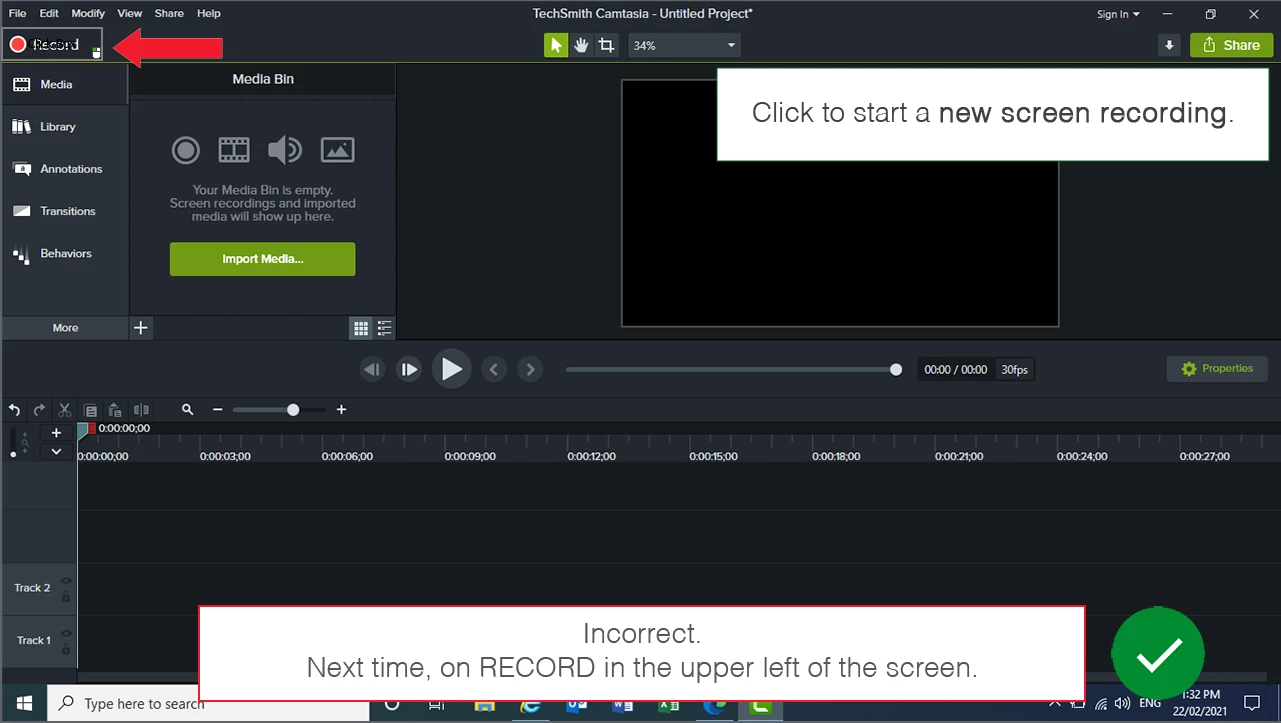
 

On enter, there's an executed advanced action (hide_All), which hides the arrow, the correction box and the green check mark button. The user has a single attempt to click the box correctly and on success the project goes to the next slide. If the user clicks anywhere else, the last attempt is to execute the advanced action (show_All) which reveals the arrow to show where they should have clicked, a written feedback and the check button that he/she can click to move on to the next screen when ready. 


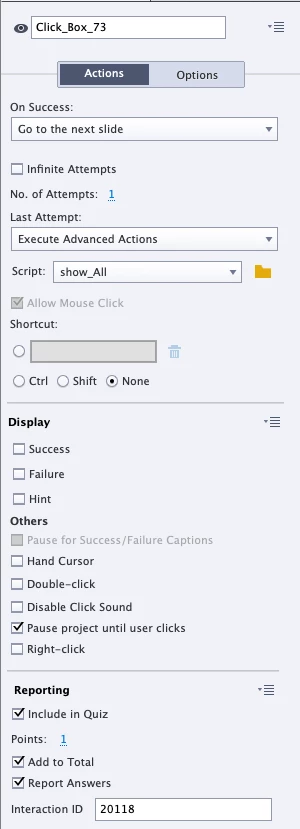
The timing of the slide is set to 0.1s. The click box is set to appear after 0s and display for the rest of the slide. The properties of the click box are as below (the left is the project I'm having issues with; the right is the original project): 
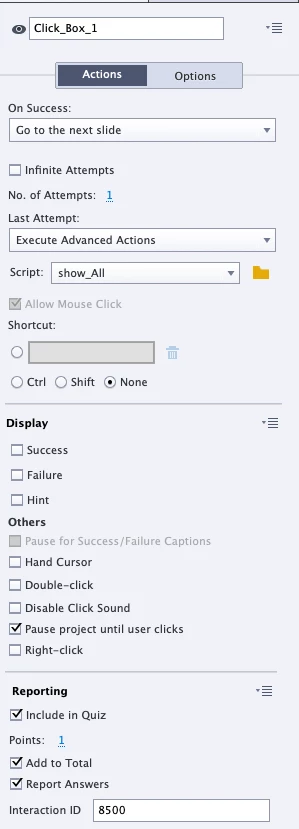
 

When I preview the new project I click on the wrong spot to force the show_All advanced action and everything works on my screen for a split second before it zaps to the next slide. It's supposed to wait for the user to click on the green tickmark (as you can see, it is clicked to pause project). 


I know this may not be the way everyone would do such a project but it was the way we were asked to do it. That's not the important part here, lol. What's important is that the original project (the settings on the right above) worked perfectly (we've had hundreds of users use it) and still works perfectly now, as tested just before I made this post, while the new one that I am *sure* worked when I finished it last week, doesn't work. I even published it to our LMS thinking perhaps there was some glitch in the preview, but no...it still didn't pause to allow me to click the green tick. The timing of the slides in the original project are also 0.1s (which doesn't matter since the project pauses at it is supposed to!). 


Does anyone have any ideas? I'm a little worried that since these project literally have the same settings and since I'm >90% sure it worked when I saved it on Thursday that somehow the file has been corrupted and I have to start it over. 


Thanks in advance!

 

    This topic has been closed for replies.
    Correct answer Lilybiri

    Hi Lilibiri;


    Thanks for your reponse :), I realize the slide duration is crazy as you say, and I'm not sure why we went with that before but it worked perfectly for that simulation (and all of the ones we did at the same time; it was more than one simulation that we did for that specific project). They are in a self-paced course on our LMS and literally hundreds of people at our institution have done them. 


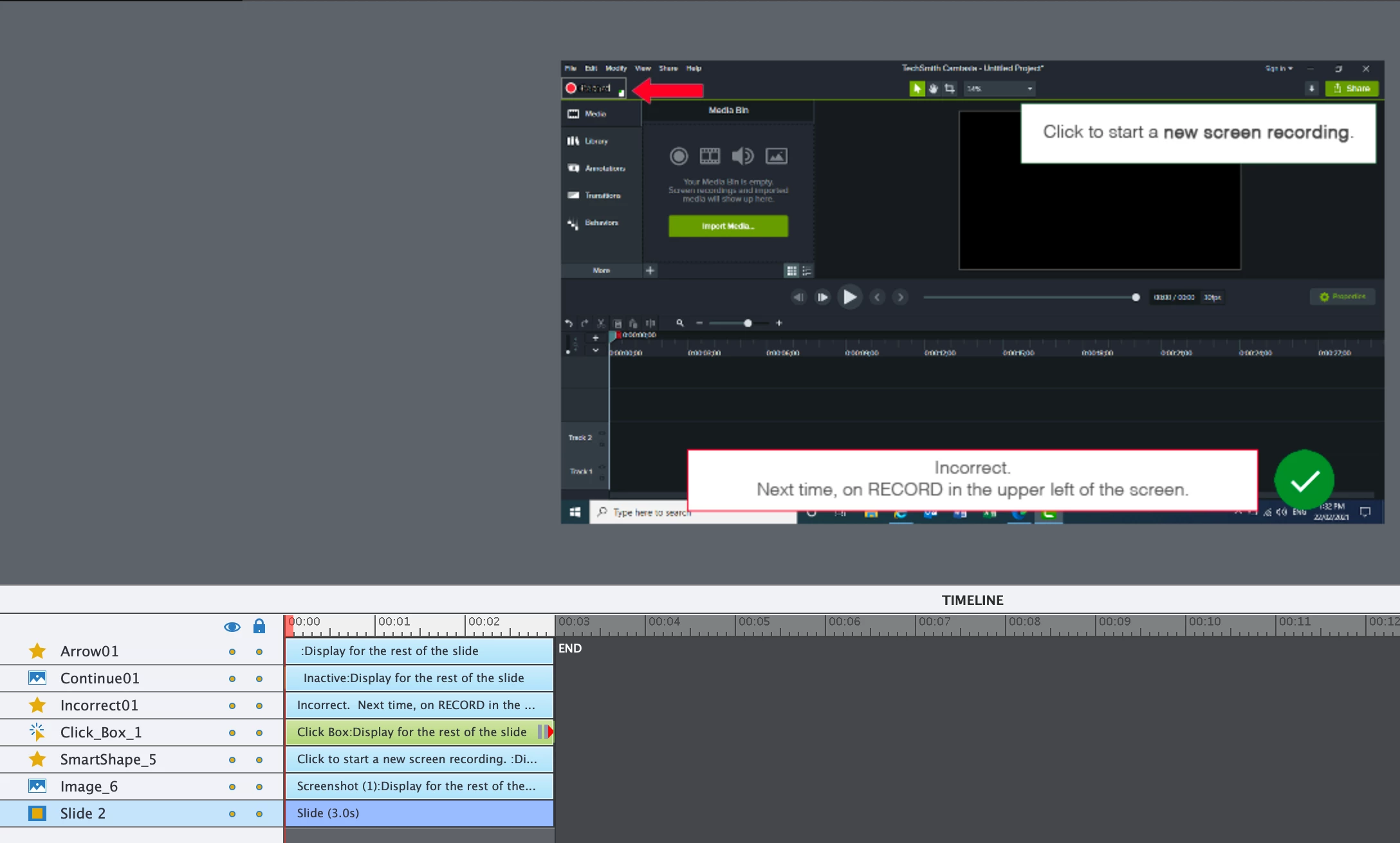
    That said, let me show you the timeline (with an increased duration of 3s):


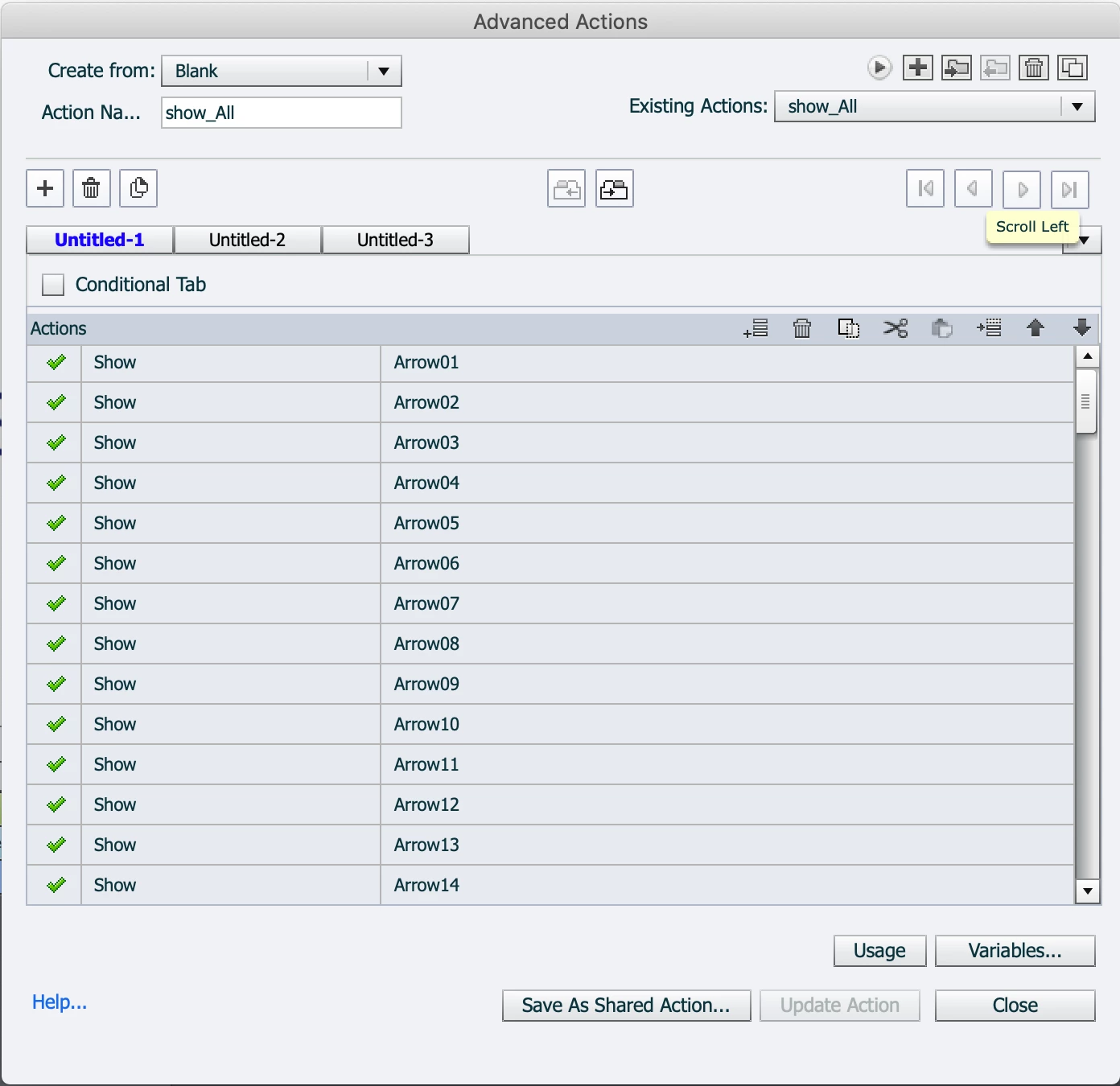
    Hmm...but now that I've gone to see the advanced action and see that it has changed!! This is what it is supposed to look like: 


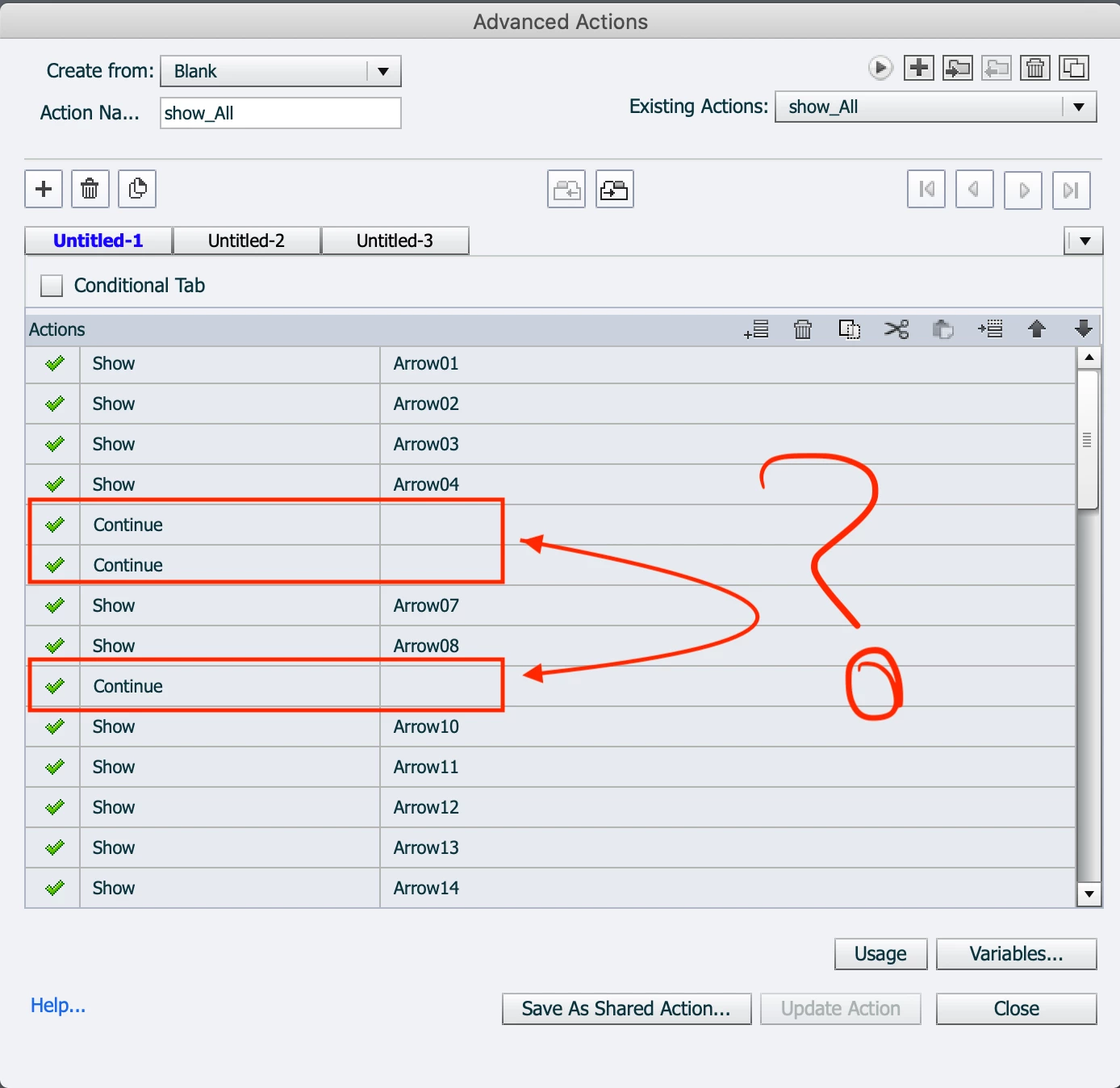
    That is the one from the other project; it goes through with 'show' for all the arrows, incorrect messages and continue buttons. I know for sure I made the exact same advanced action for this project and saved it. In my last post I said I was more than 90% sure that the simulation worked and I went back through some Whatsapp messages I had with my colleauge on that day and found confirmation (I'd sent her a message to say it was done and I was happy to save it off). But now when I look a the advanced action for this project, this is what it looks like:


    Those continue actions with no matching item were *definitely* not there on Thursday! Could this be the issue? I said I worried the file had been corrupted since it was for sure working. Could this have been some glitch? Or does it make no difference since there's nothing to go with those 'continues'?


    I'm going to delete those and see if it helps. In th meantime, any other thoughts you have on this would be appreciated. 


    Thanks!


    I expected something like this. Continue is the default command. If something is wrong in an advanced action, the command will be replaced by Continue.  I do not know if you have used copy/paste for that action. Since it is linked to a slide event that is always very risky. One of the reasons I always try to promote shared actions.


    Of course Continue matters, since it releases the playhead from pausing. You need to read that blog.


    Please use grouping to reduce that long list of Show commands

    1 reply

    samamara
    samamaraAuthor
    Known Participant
    February 28, 2021

    And just to add to my post here, I did try to lengthen the slide duration but it didn't make any difference; it still didn't pause and just advanced at the end of the slide time. I'm using Captivate 2019.

    Lilybiri
    Legend
    February 28, 2021

    Please add a screenshot of the most important panel, which is the Timeline. That is where you can see the pausing points of the interactive projects.  Increasing slide durations is seldom a solution if you use interactive objects. However having a slide duration of 0.1secs is 'crazy', it may not even be sufficient to load everything which needs to be loaded On Enter. There is a reason why de default slide duration is set to 3secs.

    Please post also a screenshot of the Advanced action used on the Last Attempt event.


    Have a look at this post, where I tried to explain Pausing timelines:

    http://blog.lilybiri.com/pausing-captivates-timeline


    samamara
    samamaraAuthor
    Known Participant
    February 28, 2021

    Hi Lilibiri;


    Thanks for your reponse :), I realize the slide duration is crazy as you say, and I'm not sure why we went with that before but it worked perfectly for that simulation (and all of the ones we did at the same time; it was more than one simulation that we did for that specific project). They are in a self-paced course on our LMS and literally hundreds of people at our institution have done them. 


    That said, let me show you the timeline (with an increased duration of 3s):


    Hmm...but now that I've gone to see the advanced action and see that it has changed!! This is what it is supposed to look like: 


    That is the one from the other project; it goes through with 'show' for all the arrows, incorrect messages and continue buttons. I know for sure I made the exact same advanced action for this project and saved it. In my last post I said I was more than 90% sure that the simulation worked and I went back through some Whatsapp messages I had with my colleauge on that day and found confirmation (I'd sent her a message to say it was done and I was happy to save it off). But now when I look a the advanced action for this project, this is what it looks like:


    Those continue actions with no matching item were *definitely* not there on Thursday! Could this be the issue? I said I worried the file had been corrupted since it was for sure working. Could this have been some glitch? Or does it make no difference since there's nothing to go with those 'continues'?


    I'm going to delete those and see if it helps. In th meantime, any other thoughts you have on this would be appreciated. 


    Thanks!