Participant
September 14, 2021
Answered

Any way to trigger JavaScript at a particular video timestamp?

  • September 14, 2021
  • 1 reply
  • 293 views

Is there a way to have JavaScript somehow watch what time the video is at and trigger an action when the video gets to a certain timestamp? 

This topic has been closed for replies.
Correct answer Paul Wilson CTDP

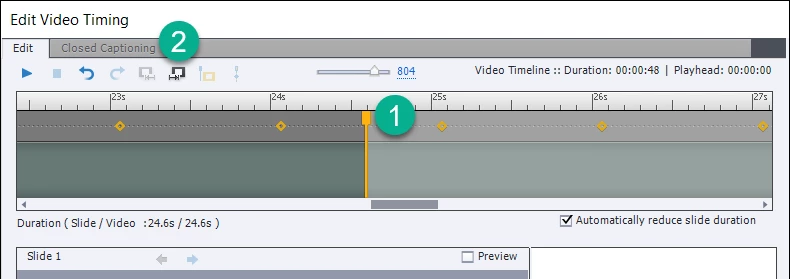
There might be more than one way to do this but here is what I would do. Add a blank slide after the video you already have in your course where you wish to run Javascript at a certain point in the video. Return to the slide with the video and click on Edit Video Timeing... in your Properties Inspector. Slide the scrollbar to the end of the video and drag the slide transition marker to the point in the video timeline where you wish to run JavaScript. Then click on the insert slide icon to place the remainder of the video on the second slide. Click OK. You will now see that your video spans the two slides. Select the second slide and set the On Enter Action to Execute Javascript. Place your script in the script window and decide if you want the video to pause and wait or continue playing.


1 reply

Paul Wilson CTDP
Community Expert
Paul Wilson CTDPCommunity ExpertCorrect answer
Community Expert
September 14, 2021

There might be more than one way to do this but here is what I would do. Add a blank slide after the video you already have in your course where you wish to run Javascript at a certain point in the video. Return to the slide with the video and click on Edit Video Timeing... in your Properties Inspector. Slide the scrollbar to the end of the video and drag the slide transition marker to the point in the video timeline where you wish to run JavaScript. Then click on the insert slide icon to place the remainder of the video on the second slide. Click OK. You will now see that your video spans the two slides. Select the second slide and set the On Enter Action to Execute Javascript. Place your script in the script window and decide if you want the video to pause and wait or continue playing.


Paul Wilson, CTDP