Inspiring
January 26, 2015
Question

Anybody know why I cannot edit the contents of my captions?

  • January 26, 2015
  • 1 reply
  • 479 views

Okay, I can delete text captions, smart shapes with text content, or failure captions, but for the first project I have started in Captivate 8 I cannot edit their contents.

I just converted a project from Captivate 7 into C8, and added newly recorded slides to it.  Those captions are editable.  BUT the ones from the freshly started project are not.  When I try to click on the text caption at the top of the timeline, or any other caption in the window, my cursor flips from the pointing finger, to the fist, as long as I hold the mouse button down.  Then it flips back to the pointing finger instead of giving me the I-beam cursor for editing.

This is a software simulation and the captions were added automatically during the recording phase and must be edited.

My project is not responsive.  Here is a snip of the editing window for this project.
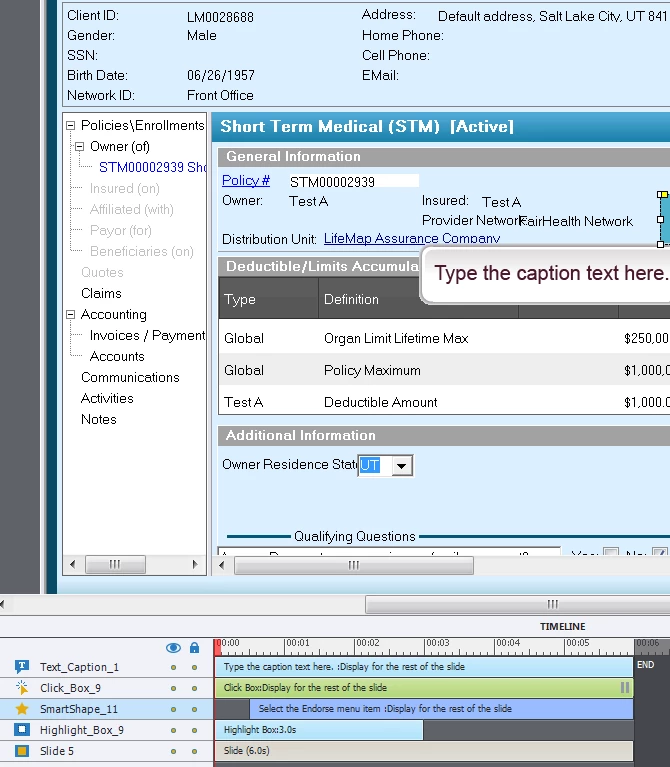
Thanks for any help you can offer.

Michele

This topic has been closed for replies.

1 reply

Lilybiri
Legend
January 26, 2015

Did you try to select the caption and use F2?

Inspiring
January 26, 2015

No, Lieve, that hadn't occurred to me.  I tried it just now and I do get an I-beam, but when I try to select the text all I get is a dashed box that I seem to be drawing with the I-beam cursor.  It draws over the caption and  will go as large as I let it before letting go of my mouse. It doesn't allow me to edit the text.  It is like the text is locked somehow, but you can see from my image above that it isn't.

I have also saved this project by another name and the new one does the same thing.  Am I going to have to go through this course, delete ALL of the captions and recreate them manually? 

Lilybiri
Legend
January 26, 2015

Think Captivate is corrupted. Did you try to refresh Preferences?

On Jan 27, 2015 12:26 AM, "MicheleBatLifeMap" <forums_noreply@adobe.com>