
Apply effect causes objects to disappear - CP9.02.437
I am trying to rotate an object a certain amount by button click. I created a custom "rotate to" effect and applied it to the object as normal. I then applied the effect through an advanced action triggered by the button. However, when I try to view in HTML5, the object does not show on the slide. When I remove the effect, the object is again visible. I tried applying other effects on a variety of objects on this slide as a test - anytime I apply any effect to any object on this slide the object disappears.
On other slides I can apply effects to objects and they behave normally.
This slide has quite a bit of javascript on enter and js functions are called through advanced actions as well. The js all behaves normally with and without the effect applied. The problem occurs no matter what order the effect is called vis a vis the javascript call.
The object appears normally when viewed as swf in browser, but I have users with tablets on which flash is not supported.
Any suggestions?
(BTW, the orange box under the balance is normally not visible - it forms a group with the balance to force the balance to rotate around its center foot)
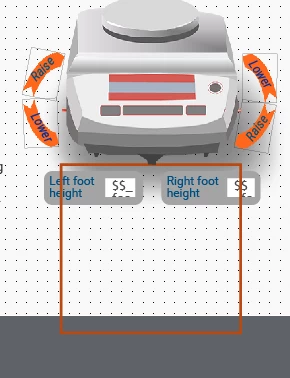
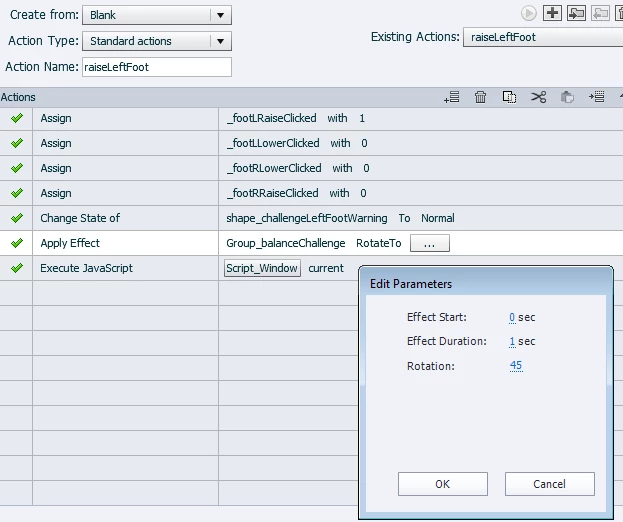
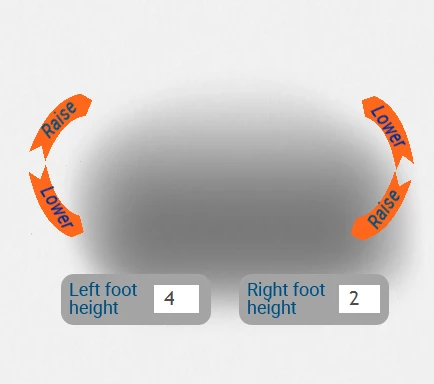 This is what appears (or doesn't appear) on slide entry with the effect applied to the balance object. The numbers in the foot height boxes indicate that the js is running normally. No buttons have been clicked at this point. Clicking the button with the above AA does trigger the js to change the foot height calculation normally.


 AdChoices