
Known Participant
December 28, 2022
Question

Assessment Message

  • December 28, 2022
  • 1 reply
  • 1190 views

Hi,


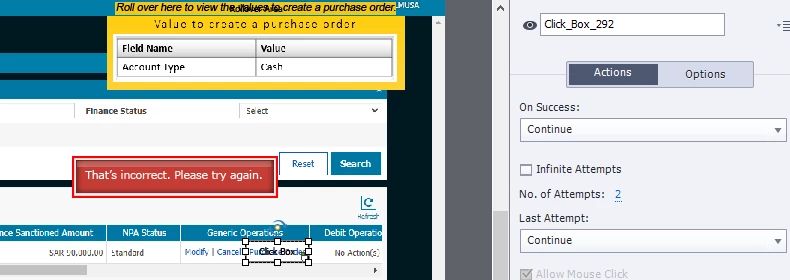
I want to create an Assessment Simulation, where I want to give a learner TWO ATTEMPTS with two different failure messages,, Messages could be.. First failure message.. This is incorrect. Please try again.

2nd failure message. Its still incorrect, let me perform this for you. (This is first sceanrio where No of Attempts are 2 with 1 click box, I want both failure message different) is it possible to get two different messages for 1 Click Box?
 

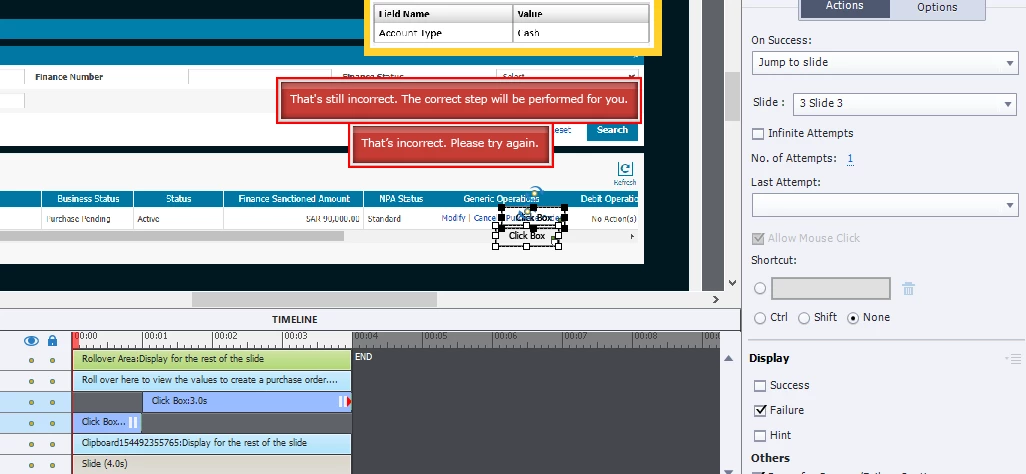
2nd Scenario 

Since Two different messages will not come with a single click box as per my knowledge, so I have used a Two Click boxes for different messages with Timeline adjustment, but problem is that two Click Boxes are counted as 2 points in result page. as a result if there are only ten steps in Assessment simulation, final result comes with 20 points, and if I performed all 1st attempt correctly still it shows I did not pass the Assessment or if I performed 2nd attempts correctly than again not passed.

So I would like to get a result in 2nd scenario that both Click Boxes should be counted as 1 point if I perform any of them correctly or if I tried both attempts worngly that it should be counted as Nigative 1 only not 2.


    This topic has been closed for replies.

    1 reply

    Lilybiri
    Legend
    December 28, 2022

    You can make messages 'dynamic' by replacing the static text by a variable. You than only have to change the value of the variable using a shared action, based on another tracking variable. 

    I explained this approach in a totally different situation, for a Drag&Drop slide in this blog post:

    https://blog.lilybiri.com/d-and-d-feedback-messages

    It is possible to write out the workflow for you, but I would prefer doing that in a blog post, not in this forum. Reason: too many of my workflows have already been stolen and published by authors without even mentioning their 'source'. At least it would be public and free on my site as well.


    Forgot to answer about the second scenario: you would need JavaScript to store the score in a user variable, and transfer it to the quizzing system variable at the end. I will leave it to the JS experts to explain that solution. Personally I try to use only Captivate features whenever possible, and for the second scenario the CpExtra widget (InfoSemantics) would be my savior.

    Known Participant
    December 29, 2022

    If its possible, please write out the workflow for me on your site, I ll take a guidence from there, and thanks a lot for the information

    Lilybiri
    Legend
    December 29, 2022

    OK, will try to find some time to create an assessment simulation to illustrate a step-by-step workflow. I will post the link here when it is published.