
Known Participant
August 16, 2019
Question

Assets not appearing in CP2019 after Update 11.5 and 11.5.1.499

  • August 16, 2019
  • 1 reply
  • 886 views

HI

I have CP2019 and after applying Update 11.5 (Cleared Preferences) the new Assets panel is blank. Discover option does go to the ELearning Brothers site.

I have now applied the Latest Update (11.5.1.499) after Clearing Preferences and Still no assets.

Uninstalled Captivate to start with a fresh install and applied the latest update and still no luck with the assets.

Has anyone got a solution?

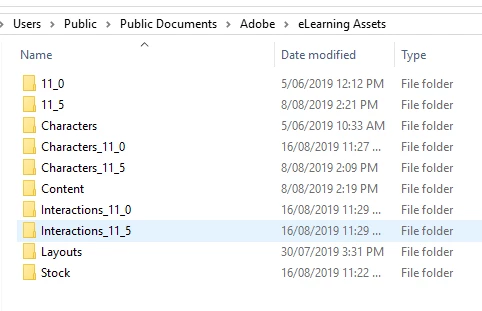
A snapshot of my assets directory below.

directories dated 16/08/2019 do have content except for the Directory Stock

Cheers

Craig
    This topic has been closed for replies.

    1 reply

    Lilybiri
    Legend
    August 16, 2019

    Can you try to delete the Content folder? Captivate has to be closed, but that helped some users. Sort of cleanup and a fresh Contnet folder will be created whenyou restart CP.

    Known Participant
    August 19, 2019

    Thanks for the response.

    I deleted the Content folder. re-launched Captivate and the Content folder was re created. However no assets.

    The Content folder only contains an empty text document called assetPaneldummy.txt.

    I am behind a corporate firewall so that maybe my issue. However others in the corporation aren't having issues.

    Participant
    August 19, 2019

    I can confirm that the assets appear when accessed from out side the corporate firewall. Has anyone found a solution to this issue?