praveend58003379
Inspiring
January 28, 2016
Answered

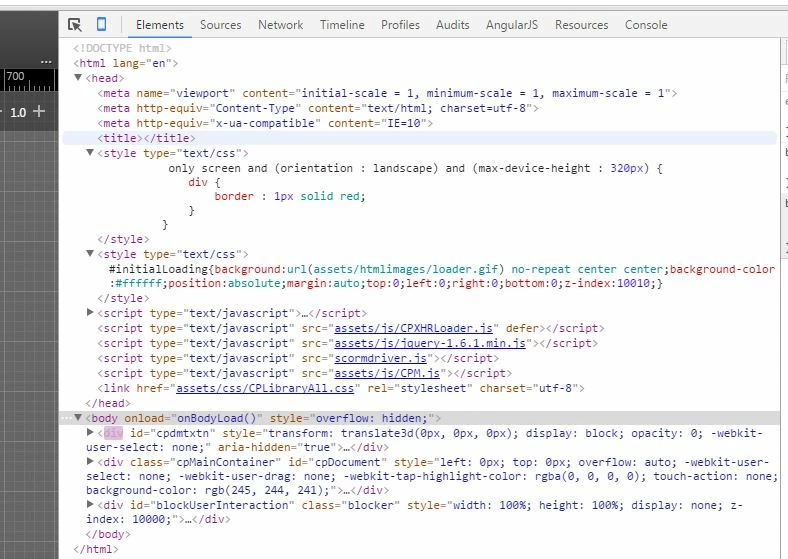
@media query trimmed out in published html

  • January 28, 2016
  • 1 reply
  • 602 views

i had added this style


@media only screen and (orientation : landscape) and (max-device-height : 320px) { div { border : 1px solid red; } } added in C:\Program Files\Adobe\Adobe Captivate 9 x64\HTML\index.html and when its published it trimmed @media ?


Why..any idea ?

    This topic has been closed for replies.
    Correct answer TLCMediaDesign


    I think it is because Captivate uses the @ symbol to designate dynamic attributes when it publishes. For example <title>@MOVIETITLE</title>

    You may have to add it with JavaScript and mask the @ symbol.

    http://modernweb.com/2014/03/24/using-media-queries-in-javascript/

    1 reply

    TLCMediaDesign
    Inspiring
    January 28, 2016

    Which type of project are you using?

    Responsive?

    HTML5 or SWF or both?

    praveend58003379
    Inspiring
    January 28, 2016

    publish to my computer dialogue box details:

         publish as html5/swf

         output format html5

              ticked yes for scalable html content

              resolution 1024*627

    TLCMediaDesign
    Inspiring
    January 28, 2016

    So to be clear, just HTML5 not SWF?

    Also, are you publishing to SCORM?