January 20, 2014
Answered

Audio Fade In Fade Out -1 Sec?

  • January 20, 2014
  • 1 reply
  • 940 views

Captivate v5.5

I have created a v5.5 Captivate project, imported the audio to each slide after creating the audio with Audacity and am now starting to sync the audio with the animations.

I have just noticed that every slide in my project has the following audio setting;
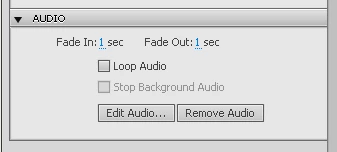
I dont recall making this audio setting.

1. Where is the Fade In Fade Out option setting to ensure this does not get applied again to future projects?

2. I cannt see how to remove the 1 second Fade In / Fade Out for the whole project.

Do I have to edit this slide by slide?

Thanks,

Noel

This topic has been closed for replies.
Correct answer

Thank you Lilybiri for taking the time to open your "old" v5.5 - I really appreciate it.

If I had not taken that screenshot I might have started to doubt myself.

On receipt of your reply I went back to the project with the issue, and would you believe it, all the slides have reverted back to 0sec Fade In and 0sec Fade Out!

I have not made any changes and now have no idea why this happened in first place or what happened to make them revert to correct 0sec settings - but will keep an eye on it and hope that it was a one off Monday morning "glitch".

Noel

1 reply

Lilybiri
Legend
January 20, 2014

Hi Noel,

I fired up 5.5 (has been long time ago) specially for you. And am stumped: my fading settings for Audio are both set to 0sec, as I suspected. And I never changed them neither. They are not in the Preferences, audio has not styles, there is no setting on the Master slide. Only idea I still have is that you are using a template, in which this setting was applied? Is that the case?

Lilybiri

Correct answer
January 20, 2014

Thank you Lilybiri for taking the time to open your "old" v5.5 - I really appreciate it.

If I had not taken that screenshot I might have started to doubt myself.

On receipt of your reply I went back to the project with the issue, and would you believe it, all the slides have reverted back to 0sec Fade In and 0sec Fade Out!

I have not made any changes and now have no idea why this happened in first place or what happened to make them revert to correct 0sec settings - but will keep an eye on it and hope that it was a one off Monday morning "glitch".

Noel